BYD smart home integration, free and open source
Your BYD in Gladys: battery, range, charge, lock, climate, tyres, position and scenes.
Published by William-De71
- Devices
- Version 0.1.0
- Requires Gladys >=5.1.1
- ★ 0
Overview
This integration brings your BYD cars into Gladys through the cloud of the overseas BYD app (not the app for China): battery, range, charge, lock, doors, windows, climate, tyre pressures, warnings and position. With the remote control PIN of the app, Gladys can also lock and unlock the car, start or stop the climate, flash the lights and run "find my car".
BYD publishes no API: the integration speaks the protocol of the app, after the open-source pyBYD library (used by the Home Assistant integration). BYD may change it at any time.
Prerequisites
- Gladys Assistant 5.1.1 or later.
- A BYD car connected to the BYD app, and the e-mail address and password of the app account.
- Advised: a second BYD account the car is shared with (sharing is done from the app). The app may sign your phone out when Gladys signs in with the same account.
- For commands: the 6-digit remote control PIN set in the BYD app by the account Gladys uses (a shared account sets its own).
Configuration
| Field | Meaning |
|---|---|
| E-mail address | The account of the BYD app. |
| Password | Its password, stored as a secret. |
| Country of the account | Two-letter code of the country the account was created in (FR, BE, DE…): it picks the server. |
| Remote control PIN | The 6 digits of the app. Empty: read only. |
| Refresh interval | 5 to 480 minutes (15 by default). Each reading wakes the car up and costs a little battery. |
| Climate temperature | 15 to 31 °C, asked when the climate is started from Gladys. |
| Climate duration | 10, 15, 20, 25 or 30 minutes. |
| Home radius | Under this distance from a house of Gladys (with a position), the car is home. |
| Language of the texts | Language of the names, statuses and scene summaries. |
Save, then click Test the connection: it lists the cars of the account.
Usage
Devices
In Discover, add your cars. Each car offers the features it reports: battery, electric range (and fuel for plug-in hybrids), odometer, charging cable, charging status, time to full charge, inside temperature, lock, doors and trunk, windows, climate, the four tyre pressures (in bar), warnings and distance from home. Scan again after a first drive if a feature is missing.
The lock and the climate are commands: they need the PIN. A command is sent in the background; the car answers within a minute and is read again 30 seconds later.
Dashboard widget
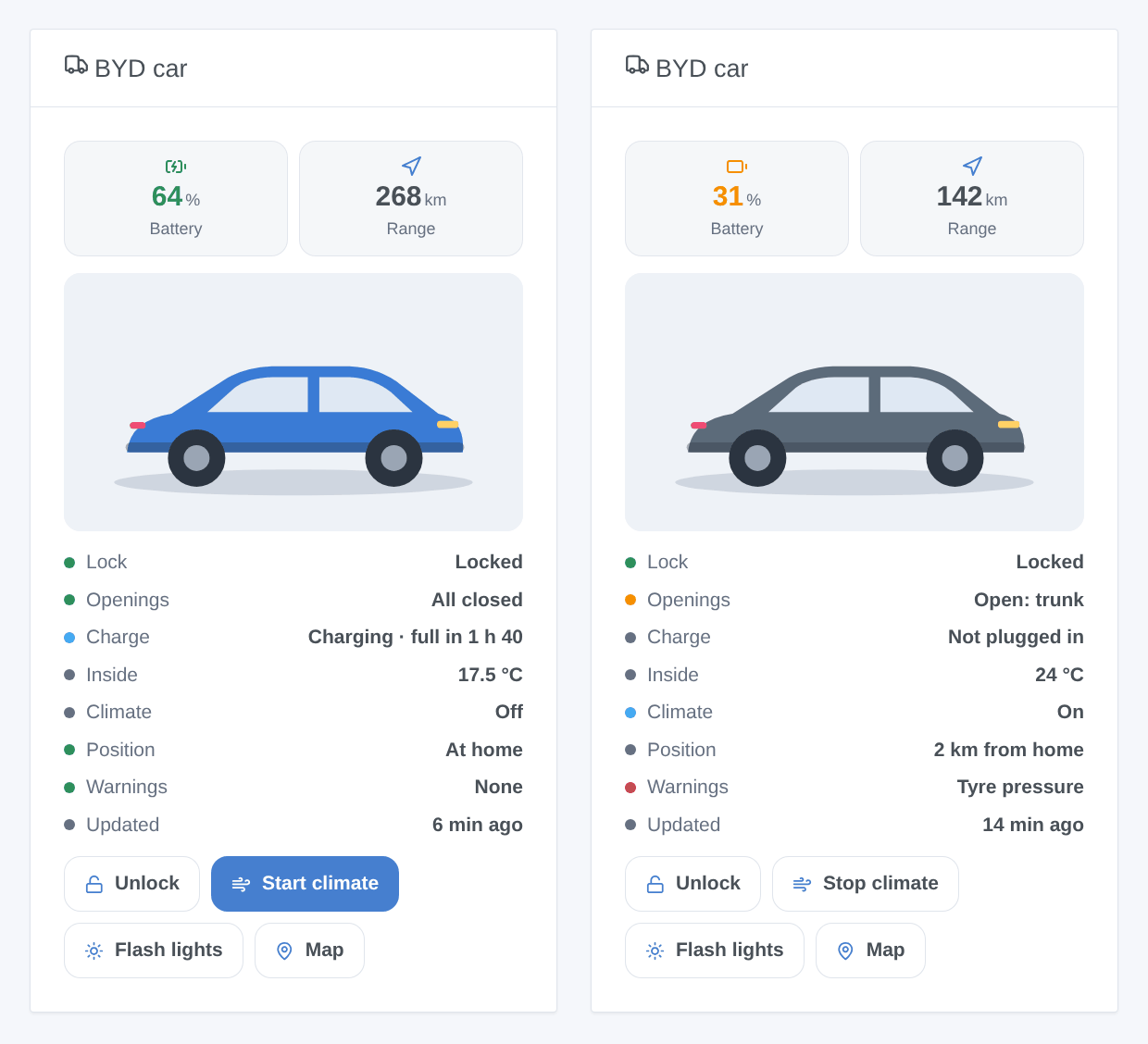
The BYD car widget shows the picture of the model, battery, range, lock, openings, charge, inside temperature, climate, position, warnings and the age of the data, with buttons to lock or unlock, start or stop the climate, flash the lights and open the map.
Scenes
Triggers: locked or unlocked, locked but left open, charge started or stopped, cable plugged or unplugged, arrived home or left, warning light on, account problem. Actions: send a command (waits for the car), read the status of the car.
- When the car arrives home → send "Plug the car in: {{triggerEvent.data.battery_level}} %".
- When the car is locked but left open → send {{triggerEvent.data.summary}}.
- Every weekday at 7:40 → send the command "Start the climate".
Transport
Everything goes through the BYD cloud of your region (badge cloud). An orange dot means BYD sees the car offline: the values may be old.
Troubleshooting
- Sign-in refused: check the e-mail address, the password and the country. After a refusal the integration waits 15 minutes (then 30, up to 4 hours) before trying again, so that BYD does not lock the account; saving the configuration tries again at once.
- PIN refused: every command stops until you change the PIN in the configuration. Repeated wrong PINs lock the remote control of the car for the day.
- Your phone was signed out: use a second account the car is shared with.
- Old values, "car offline": the car has no mobile network (underground car park) or sleeps deeply; commands may fail until it reconnects.
- A value is missing or looks wrong: click Diagnostic in the configuration, then copy the lines starting with "BYD diagnostic" from the Logs tab into a GitHub issue (VIN, plate and position are removed).
Configuration settings
These are the settings BYD asks for in its configuration screen in Gladys.
| Setting | Type | Required | Description |
|---|---|---|---|
| 1. BYD account | section | No | Gladys reads your cars through the cloud of the BYD app (the overseas app, not the one for China), with the account of the app. Advice: the BYD app may sign your phone out when Gladys signs in with the same account; create a second account and share the car with it from the app, then enter that account here. |
| E-mail address | string | Yes | |
| Password | secret | Yes | |
| Country of the account | string | Yes | Two-letter code of the country the account was created in (FR, BE, DE, ES…): it picks the BYD server. |
| 2. Remote control (optional) | section | No | To lock, unlock, start the climate or flash the lights from Gladys, enter the 6-digit remote control PIN set in the BYD app (a shared account sets its own). Without it, Gladys only reads. A refused PIN stops the commands until you change it here: repeated wrong PINs lock the remote control of the car for the day. |
| Remote control PIN | secret | No | |
| Options | section | No | |
| Refresh interval (min) | number | No | Between 5 and 480 minutes. Each reading wakes the car up and costs a little battery: do not go below 15 minutes without a reason. |
| Climate temperature (°C) | number | No | Asked when the climate is started from Gladys, 15 to 31 °C. |
| Climate duration | select | No | |
| Home radius (m) | number | No | A car closer than this to a house of Gladys (with its position set) is home: distance feature and arrived/left scenes. |
| Language of the texts | select | No | Language of the device names, the charging status, the warnings and the scene summaries. Automatic: the language of your dashboard. |
How to install BYD in Gladys
- In Gladys, open Integrations: BYD appears in the catalog, next to the native integrations, with a community badge.
- Click Install. Gladys pulls the Docker image (
ghcr.io/william-de71/gladys-byd:0.1.0), starts it in a sandbox isolated from the core, and generates the integration's interface (devices, discovery and configuration). - Open the Configuration screen of the integration, fill in the settings, and save.
- You can also install it directly from its repository URL: https://github.com/William-De71/gladys-byd.
BYD requires Gladys >=5.1.1. The catalog inside Gladys refreshes every hour, so a new version becomes available at most one hour after its release.
Not running Gladys yet? It is free and open source: follow the installation guide to get started.
About external integrations
BYD is an external integration: a community integration packaged as a Docker container and published on GitHub, that Gladys installs in one click and runs in a sandbox isolated from its core. It is published and maintained by William-De71, not by the Gladys core team.
- Browse all integrations, native and community
- Build and publish your own external integration
- Source code on GitHub — source of this documentation