BMW CarData smart home integration, free and open source
BMW and MINI cars: battery, range, charge, doors, lock, position, scenes (CarData).
Published by William-De71
- Devices
- Version 0.1.0
- Requires Gladys >=5.1.1
- ★ 0
Overview
This integration brings your BMW and MINI cars into Gladys through BMW CarData, BMW's official access to the data of your own car (Europe): battery and range, fuel, charging, mileage, lock, doors, windows, tyres, position and distance from home.
- Read-only: CarData sends data, it accepts no command. You cannot lock, unlock, start the climate or a charge from Gladys (BMW offers no remote command to individuals through CarData).
- Real time: the integration listens to the CarData stream (MQTT): a change reported by the car reaches Gladys within seconds, and it costs nothing.
- REST API: it completes what the stream does not send (door lock status, the model of the car, data while the stream is down). BMW allows 50 calls a day for the whole account, reset at 00:00 UTC; the integration counts them and keeps 5 for your own requests.
- Cloud: your car data comes from BMW's servers to Gladys; nothing goes anywhere else.
Prerequisites
- Gladys 5.1.1 or later.
- A car with an active ConnectedDrive / MINI Connected contract, in a supported (European) market, added to your MyBMW account, of which you are the primary user (CarData serves no data to a secondary user).
- A CarData client ID: in the MyBMW (or MINI) web portal, open your car → BMW CarData → Create CarData client, then tick both subscriptions, CarData API and CarData Stream. A client ID without the subscriptions gives tokens that do not work.
- The data stream configured: on the same page, Configure data stream, tick the data you want (battery, doors, windows, position, tyres…) and save. BMW only streams what is ticked there.
- Only one stream connection per BMW account: if another tool (Home Assistant, MQTT Explorer…) already uses the CarData stream of the account, they will disconnect each other.
Configuration
- Enter the CarData client ID and save.
- Click Connect: a BMW page opens. Sign in, check that the code is the one shown in the connection status of the integration, and approve it. Gladys picks up the sign-in by itself within a few seconds.
- Go to Discover, add your car.
- Optionally, add the BMW car and BMW CarData widgets to a dashboard.
| Field | Default | Purpose |
|---|---|---|
| CarData client ID | — | The ID of the CarData client created in the portal. |
| BMW account | — | The Connect button (BMW device code sign-in). |
| Stream host / port | customer.streaming-cardata.bmwgroup.com / 9000 | As shown by the portal next to the stream credentials. |
| API reading every (hours) | 4 | Automatic REST reading of each car; 0 = only on request. 4 h = 6 calls a day per car. |
| Home radius (m) | 200 | Around the houses of Gladys (with coordinates): the car is home within this distance. |
| Language of the texts | Automatic | Feature names and scene summaries. |
The sign-in stays valid as long as Gladys runs: tokens are renewed every hour. If Gladys stays off for more than two weeks, or if you delete the client in the portal, click Connect again (a scene trigger warns you).
Usage
Devices
One device per car, named after its model (for example "BMW iX1 xDrive30"). A feature appears once the car has reported its value: scan again after a first drive or charge if one is missing. All features are read-only.
Battery, electric range, total range, fuel level and amount, charging cable plugged in, charging, charging status, charging power, charge target, charging time left, mileage, locked, doors, trunk, hood, windows, sunroof, driving, pre-conditioning, the four tyre pressures (bar) and the distance from home.
Dashboard widgets
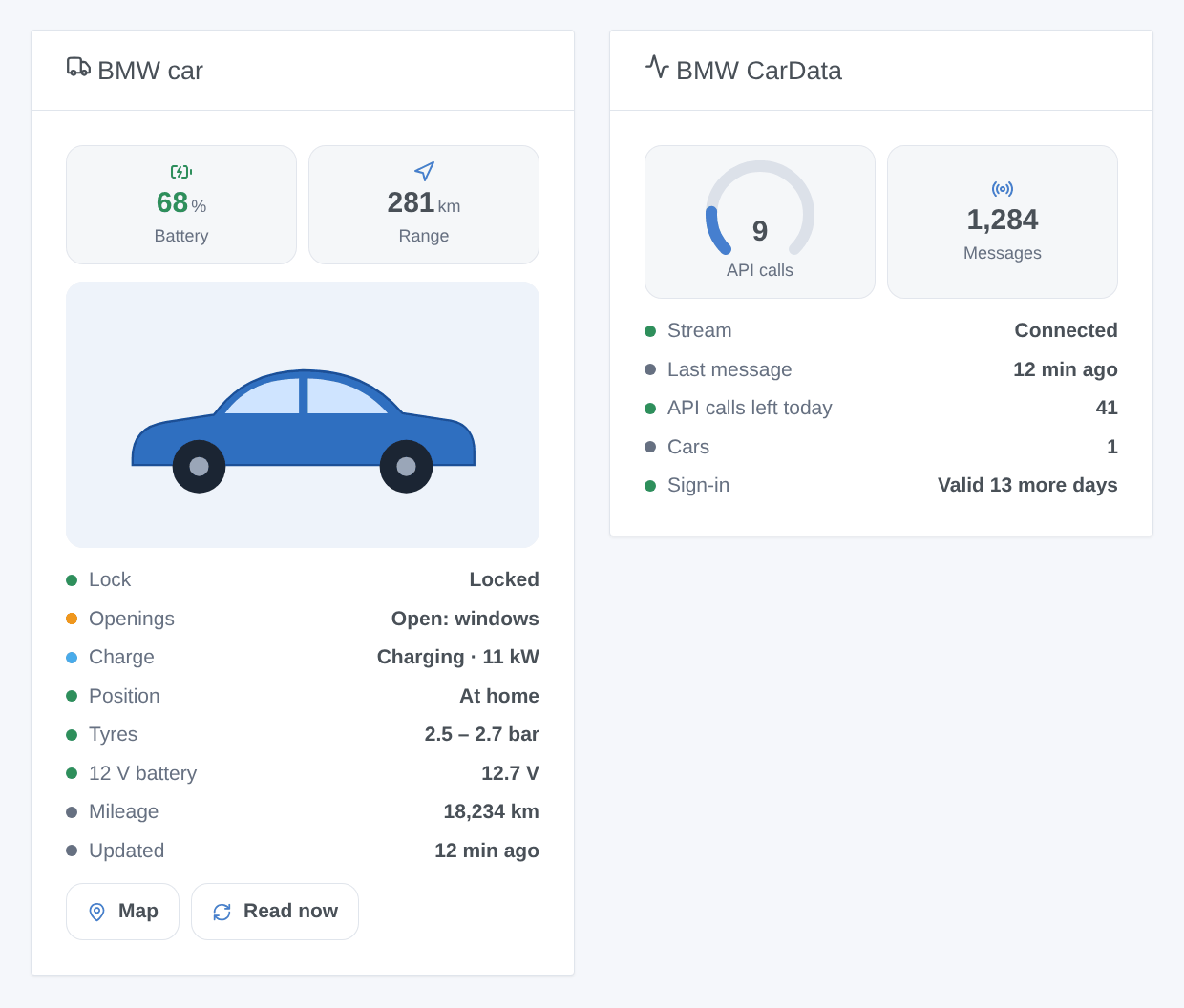
- BMW car: the picture BMW serves for the car (fetched once, 1 API call), battery or fuel, range, lock, openings, charge, position, tyres, 12 V battery, mileage, the age of the data, a Map button and a Read now button (1 API call).
- BMW CarData: the API calls of the day out of 50, the stream, its last message, the cars and how long the sign-in stays valid.
Scenes
Triggers (each one can be limited to one car):
- Locked or unlocked, locked but left open (a door, the trunk, the hood, a window or the sunroof);
- Charging status changed (charging, paused, finished, error…), cable plugged or unplugged;
- Started or stopped driving, arrived or left home;
- Sign-in to renew.
Action: Read the status of a car (battery, range, fuel, charge, lock, openings, home, mileage, a summary), optionally after an API reading.
Examples:
- When the car is locked but left open → send me a message with
{{triggerEvent.data.openings}}. - When the charge is finished → notify "The car is charged:
{{triggerEvent.data.battery_level}}%". - When the car arrives home after dark → turn on the driveway lights.
Transport
Cloud: the cars carry the cloud badge. While the stream is down, the badge shows an orange dot (degraded mode): the values then only come from the API, several hours apart.
Troubleshooting
- "access_denied" when approving the code: a known BMW-side problem. Retry in a private browser window, open the portal yourself and type the code by hand. If it persists, delete the CarData client in the portal, create a new one with both subscriptions, enter the new client ID and connect again.
- Connected but no value moves: check the data selection of the stream in the portal, then lock and unlock the car to make it report. A sleeping car sends nothing.
- "Another app keeps taking the stream": stop the other CarData client of the account (one stream connection per account).
- "The 50 daily API calls are used up": every tool of the account shares them; the stream keeps working, new calls at 00:00 UTC. Lower the API reading frequency if needed.
- Logs: click Diagnostic in the integration configuration, then open Settings → Supervision: an anonymized summary (stream, sign-in, quota, data received per car, without token nor full VIN) is written there. Attach it to an issue on GitHub with your Gladys and integration versions.
Configuration settings
These are the settings BMW CarData asks for in its configuration screen in Gladys.
| Setting | Type | Required | Description |
|---|---|---|---|
| BMW CarData client | section | No | In the MyBMW (or MINI) web portal, open your car → BMW CarData. Click « Create CarData client », tick BOTH « CarData API » and « CarData Stream », then copy the client ID here and save. Europe only; you must be the primary user of the car. |
| CarData client ID | string | Yes | The ID shown by the portal after « Create CarData client » (a UUID). |
| Sign in | section | No | Save first, then click Connect: a BMW page opens. Sign in, check that the code shown in the connection status of Gladys is the same, and approve. If BMW answers « access denied », retry in a private window and type the code by hand. |
| BMW account | account_link | No | |
| Stream (real time) | section | No | In the portal, click « Configure data stream » and tick the data you want (battery, doors, position…): BMW only streams what is ticked there. The host and port below are the ones the portal shows; the defaults fit most accounts. Only one stream connection per BMW account: stop any other CarData tool. |
| Stream host | string | No | |
| Stream port | number | No | |
| Options | section | No | BMW allows 50 API calls a day for the whole account (reset at 00:00 UTC). The stream costs none. The API fills what the stream does not send (door lock, data while the stream is down). |
| API reading every (hours) | number | No | 0 = only on request. 4 h = 6 calls a day per car. |
| Home radius (m) | number | No | Around the houses of Gladys: the car is home within this distance. |
| Language of the texts | select | No | Feature names and scene summaries. Automatic: the language of your dashboard, once a widget has been displayed. |
How to install BMW CarData in Gladys
- In Gladys, open Integrations: BMW CarData appears in the catalog, next to the native integrations, with a community badge.
- Click Install. Gladys pulls the Docker image (
ghcr.io/william-de71/gladys-bmw-cardata:0.1.0), starts it in a sandbox isolated from the core, and generates the integration's interface (devices, discovery and configuration). - Open the Configuration screen of the integration, fill in the settings, and save.
- You can also install it directly from its repository URL: https://github.com/William-De71/gladys-bmw-cardata.
BMW CarData requires Gladys >=5.1.1. The catalog inside Gladys refreshes every hour, so a new version becomes available at most one hour after its release.
Not running Gladys yet? It is free and open source: follow the installation guide to get started.
About external integrations
BMW CarData is an external integration: a community integration packaged as a Docker container and published on GitHub, that Gladys installs in one click and runs in a sandbox isolated from its core. It is published and maintained by William-De71, not by the Gladys core team.
- Browse all integrations, native and community
- Build and publish your own external integration
- Source code on GitHub — source of this documentation