Bluesky smart home integration, free and open source
Talk to Gladys in Bluesky direct messages, post from scenes, react to mentions and followers.
Published by William-De71
- Messaging
- Version 0.1.0
- Requires Gladys >=5.3.0
- ★ 0
Unofficial integration, not affiliated with Bluesky Social PBC.
Overview
The Bluesky integration connects Gladys to one Bluesky account, ideally an account of the house (e.g. home-gladys.bsky.social):
- each user of Gladys links their own Bluesky account once, then talks to Gladys in direct messages to the account of the house; the notifications of Gladys arrive there too;
- your scenes react to mentions, replies, quotes, new followers, likes, reposts and direct messages, and can publish a post, send a direct message or delete a post;
- three dashboard widgets show the account, the last notifications and the last direct messages.
Everything goes through the servers of Bluesky (cloud transport): the integration asks Bluesky regularly (every 10 to 60 seconds for direct messages, every 30 seconds for notifications). Gladys needs no public URL and no Gladys Plus. Posts are public; direct messages are private between the accounts.
Prerequisites
- Gladys Assistant 5.3.0 or later.
- A Bluesky account (on bsky.social or on a self-hosted PDS) and an app password of this account with access to direct messages.
- Internet access from Gladys.
Create the app password
- Sign in to the Bluesky app with the account of the house.
- Open Settings → Privacy and security → App passwords → Add App Password.
- Name it
Gladysand check Allow access to your direct messages: without it, Gladys can neither read nor send direct messages. - Copy the password (it is shown once).
- In the chat settings of the account (Chat → ⚙, “Allow new messages from”), choose Everyone so that your family can send a link code, or follow their accounts.
Never enter the main password of the account: an account protected by a code sent by e-mail refuses it, and an app password can be revoked on its own at any time.
Configuration
In Gladys, open Integrations → Bluesky → Configuration:
| Field | Meaning |
|---|---|
| Handle or e-mail of the account | name.bsky.social (without the @), your own domain, or the e-mail address of the account |
| App password | the app password created above (stored encrypted) |
| Server (advanced) | leave empty for bsky.social; for a self-hosted PDS, its https:// address |
| Read the direct messages | off: nobody can talk to Gladys nor link an account; Gladys can still send messages |
| Send the direct messages to Gladys | off: the messages of linked users only reach the scenes |
| Check the direct messages every | 10, 15 (default), 30 or 60 seconds |
| Watch the notifications | mentions, replies, quotes, followers, likes and reposts for the scenes and the widgets |
| Language of the integration | the answer to a link code, and the default language of the posts published by the scenes |
Click Test the connection: it shows the account, its followers, whether the direct messages are readable, and the number of linked users. The integration logs in once and keeps its session: Bluesky limits logins to 300 a day.
Link your Bluesky account
- In the configuration of the integration, Link my account → Generate a link code.
- In the Bluesky app, with your own account, send the code in a direct message to the account of the house, within 15 minutes.
- The account of the house answers that your account is linked.
To receive the alerts of Gladys, your own account must accept messages from the account of the house (follow it, or allow messages from everyone).
Usage
Talk with Gladys
Write to the account of the house in a direct message: Gladys answers in the same conversation, as with the Telegram integration. Long answers are split in several messages. Bluesky direct messages cannot carry images: a camera image sent by Gladys arrives as a short notice.
Messages from accounts that are not linked never reach Gladys and get no answer: they stay unread in the app for a human, and only fire the scene trigger Message from an unlinked account.
Dashboard widgets
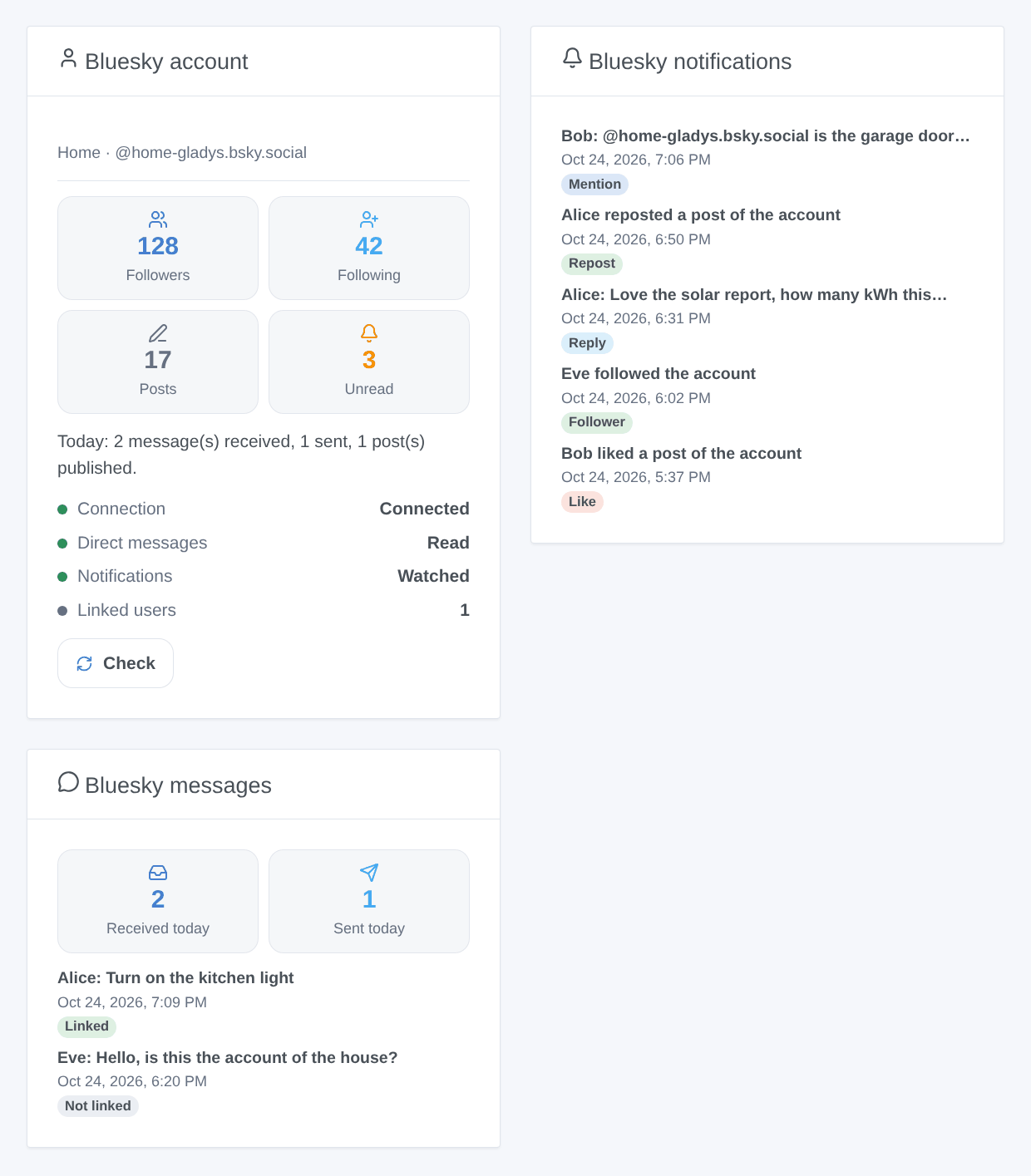
Generated illustration, not a screenshot: made-up accounts and messages.
- Bluesky account: followers, follows, posts, unread notifications, today’s activity, the connection and a Check button.
- Bluesky notifications: the last 8 notifications, linking to bsky.app; the setting Show likes and reposts keeps only mentions, replies, quotes and followers when off.
- Bluesky messages: messages received and sent today and the last 8 messages; their text only with Show the text of the messages (off by default, since a dashboard can be shared).
Scenes
| Trigger | When |
|---|---|
| Mentioned on Bluesky | someone mentions the account in a post |
| Bluesky reply received | someone replies to a post of the account |
| Bluesky post quoted | someone quotes a post of the account |
| New Bluesky follower | someone follows the account |
| Bluesky like received | someone likes a post of the account |
| Bluesky repost received | someone reposts a post of the account |
| Bluesky message received | a linked user sends a direct message |
| Message from an unlinked account | another account sends a direct message (never to Gladys) |
| Bluesky message not sent | a message of Gladys could not be delivered (once per user) |
The first read after the start is the reference: what was already there fires nothing. The actions are Publish a Bluesky post (text, language, reply to a post, optional image URL and its description), Send a Bluesky direct message and Delete a Bluesky post. The same post within a minute is published once, and 30 posts an hour at most.
Examples:
- Mentioned on Bluesky → Publish a Bluesky post with Reply to
{{triggerEvent.data.post_uri}}. - Every evening → Publish a Bluesky post with the solar production of the day.
- Message from an unlinked account → a notification to your phone with
{{triggerEvent.data.sender_handle}}.
Troubleshooting
- “Bluesky refuses the identifier or the app password”: check the handle (without the @) and create a new app password. A refused password is not retried on its own: save the configuration again or click Test the connection.
- “Bluesky asks for a code sent by e-mail”: the main password was entered; use an app password.
- “The app password does not allow direct messages”: create a new app password with Allow access to your direct messages checked.
- A user receives nothing: their account must accept messages from the account of the house; the scene trigger Bluesky message not sent tells the reason.
- The link code is refused: it expires after 15 minutes; generate a new one.
- “Bluesky asks to wait”: too many requests; the integration waits for the time Bluesky gives.
- Report a problem with the versions of Gladys and of the integration, the message of Test the connection and the logs (
DEBUG=gladys-integration-sdk), never the app password: https://github.com/William-De71/gladys-bluesky/issues
Configuration settings
These are the settings Bluesky asks for in its configuration screen in Gladys.
| Setting | Type | Required | Description |
|---|---|---|---|
| Bluesky account | section | No | Unofficial integration, not affiliated with Bluesky Social PBC. Gladys uses one Bluesky account: ideally an account of the house (e.g. home-gladys.bsky.social), since everyone talking to Gladys writes to it. 1. In the Bluesky app, signed in with this account, open Settings → Privacy and security → App passwords → Add App Password. 2. Name it Gladys and check “Allow access to your direct messages” (without it, Gladys cannot read nor send direct messages). 3. Copy the password shown once, paste it below with the handle of the account, and save. Never enter the main password of the account. |
| Handle or e-mail of the account | string | Yes | The handle without the @ (name.bsky.social, or your own domain), or the e-mail address of the account. |
| App password | secret | Yes | Created in Settings → Privacy and security → App passwords, with access to direct messages. Stored encrypted, never shown again. |
| Server (advanced) | string | No | Leave empty for an account created on bsky.social. For a self-hosted PDS, its https:// address. |
| Talk with Gladys | section | No | Each user links their own Bluesky account once: “Link my account” below → “Generate a link code”, then send the code in a direct message to the account of the house. Then everything they write to it goes to Gladys, who answers there. The account of the house must accept their messages (Chat → ⚙ settings → Allow new messages from: Everyone, or follow them), and they must accept its messages to receive the alerts of Gladys. Messages of accounts that are not linked never reach Gladys: they only fire the scene trigger made for them. |
| Read the direct messages | boolean | No | Off: nobody can talk to Gladys nor link an account; Gladys can still send messages and alerts. |
| Send the direct messages to Gladys | boolean | No | Off: the messages of linked users only reach the scenes, Gladys does not answer them. |
| Check the direct messages every | select | No | Bluesky offers no push to a home server: the integration asks regularly. Notifications are read every 30 s (60 s with the 60 s choice). |
| Watch the notifications | boolean | No | Mentions, replies, quotes, new followers, likes and reposts: the scene triggers and the widgets. They stay unread in the Bluesky app. |
| Language of the integration | select | No | Language of the few texts the account writes itself (answer to a link code) and default language of the posts published by the scenes. |
How to install Bluesky in Gladys
- In Gladys, open Integrations: Bluesky appears in the catalog, next to the native integrations, with a community badge.
- Click Install. Gladys pulls the Docker image (
ghcr.io/william-de71/gladys-bluesky:0.1.0), starts it in a sandbox isolated from the core, and generates the integration's interface (devices, discovery and configuration). - Open the Configuration screen of the integration, fill in the settings, and save.
- You can also install it directly from its repository URL: https://github.com/William-De71/gladys-bluesky.
Bluesky requires Gladys >=5.3.0. The catalog inside Gladys refreshes every hour, so a new version becomes available at most one hour after its release.
Not running Gladys yet? It is free and open source: follow the installation guide to get started.
About external integrations
Bluesky is an external integration: a community integration packaged as a Docker container and published on GitHub, that Gladys installs in one click and runs in a sandbox isolated from its core. It is published and maintained by William-De71, not by the Gladys core team.
- Browse all integrations, native and community
- Build and publish your own external integration
- Source code on GitHub — source of this documentation