Bestway Lay-Z-Spa smart home integration, free and open source
Bestway Lay-Z-Spa inflatable spas: heating, filter, bubbles, temperature, via the cloud.
Published by William-De71
- Devices
- Version 0.1.0
- Requires Gladys >=5.1.0
- ★ 0
Overview
This integration brings Bestway Wi-Fi spas (Lay-Z-Spa, SaluSpa) and Flowclear Smart Touch pool filter pumps into Gladys, through the Bestway cloud, with the account of the app you already use.
Gladys reads the water temperature, the target, the heater, the filter pump, the bubbles, the jets and the errors, and can switch them on and off and change the target. It also learns how fast your spa heats, to tell you when the water will be ready.
Not affiliated with Bestway.
Requirements
- Gladys Assistant 5.1.0 or later, with Internet access.
- A Bestway Wi-Fi spa that works in one of these apps, and the e-mail and password of that app:
- Bestway Smart Hub (models up to about 2024, called V1 here);
- Bestway Connect (models from 2025, called V2 here).
- The accounts of the "Lay-Z-Spa Wi-Fi" app are not accepted: use one of the two apps above.
Configuration
Accounts
Fill in the account of your app:
- Bestway Smart Hub account (V1): e-mail, password and region (Europe or United States).
- Bestway Connect account (V2): e-mail, password and region (Europe, United States or China). No sharing QR code is needed.
You can fill in both if you have spas in both apps. Leave the other one empty. Then save and press Test the accounts: it logs in and lists every spa found, with its model and its water temperature.
The region is the one chosen when the account was created: if the login fails or no spa is found, try the other one. After a refused login, the integration waits 15 minutes before trying again (then longer), so that a wrong password never gets your account locked: saving the corrected password tries again at once.
Settings
Read the spas every: from 30 seconds to 5 minutes (1 minute by default).
Language of the names and texts: the language of the feature names, of the bubbles levels and of the error messages.
Usage
Devices
Open the Discover tab of the integration and add your spa. It gets the name you gave it in the app, and, depending on the model:
- Water temperature and Target temperature (20 to 40 °C; a spa set to Fahrenheit is converted);
- Heater (on / off) and Heating now;
- Power and Filter pump;
- Bubbles: on / off, or off / medium / maximum on the V1 models that have levels;
- HydroJet jets (HydroJet models) and Panel lock (AirJet models);
- Errors: the codes reported by the spa (
E02…), see its manual for their meaning.
A Flowclear Smart Touch pool filter pump gets its power, its filter timer, its cartridge (OK / to change) and its errors.
A command is shown at once and kept until the cloud reports it (5 to 30 seconds), then checked by a reading 15 seconds later. Switching the heater on also starts the filter pump, as the spa does.
Widgets
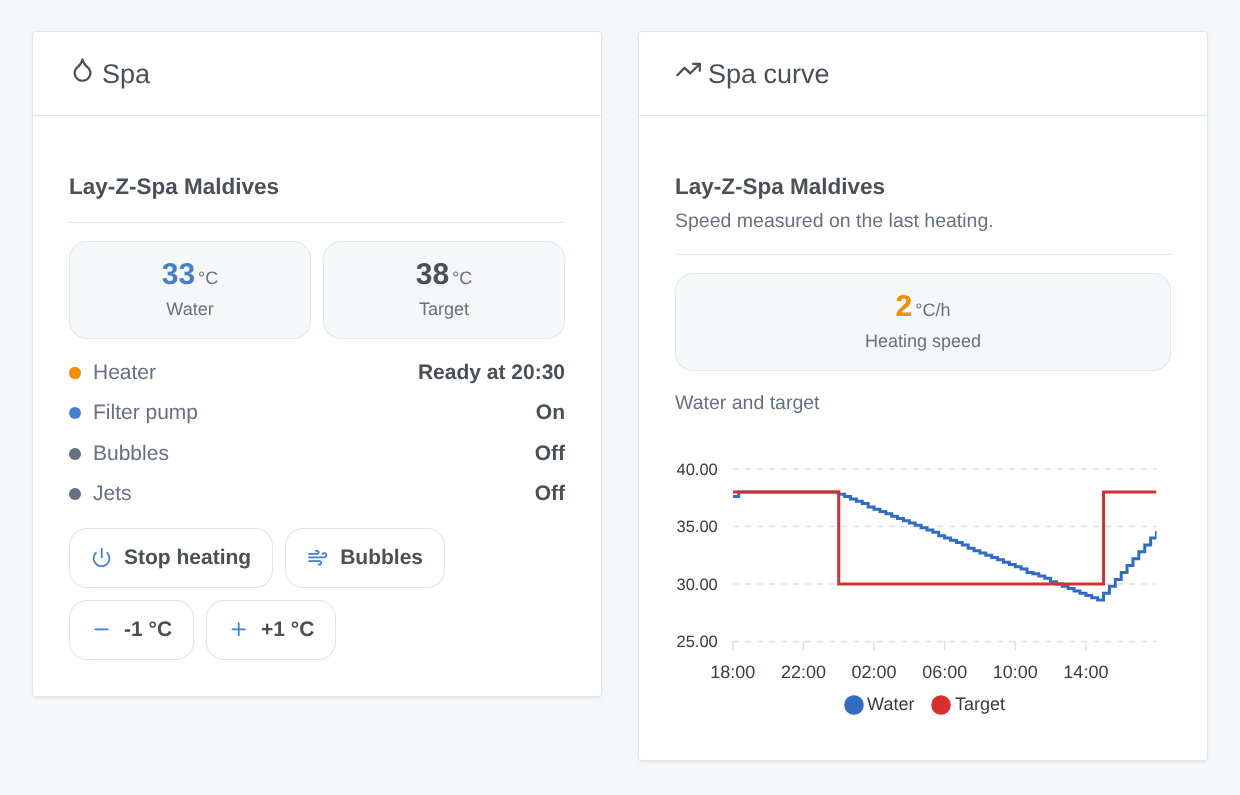
- Spa: the water and its target, the heater (off, heating, "ready at 20:30", at temperature), the filter pump, the bubbles, the jets, the errors, and buttons to heat, for the bubbles and to change the target by one degree.
- Spa curve: the water and target temperatures over 24 hours, 3 or 7 days (the device must be added), and how fast the spa heats.
The "ready at" time appears after 45 minutes of heating: the integration measures the heating speed, then remembers it for the next times.
Scenes
Triggers: The spa water reaches its target, The spa reports an error (filter on a code if you want), The spa is unreachable (5 minutes), The spa answers again.
Actions: Read the spa (water, target, heater, minutes to the target, ready time, errors) and Heat the spa to a temperature (target and heater in one step).
Examples:
- Every Friday at 5 pm → Heat the spa to 38 °C → send a message with the ready time.
- The spa water reaches its target → send a notification "The spa is ready".
- The spa reports an error → send a notification with
{{triggerEvent.data.error_code}}.
Troubleshooting
- The e-mail or password is refused: check that you use the account of the app your spa works with (Smart Hub = V1, Bestway Connect = V2) and the right region.
- "Connected, but no device": the spa is not on this account or in this region: try the other region, or add the spa in the app.
- The spa is unreachable: check that it works in the app (Wi-Fi of the spa, power).
- A command comes back to the old value for a moment: the cloud reports late; the real state shows a few seconds later.
- The Test the accounts button lists what the integration sees; the Logs tab of the integration tells more.
Report a problem on GitHub with your Gladys version, the integration version, the model of the spa, its app (V1 or V2), the region and the logs.
Configuration settings
These are the settings Bestway Lay-Z-Spa asks for in its configuration screen in Gladys.
| Setting | Type | Required | Description |
|---|---|---|---|
| Your Bestway spa | section | No | Gladys controls Wi-Fi Lay-Z-Spa (and SaluSpa) spas through the Bestway cloud, with the account of the app you use: Bestway Smart Hub for the models up to about 2024 (V1), Bestway Connect for the newer ones (V2). The spa must first work in that app. Gladys reads it every minute; the e-mail and password stay in Gladys, the spa data goes through the Bestway cloud. Not affiliated with Bestway. |
| Bestway Smart Hub account (V1) | section | No | Leave empty if you do not use the Bestway Smart Hub app. The Lay-Z-Spa Wi-Fi app accounts are not accepted here. |
string | No | ||
| Password | secret | No | |
| Region of the account | select | No | The region chosen when the account was created. If the login fails or no spa is found, try the other one. |
| Bestway Connect account (V2) | section | No | For the spas of the Bestway Connect app (2025 and later). Use the e-mail and password of that app: the sharing QR code is no longer needed. |
string | No | ||
| Password | secret | No | |
| Region of the account | select | No | |
| Settings | section | No | |
| Read the spas every | select | No | |
| Language of the names and texts | select | No | Gladys does not tell integrations the language of its users: choose the one of the feature names and of the error messages. |
How to install Bestway Lay-Z-Spa in Gladys
- In Gladys, open Integrations: Bestway Lay-Z-Spa appears in the catalog, next to the native integrations, with a community badge.
- Click Install. Gladys pulls the Docker image (
ghcr.io/william-de71/gladys-bestway:0.1.0), starts it in a sandbox isolated from the core, and generates the integration's interface (devices, discovery and configuration). - Open the Configuration screen of the integration, fill in the settings, and save.
- You can also install it directly from its repository URL: https://github.com/William-De71/gladys-bestway.
Bestway Lay-Z-Spa requires Gladys >=5.1.0. The catalog inside Gladys refreshes every hour, so a new version becomes available at most one hour after its release.
Not running Gladys yet? It is free and open source: follow the installation guide to get started.
About external integrations
Bestway Lay-Z-Spa is an external integration: a community integration packaged as a Docker container and published on GitHub, that Gladys installs in one click and runs in a sandbox isolated from its core. It is published and maintained by William-De71, not by the Gladys core team.
- Browse all integrations, native and community
- Build and publish your own external integration
- Source code on GitHub — source of this documentation