Belgian Mobility smart home integration, free and open source
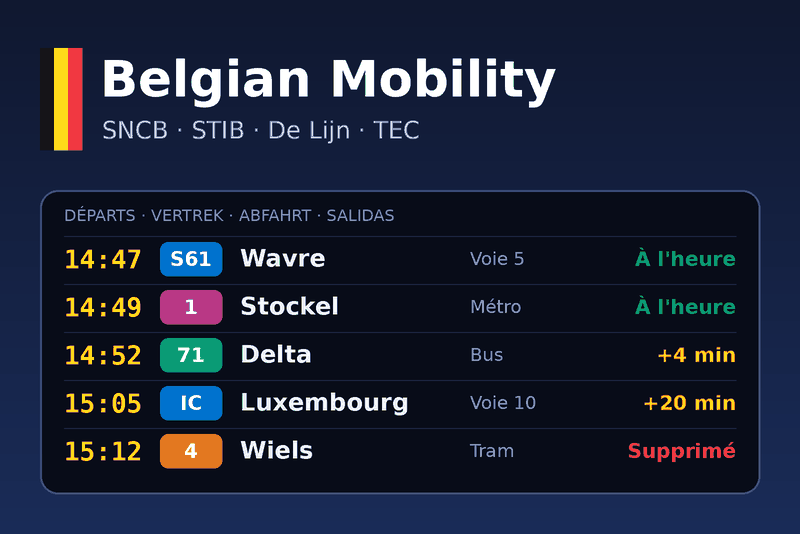
Live departures, delays and disruptions of Belgian public transport: SNCB, STIB, De Lijn, TEC.
Published by gboulvin
- Devices
- Version 1.1.0
- Requires Gladys >=5.3.0
- ★ 0
Follow the public transport you use, anywhere in Belgium, from Gladys: the next departures of your train station and of your metro, tram or bus stops, their delays and cancellations, and the disruptions of the SNCB rail network.
| Operator | Covers | Source |
|---|---|---|
| SNCB / NMBS | Trains (platforms, delays, cancellations) | iRail |
| STIB / MIVB | Brussels metro, trams and buses | Transitous |
| De Lijn | Flemish trams and buses | Transitous |
| TEC | Walloon metro (Charleroi), trams, buses | Transitous |
Both sources are free and open: no account, no API key. The integration needs an internet connection (cloud).
1. Find your stops
- A train station: just type its name, in any official language:
Namur,Bruxelles-CentralorBrussel-Centraal,Liège-Guillemins. - A metro, tram or bus stop: in the Configuration screen, click
Search a stop, type its name (
De Brouckère,Gent Korenmarkt,Charleroi Palais...) and copy the identifier shown after the arrow, e.g.be-stib_6.
2. Configure
| Field | What it does |
|---|---|
| Stops to follow | The stops, separated by ;. Add | 71, 89 after a stop to keep only those lines (IC, S... for trains). |
| Language of the texts | English, French, German or Spanish: summaries, scene outputs, SNCB station names and disruptions. |
| Delay alert | A departure late by at least this many minutes fires Departure delayed (default 5). |
| Time to leave | Departure soon fires when a departure is this many minutes away (default 10, 0 turns it off). |
| SNCB network | Adds the SNCB network device and the New SNCB disruption trigger. |
| Refresh interval | How often each stop is read, in seconds (60 minimum). |
Example: Namur; be-stib_6 | 1, 5; Bruxelles-Central | IC
Save, then open the Discovery tab of the integration to create the devices. Click Test the connection to check that both sources answer.
3. Devices
Each followed stop becomes a device with three features:
- Next departure in: minutes until the next departure you can take;
- Delay of the next departure: in minutes, kept in history;
- Next departure: a summary, e.g.
14:47 S61 4586 → Wavre, Platform 5.
The optional SNCB network device shows the latest disruption.
4. Scenes
Triggers (each one fires once per trip, never once per refresh):
- Departure delayed, Departure cancelled, Departure soon: filter on a
stop, a line (
71,IC) or a precise train (IC 2113). The following actions can useline,vehicle,destination,delay_minutes,minutes,platform,scheduled_time,expected_time... - New SNCB disruption: a disruption or planned works on the rail network.
Actions:
- Get the next departure of a stop (optionally one line or one direction);
- Plan a train journey between two stations, now or at a given time;
- Get the SNCB network status.
Example: every weekday at 7:15, get the next departure of Namur towards
Bruxelles; if delay_minutes > 5, send me "Your {{vehicle}} is
{{delay_minutes}} min late, platform {{platform}}".
5. Dashboard widgets
- Departures board: the next departures of a stop (pick it in the widget settings) with delays, cancellations and platforms, and a refresh button;
- SNCB network: current disruptions and planned works.
Good to know
- Real-time data depends on the operator: SNCB, De Lijn and TEC publish it; the STIB stops currently show the timetable (badge Scheduled).
- Only the stop identifiers and station names you configure are sent to iRail and Transitous. Nothing else leaves your Gladys.
- A stop marked as unknown in the connection status: check its spelling or use Search a stop.
Configuration settings
These are the settings Belgian Mobility asks for in its configuration screen in Gladys.
| Setting | Type | Required | Description |
|---|---|---|---|
| Getting started | section | No | Follow the train stations and the metro, tram and bus stops you use, anywhere in Belgium. Data comes from two free open APIs, no account nor key needed: iRail for the SNCB trains, Transitous for STIB, De Lijn and TEC. Use the "Search a stop" button below to find the identifier of a stop. |
| Stops to follow | string | No | Separated by ";". An SNCB station name (Namur) or a stop identifier from "Search a stop" (be-stib_6). Add "| 71, 89" to keep only some lines. |
| Language of the texts | select | No | Language of the summaries, scene outputs, SNCB station names and disruptions. |
| Delay alert (minutes) | number | No | A departure late by at least this many minutes fires the "Departure delayed" scene trigger. |
| Time to leave (minutes) | number | No | "Departure soon" fires when a departure is this many minutes away (time to walk to the stop). 0 turns it off. |
| Follow the SNCB network disruptions | boolean | No | Adds an "SNCB network" device and the "New disruption" scene trigger. |
| Refresh interval (s) | number | No | How often each stop is read, in seconds (one minute minimum). |
How to install Belgian Mobility in Gladys
- In Gladys, open Integrations: Belgian Mobility appears in the catalog, next to the native integrations, with a community badge.
- Click Install. Gladys pulls the Docker image (
ghcr.io/gboulvin/gladys-belgianmobility:1.1.0), starts it in a sandbox isolated from the core, and generates the integration's interface (devices, discovery and configuration). - Open the Configuration screen of the integration, fill in the settings, and save.
- You can also install it directly from its repository URL: https://github.com/gboulvin/Gladys-BelgianMobility.
Belgian Mobility requires Gladys >=5.3.0. The catalog inside Gladys refreshes every hour, so a new version becomes available at most one hour after its release.
Not running Gladys yet? It is free and open source: follow the installation guide to get started.
About external integrations
Belgian Mobility is an external integration: a community integration packaged as a Docker container and published on GitHub, that Gladys installs in one click and runs in a sandbox isolated from its core. It is published and maintained by gboulvin, not by the Gladys core team.
- Browse all integrations, native and community
- Build and publish your own external integration
- Source code on GitHub — source of this documentation