Atmo France smart home integration, free and open source
French air quality index (ATMO) per commune: forecast, pollution episodes and pollen.
Published by William-De71
- Devices
- Version 0.1.0
- Requires Gladys >=5.2.0
- ★ 0
Overview
This integration brings the official French air quality index (ATMO) into Gladys, for one to three communes: the index today and tomorrow, the sub-indices of the five pollutants (NO₂, O₃, PM10, PM2.5, SO₂), the pollution episodes announced for the department and, if you wish, the pollen allergy risk. Each commune becomes a device you can show on a dashboard and use in scenes.
The data come from Atmo Data, the open data service of the Fédération Atmo France and of the regional air quality agencies (AASQA). They are published once a day, early in the afternoon. The integration reads them twice a day (about 07:30 and 15:30, Paris time) and keeps them, so a restart costs no request.
It is a cloud integration: it contacts admindata.atmo-france.org with your account, and geo.api.gouv.fr (the open commune service of the French government) to find the commune of your house.
Prerequisites
- Gladys Assistant 5.2.0 or later.
- A free Atmo Data account. Request it at https://admindata.atmo-france.org/inscription-api: Atmo France validates the request by e-mail, usually within a few days, then you choose your password.
- The location of your house in Gladys (Settings > Houses), or the name of the commune to follow. Communes of mainland France, Corsica and overseas are covered.
Configuration
| Field | What to enter |
|---|---|
| User name, Password | The account of Atmo Data. |
| House | A house of Gladys: its location gives the commune. |
| Or a commune | "Mâcon", "71000", "Saint-Denis 93200" or the INSEE code. When filled, it wins over the house. |
| Place 2, Place 3 | Other communes (a second home, the office, the school). Optional. |
| Pollen | Also read the pollen risk. Changing it adds or removes features: update the devices. |
| Language of the texts | Device names, the air quality as text and the scene summaries. |
Save: the status at the top of the page shows the communes found, today's air quality and the time of the next reading. Read now reads again at once (at most every 10 minutes).
Usage
Devices
In the Discover tab, create the "Air quality …" device of each commune. It holds:
- the ATMO index today and tomorrow, from 1 (good) to 6 (extremely poor), and the air quality as text;
- the sub-index of each pollutant today, from 1 to 6: a level, not a concentration in µg/m³;
- the pollution episode of the department today and tomorrow: 0 none, 1 information and advice, 2 alert on persistence, 3 alert (shown by Gladys as no, low, medium or high risk);
- with pollen: the pollen index today and tomorrow, the main pollen, and the level of ragweed, mugwort, alder, birch, grasses and olive today.
When Atmo France has no value for a day, or announces a special event (a fire), nothing is published. The badge of the index stays green in Gladys whatever its value (Gladys colors it on the US scale, 0 to 500): use the widgets to see the right colors. The "tomorrow" features keep the previous forecast between midnight and the afternoon reading.
Dashboard widgets
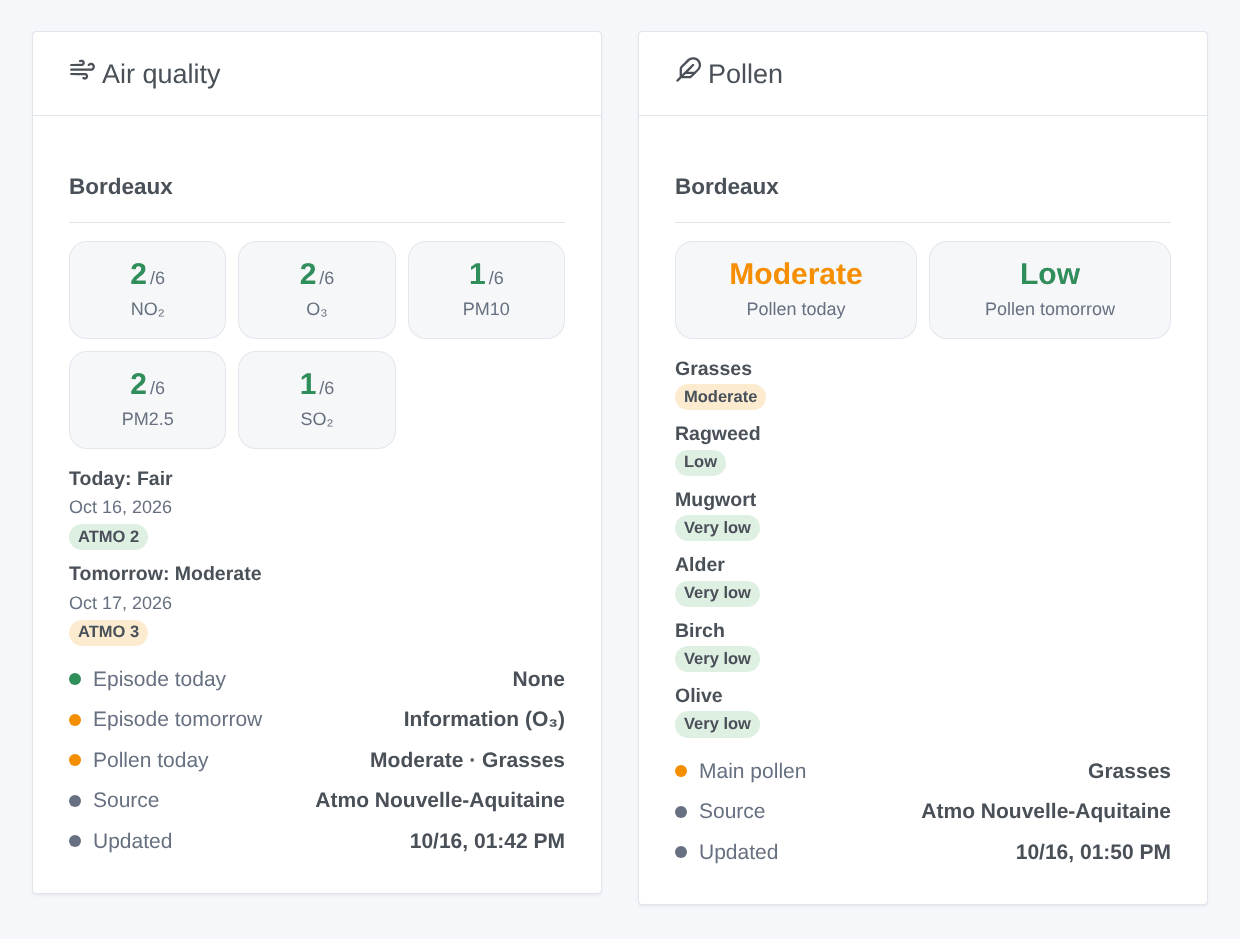
- Air quality: the sub-indices of today, a card for today and one for tomorrow (tap it for the details), the episodes, the pollen, the source and the update time.
- Pollen: the risk today and tomorrow and the level of each taxon.
Choose the commune in the settings of the widget (empty: the first one).
Scenes
Triggers, fired once per change and never twice for the same day:
- Atmo: air quality degraded: the index of today or tomorrow reaches "Moderate" or worse, or worsens again.
- Atmo: pollution episode: an information or alert procedure is announced, or rises to a higher level.
- Atmo: pollen risk: the pollen risk reaches "Moderate" or more, or rises.
- Atmo: tomorrow's forecast: published once a day, in the afternoon.
Each one gives a ready-made sentence, {{triggerEvent.data.summary}}, and its values (level, pollutants, pollen…). The action Atmo: read the air quality returns the same values for today or tomorrow, to put in a message or test in a condition.
Examples:
- When an alert episode is announced for tomorrow → send the summary to the family.
- When tomorrow's forecast is published → send it every afternoon.
- When the grasses pollen is high → close the bedroom shutters.
Transport
Cloud only: the data come from the internet (Atmo Data and geo.api.gouv.fr). Only your account, the coordinates of the chosen house and the communes leave your network.
Troubleshooting
- "refused the user name or the password": check them, and that Atmo France has validated your account (validation e-mail). A refused password is not retried before the next reading.
- "Commune not found": the house has no location, or the name is ambiguous: type "name postal code", or the INSEE code.
- No value for a commune: some regions publish per intercommunality only, which the integration reads instead; a value can be missing for a few hours around the daily update.
- "too many requests": Atmo Data asked to wait; the integration waits the requested time.
- To report a problem: press Diagnostic, then copy the lines starting with "Atmo diagnostic" from the Logs tab into an issue on GitHub or a reply on the forum, with the versions of Gladys and of the integration. They contain neither your user name nor your password.
Configuration settings
These are the settings Atmo France asks for in its configuration screen in Gladys.
| Setting | Type | Required | Description |
|---|---|---|---|
| Atmo Data account | section | No | The data come from Atmo Data, the open data service of the Fédération Atmo France and of the regional air quality agencies (AASQA): the ATMO index of each commune today and tomorrow, the pollution episodes of the department and the pollen allergy risk. The account is free but must be requested: fill in the form, wait for the validation e-mail of Atmo France (a few days), then create your password. The data are updated once a day, early in the afternoon; the integration reads them twice a day, about ten requests a day. |
| User name | string | Yes | The user name of your Atmo Data account. |
| Password | secret | Yes | |
| Communes | section | No | Choose a house of Gladys: its location gives the commune (Settings > Houses). Or type the commune: “Mâcon”, “71000”, “Saint-Denis 93200” or its INSEE code. Each commune becomes a device in the Discover tab. Up to three places. |
| House | select | No | Its location in Gladys gives the commune. |
| Or a commune | string | No | Name, postal code, “name postal code” or INSEE code. Wins over the house. |
| Place 2 | section | No | Another commune to follow (a second home, the workplace, the school). Optional. |
| House | select | No | Its location in Gladys gives the commune. |
| Or a commune | string | No | Name, postal code, “name postal code” or INSEE code. Wins over the house. |
| Place 3 | section | No | Another commune to follow (a second home, the workplace, the school). Optional. |
| House | select | No | Its location in Gladys gives the commune. |
| Or a commune | string | No | Name, postal code, “name postal code” or INSEE code. Wins over the house. |
| Options | section | No | |
| Pollen | boolean | No | Also read the pollen allergy risk (index and six main taxa). Changing it adds or removes features: update the devices in the Discover tab. |
| Language of the texts | select | No | Names of the devices, air quality as text, scene summaries. Automatic: the language of your dashboard, once an Atmo France widget has been displayed (French before). |
How to install Atmo France in Gladys
- In Gladys, open Integrations: Atmo France appears in the catalog, next to the native integrations, with a community badge.
- Click Install. Gladys pulls the Docker image (
ghcr.io/william-de71/gladys-atmo-france:0.1.0), starts it in a sandbox isolated from the core, and generates the integration's interface (devices, discovery and configuration). - Open the Configuration screen of the integration, fill in the settings, and save.
- You can also install it directly from its repository URL: https://github.com/William-De71/gladys-atmo-france.
Atmo France requires Gladys >=5.2.0. The catalog inside Gladys refreshes every hour, so a new version becomes available at most one hour after its release.
Not running Gladys yet? It is free and open source: follow the installation guide to get started.
About external integrations
Atmo France is an external integration: a community integration packaged as a Docker container and published on GitHub, that Gladys installs in one click and runs in a sandbox isolated from its core. It is published and maintained by William-De71, not by the Gladys core team.
- Browse all integrations, native and community
- Build and publish your own external integration
- Source code on GitHub — source of this documentation