Anniversaries smart home integration, free and open source
Countdowns to birthdays and important dates: days left, years, scenes, widgets.
Published by William-De71
- Devices
- Version 0.1.0
- Requires Gladys >=5.1.0
- ★ 0
Overview
This integration counts down to the dates that matter: birthdays, wedding anniversaries, remembrance days, events. For each date it tells how many days are left, how old someone turns or how many years have passed, and it can start your scenes on the day, a few days before, or at the reminder of each date.
- Each date becomes a device: days remaining, years at the next anniversary and years so far, days elapsed (option), days to the half anniversary (option), next date.
- Scene triggers: a date is today, a date is in N days, reminder of a date. Scene action: get the upcoming dates as a text to send.
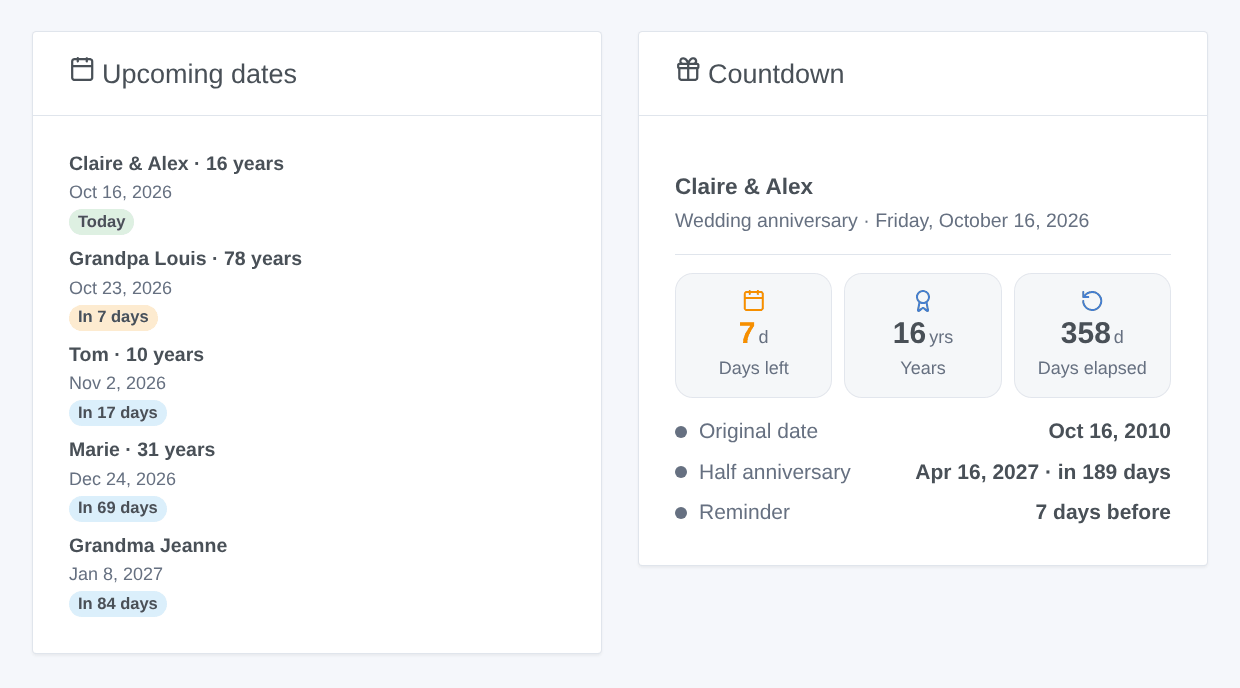
- Two dashboard widgets: upcoming dates, countdown of one date.
The image above is a generated illustration, not a screenshot.
Prerequisites
- Gladys Assistant 5.1.0 or later.
- The timezone of Gladys set correctly (Settings > System): the days change at its midnight.
- Nothing else: no account, no device, no internet access.
Configuration
The dates are not typed as JSON: each one is a small form, behind the buttons at the bottom of the configuration page.
| Field or button | Description |
|---|---|
| Hour of scene events | The hour (0 to 23) the "today", "in N days" and reminder scenes start every day. 9 by default. |
| Default reminder | Days before a date for its "Reminder of a date" scenes, for the dates without their own. 7 by default, 0 for none. |
| Language of the texts | Feature names, next date, scene summaries, messages of the buttons. Automatic: the language of your dashboard once a widget has been displayed. |
| Add a date | Name, day, month, year (empty when unknown), kind, every year or one time only, own reminder, "count the days elapsed", "half anniversary". |
| Edit a date | The name or number of the date (as "List the dates" shows it), then only the fields to change. A year of 0 removes the year. |
| Remove a date | Its name or number. Its device stays in Gladys until you delete it. |
| List the dates | Every date with its number, next occurrence, years and options, and the day and timezone the integration uses. |
The dates are stored in the configuration of the integration in Gladys: they follow your Gladys backups.
Usage
Dates
- With or without the year: without it, the integration counts the days but not the years.
- Every year or one time only: a one-time date (an event, a deadline) needs its year; once passed, its days remaining go negative and it leaves the widgets.
- 29 February falls on 28 February in the other years.
- Kind: birthday, wedding anniversary, anniversary, remembrance, event or other. Scenes and widgets can filter on it.
Devices
After Add a date, open the Discover tab of the integration and add the date: it becomes a device named after it.
- Days remaining (days; 0 on the day).
- Years at the next anniversary and years so far (when the year is known; "age" for a birthday).
- Days elapsed (option "count the days elapsed"): since the last occurrence, or since a one-time date.
- Days to the half anniversary (option), six months after the date.
- Next date, written in the language of the integration.
The values change at midnight in the timezone of Gladys. When you change the options of a date, its device gets new features: click Update on it in the Discover tab.
Dashboard widgets
- Upcoming dates: the next dates (1 to 8), with the years reached, the day and a badge (green today, orange within the reminder). Settings: how many, within how many days, which kinds. Tap a date for its details.
- Countdown: one date among the added devices: days left, years, days elapsed, original date, half anniversary and reminder.
Scenes
Triggers, fired once a day at the hour of the configuration (never twice for the same date and day; if Gladys was stopped at that hour, they come when it is back, the same day):
- A date is today: filters on the date and the kinds.
- A date is in N days: you choose N (1 to 60), for example 7 for "one week before".
- Reminder of a date: when a date reaches its own reminder (or the default one).
Variables: name, kind, years reached, original date, day, days remaining, and a ready-made summary sentence ("Marie: in 7 days, Thursday, December 24, 2026 (31 years)").
Action Get the upcoming dates: within N days (0 for today only), optionally for some kinds; outputs the count, a summary (one line per date) and the nearest date.
Examples:
- When a birthday is today → send "{{triggerEvent.data.summary}}" to the family and turn the living room light to a festive color.
- When a date is in 7 days, kind wedding anniversary → send yourself a message to book the restaurant.
- Every Monday at 8:00 → get the upcoming dates within 7 days → send the summary by message.
Transport
Local: the integration calls no online service, nothing leaves your Gladys. Its badge in the catalog says "local".
Troubleshooting
- A date shows one day off: check the timezone of Gladys (Settings > System); "List the dates" shows the day and the timezone the integration uses.
- A scene did not start: the events come at the hour of the configuration, not at midnight. A date added after that hour fires its events of the day right away; a date never fires the same event twice in a day.
- A feature is missing after an edit: click Update on the device in the Discover tab.
- Something else: open an issue on GitHub (https://github.com/William-De71/gladys-anniversaries/issues) with the versions of Gladys and of the integration, the result of "List the dates" and the logs of the integration (Settings > Supervision).
Configuration settings
These are the settings Anniversaries asks for in its configuration screen in Gladys.
| Setting | Type | Required | Description |
|---|---|---|---|
| Your dates | section | No | Declare each birthday, anniversary or important date with the “Add a date” button below, then add it from the Discover tab: it becomes a device counting the days. Nothing leaves your Gladys: the integration calls no online service. |
| Hour of the scene events | number | No | The “today”, “in N days” and reminder scenes start every day at this hour (0 to 23, in the timezone of Gladys). The days change at midnight. |
| Default reminder (days before) | number | No | For the dates without their own reminder. 0: no reminder. |
| Language of the texts | select | No | Feature names, next date, scene summaries and messages of the buttons. Automatic: the language of your dashboard, once a widget of the integration has been displayed. |
How to install Anniversaries in Gladys
- In Gladys, open Integrations: Anniversaries appears in the catalog, next to the native integrations, with a community badge.
- Click Install. Gladys pulls the Docker image (
ghcr.io/william-de71/gladys-anniversaries:0.1.0), starts it in a sandbox isolated from the core, and generates the integration's interface (devices, discovery and configuration). - Open the Configuration screen of the integration, fill in the settings, and save.
- You can also install it directly from its repository URL: https://github.com/William-De71/gladys-anniversaries.
Anniversaries requires Gladys >=5.1.0. The catalog inside Gladys refreshes every hour, so a new version becomes available at most one hour after its release.
Not running Gladys yet? It is free and open source: follow the installation guide to get started.
About external integrations
Anniversaries is an external integration: a community integration packaged as a Docker container and published on GitHub, that Gladys installs in one click and runs in a sandbox isolated from its core. It is published and maintained by William-De71, not by the Gladys core team.
- Browse all integrations, native and community
- Build and publish your own external integration
- Source code on GitHub — source of this documentation