AirNow smart home integration, free and open source
U.S. air quality from AirNow (EPA): AQI now, forecast and alerts for your places.
Published by William-De71
- Devices
- Version 0.1.0
- Requires Gladys >=5.2.0
- ★ 0
Overview
AirNow is the air quality program of the U.S. Environmental Protection Agency (EPA) and of more than 150 state, local and tribal agencies. It reports the Air Quality Index (AQI) measured every hour by over 2,500 monitors, and the forecasts of more than 500 cities, across the United States, Canada and Mexico.
This integration brings it into Gladys for up to three places, each a house of Gladys or a ZIP code: the AQI now with PM2.5, ozone and PM10, the forecast of the next days, scene triggers when the air quality changes or an air quality alert is announced, and two dashboard widgets.
The AQI goes from 0 to 500 (more during wildfire smoke): Good (0-50), Moderate (51-100), Unhealthy for sensitive groups (101-150), Unhealthy (151-200), Very unhealthy (201-300), Hazardous (301 and more). AirNow data are preliminary: they are not fully verified and may change.
Prerequisites
- Gladys Assistant 5.2.0 or later (the house picker of the configuration). Older instances cannot install the integration.
- A free AirNow API key (below).
- A place covered by AirNow: the United States, and Canada or Mexico through a house (ZIP codes are U.S. only). AirNow answers with the nearest reporting area and its monitors, within about 50 miles.
Get an API key
- Open Request an AirNow API account and fill in the form (a name and an e-mail address).
- Confirm the e-mail, then log in.
- Open Web Services: your API key is at the top right of the page. Copy it.
One key allows 500 requests per hour; the integration makes fewer than two per place and per hour, and never more than 200 per hour.
Configuration
| Field | What to enter |
|---|---|
| API key | The key of your AirNow account. Stored as a secret, never shown again nor logged. |
| House (place 1, 2, 3) | A house of Gladys: its location (Settings → Houses) locates the place. The integration asks for this access. |
| Or a ZIP code | A U.S. ZIP code, five digits: 90210. It wins over the house of the same place. |
| Language of the texts | Device names and the texts given to scenes. Automatic: the language of the last widget shown. |
Two buttons complete the screen: Read now (checks the key, locates the places and reads them at once) and Diagnostic (the state of the integration in its logs, without the key).
Usage
Devices
Open the Discover tab of the integration and create one device per place, named after its reporting area ("AirNow NW Coastal LA"):
- Air Quality Index: the AQI now, the highest of the pollutants measured;
- PM2.5 (AQI), Ozone (AQI), PM10 (AQI): the AQI of each pollutant (NowCast, the hourly index of AirNow);
- Air quality: the category, as text;
- Forecast AQI today and Forecast AQI tomorrow: when the agency gives a number (some give only a category);
- Forecast: "Tomorrow: Moderate (Ozone)", and the alert when there is one.
Gladys colors the AQI features on this very scale. A pollutant a monitor did not send keeps its last value: no 0 is invented. The observations are read at 35 minutes past every hour, when AirNow has published them, and the forecasts every 3 hours.
Dashboard widgets
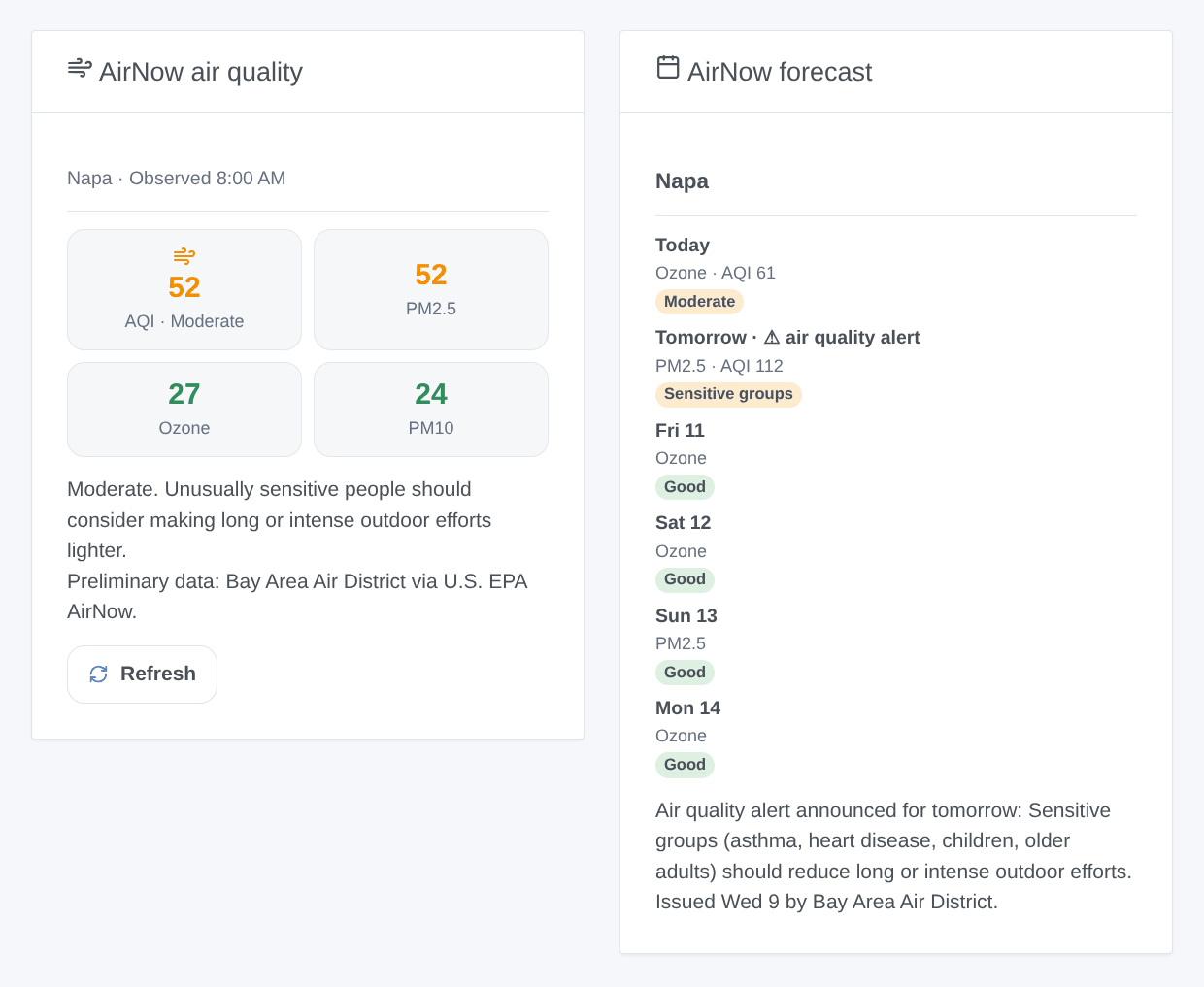
- AirNow air quality: the AQI now in the color of its category, PM2.5, ozone and PM10, the health message of the category, the hour of the observation, and the agency that measured it.
- AirNow forecast: one card per day with its category and main pollutant; a tap shows the health message and the discussion of the forecaster. An air quality alert is announced at the bottom.
Both have a setting Place (the first place by default) and a Refresh button, which reads again only when AirNow may have something new.
Scenes
Triggers:
- AirNow: air quality changed: the category now changes. Filters: place, new category (one or several), direction (worse, better). Variables:
aqi,category,category_name,previous_category,direction,pollutant_name,area. - AirNow: forecast updated: the forecast category of a day appears or changes. Filters: place, day (today, tomorrow, later), category.
- AirNow: air quality alert: a forecast announces an Air Quality Action Day, an alert of the local agency. Filters: place, day. Variables:
date,aqi,category_name,pollutant_name,discussion.
Action: AirNow: read the air quality of a place: the AQI, the category, the forecast of today and tomorrow, whether an alert is announced, and a ready-made summary sentence.
Examples:
- When the air quality becomes Unhealthy for sensitive groups or worse → close the windows and turn the air purifier on.
- When an air quality alert is announced for tomorrow → send
{{triggerEvent.data.category_name}} expected tomorrow ({{triggerEvent.data.pollutant_name}})to your phone. - Every morning at 7:00 → read the air quality and have the
summaryspoken before the run.
Transport
Cloud ("transports": ["cloud"]): the integration contacts www.airnowapi.org over HTTPS with your key and, per place, the ZIP code or the coordinates of the house (rounded to about 10 m). Nothing else leaves your network. The readings are kept in the /data volume of the integration, so a restart reads nothing that is still fresh.
Troubleshooting
- AirNow refused the API key: copy it again from the Web Services page (no space), then save the configuration: the readings resume at once.
- No data near a place: the place is too far from a reporting area or a monitor (central Nevada, outside North America). Try a ZIP code of the nearest city.
- The house has no location: set it in Settings → Houses, then press Read now.
- No forecast: some agencies forecast only part of the year or only some days; the widget says so.
- Values differ from AirNow.gov by a few points: both show the NowCast of the same hour, but the reporting area and the monitors chosen may differ slightly.
- Still stuck: press Diagnostic, then open an issue on GitHub with the versions of Gladys and of the integration, the place, and the "AirNow diagnostic" lines of the logs (add
DEBUG=gladys-integration-sdkin developer mode).
Data: U.S. EPA AirNow and its partner agencies, preliminary data, shown as received.
Configuration settings
These are the settings AirNow asks for in its configuration screen in Gladys.
| Setting | Type | Required | Description |
|---|---|---|---|
| AirNow API key | section | No | AirNow is the air quality program of the U.S. EPA, with its state, local and tribal partners: observations and forecasts of the Air Quality Index for the United States, Canada and Mexico. Its API needs a free key: request an account, then copy the key shown at the top right of its Web Services page. |
| API key | secret | Yes | |
| Place 1 | section | No | Up to three places, each a house of Gladys or a ZIP code. AirNow answers with the nearest reporting area and its monitors (within about 50 miles). |
| House | select | No | Its location in Gladys locates the place (United States, Canada, Mexico). |
| Or a ZIP code | string | No | A U.S. ZIP code, five digits. Wins over the house. |
| Place 2 | section | No | Optional. |
| House | select | No | Its location in Gladys locates the place (United States, Canada, Mexico). |
| Or a ZIP code | string | No | A U.S. ZIP code, five digits. Wins over the house. |
| Place 3 | section | No | Optional. |
| House | select | No | Its location in Gladys locates the place (United States, Canada, Mexico). |
| Or a ZIP code | string | No | A U.S. ZIP code, five digits. Wins over the house. |
| Options | section | No | AirNow updates the observations once an hour and the forecasts once or twice a day: the integration reads them at 35 minutes past every hour. |
| Language of the texts | select | No | Device names and the texts given to scenes. Automatic: the language of the last widget shown. |
How to install AirNow in Gladys
- In Gladys, open Integrations: AirNow appears in the catalog, next to the native integrations, with a community badge.
- Click Install. Gladys pulls the Docker image (
ghcr.io/william-de71/gladys-airnow:0.1.0), starts it in a sandbox isolated from the core, and generates the integration's interface (devices, discovery and configuration). - Open the Configuration screen of the integration, fill in the settings, and save.
- You can also install it directly from its repository URL: https://github.com/William-De71/gladys-airnow.
AirNow requires Gladys >=5.2.0. The catalog inside Gladys refreshes every hour, so a new version becomes available at most one hour after its release.
Not running Gladys yet? It is free and open source: follow the installation guide to get started.
About external integrations
AirNow is an external integration: a community integration packaged as a Docker container and published on GitHub, that Gladys installs in one click and runs in a sandbox isolated from its core. It is published and maintained by William-De71, not by the Gladys core team.
- Browse all integrations, native and community
- Build and publish your own external integration
- Source code on GitHub — source of this documentation