Air France-KLM smart home integration, free and open source
Follow your Air France and KLM flights: status, delays, gate, baggage belt, scenes.
Published by William-De71
- Devices
- Version 0.1.0
- Requires Gladys >=5.3.0
- ★ 0
Overview
This integration follows your Air France and KLM flights (and those of the partners Air France-KLM publishes: Transavia, HOP!, Delta…) in Gladys. You declare a flight — "AF1234, tomorrow" — and it becomes a device: its status (on time, delayed, in flight, landed, cancelled, diverted), the departure and arrival times with the terminal, gate and baggage belt, and the delays in minutes. Three scene triggers tell you when the status changes, when the delay moves by 15 minutes or more, and when the gate is announced or changes. Two widgets show one flight and all your flights.
The data comes from the official Flight Status API of Air France-KLM, with the free key of your own application on the developer portal. A flight is published a few days before its departure; until then it shows "Not published" and the integration reads it again regularly.
This is a cloud integration: it calls api.airfranceklm.com. Only the numbers and dates of your flights are sent there.
Community integration, not affiliated with Air France or KLM.
Requirements
- Gladys Assistant 5.3.0 or later.
- A free key of the Flight Status API:
- create an account on developer.airfranceklm.com;
- create an application ("My Apps") and subscribe it to the Flight Status API;
- copy its key (not the secret). While the application is not active, the API answers "Developer Inactive".
Configuration
| Field / button | Purpose |
|---|---|
| API key | The key of your Air France-KLM application. |
| Calls a day at most | 100 on the free plan. Raise it only if your plan allows more. |
| Language of the texts | Device names, statuses, scene summaries and the reasons given by the airline. Automatic: the language of the dashboard. |
| Test the connection | Reads one flight to check the key, and gives the calls used today. |
| Follow a flight | Flight number (AF1234, KL 1008), departure date (06/11, tomorrow, +3) and, for a flight with a stop, the airports you board and leave at. |
| Stop following a flight | Its number in List the flights, or its flight number. Its device stays until you delete it. |
| List the flights | The followed flights, numbered, with their route and status, and the calls of the day. |
Stops. AF28 flies from Paris to Papeete via Los Angeles. Without an airport, you follow the whole flight; with Arrival airport LAX, only Paris → Los Angeles; with Boarding airport LAX, only Los Angeles → Papeete (the date may be the one of your leg).
Up to 10 flights. They are kept in the Gladys configuration and follow its backups. A flight leaves the list 3 days after its date; its device stays.
Usage
Devices
In the Discovery tab, create the device Flight AF1234 CDG → NCE · 06/11. It has five features:
- Flight status: On time, Delayed, In flight, Landed, Cancelled, Diverted or Not published;
- Departure: "14:35 (scheduled 14:05) · CDG T2F · gate F42", in the local time of the airport;
- Arrival: "16:10 · NCE T2 · belt 5", with "(+1)" when the plane lands the next day;
- Departure delay and Arrival delay, in minutes (negative when early), for your scene conditions.
Dashboard widgets
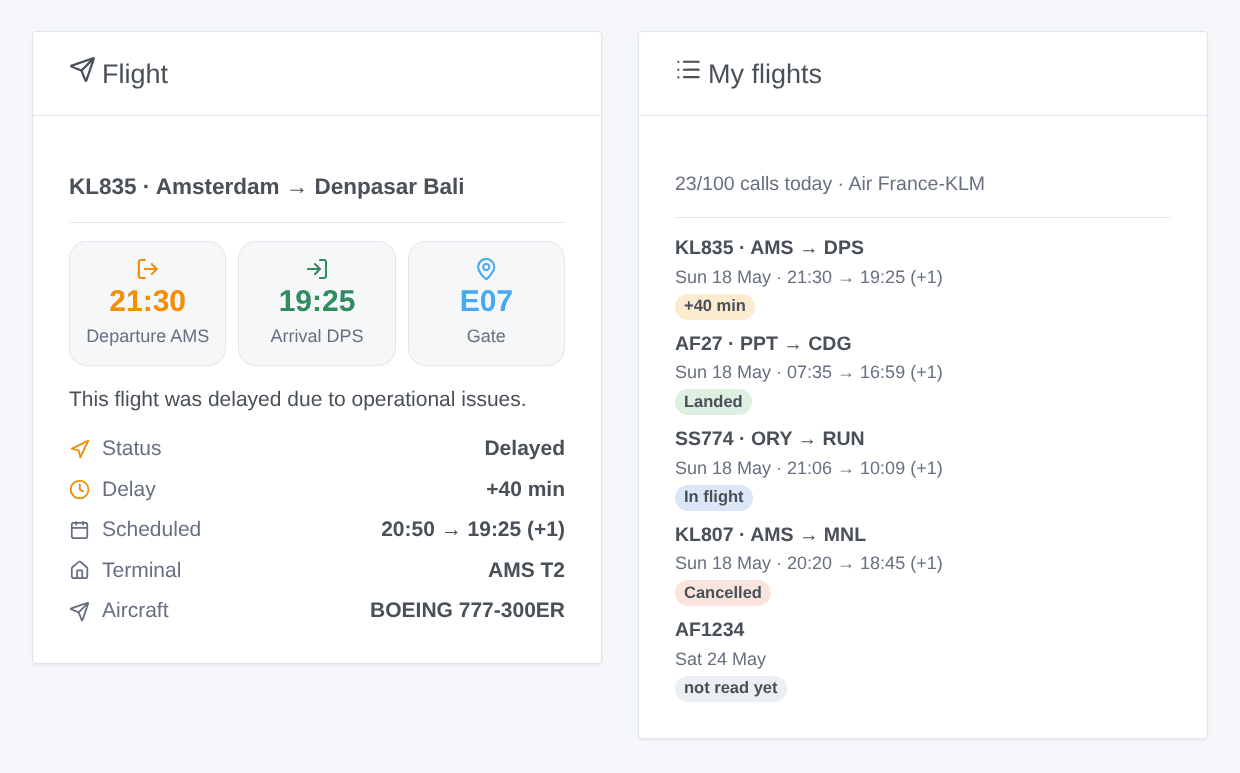
- Flight: the chosen flight, with its departure and arrival times, the gate (the baggage belt once landed), the status, the delay, the scheduled times, the terminals, the aircraft, and the reason of a delay or a cancellation given by the airline.
- My flights: every followed flight with its status (or its delay), and the calls used today.
Scenes
Triggers (the first reading of a flight is only a baseline):
- Flight status changed: delayed, took off, landed, cancelled or diverted. The New status filter keeps one status. Variables:
status,previous_status,departure_time,arrival_time,gate,delay,reason,summary… - Flight delay changed: the delay moved by 15 minutes or more (the departure one until take-off, the arrival one after). Variables:
delay,previous_delay,summary… - Gate announced or changed: variables
gate,previous_gate,terminal,summary.
Actions:
- Read a followed flight: status, times, delays, gate, baggage belt, aircraft, reason and a
summary; read again when older than 10 minutes. - Look up a flight: any flight on a date, without following it (one call, kept 15 minutes).
Examples:
- When the status of "Flight AF1234" becomes Delayed → send
{{triggerEvent.data.summary}}to your phone. - When the return flight becomes Landed → turn the heating and the hall light on.
- When the gate is announced → have the speaker say "Gate
{{triggerEvent.data.gate}}".
Transport and quota
Cloud only. The free plan allows 100 calls a day and one a second: the integration reads each flight more often as its departure gets closer:
- every 12 h while it is not published (every 2 h within 3 days);
- every 6 h more than 24 h before departure, then every 2 h, every 30 min in the last 6 hours and every 15 min in the last 2;
- in the air, every 30 min, then every 15 min in the hour before landing;
- never again once landed or cancelled.
Count about 30 calls for a flight on its day. The automatic readings stop 5 calls before the limit, so tests and scene actions still work. The count starts again at midnight (UTC) and survives restarts.
Troubleshooting
- "Key refused (HTTP 403: Developer Inactive)": the key is wrong, or the application is not active yet or not subscribed to Flight Status on the portal.
- "Not published": Air France-KLM publishes flights a few days before departure. Check the number and the date too (the departure one, in local time).
- "Daily limit reached": the flights are read again after midnight (UTC). Follow fewer flights on the same day, or raise the limit if your plan allows it.
- "Air France-KLM refuses more calls": the quota of the key is spent on the Air France-KLM side; the integration waits one hour before trying again.
- The delay reasons are in English: the airline does not publish them in every language.
- To report a problem: copy the answers of Test the connection and List the flights into a GitHub issue or a reply on the forum, with the versions of Gladys and of the integration.
Configuration settings
These are the settings Air France-KLM asks for in its configuration screen in Gladys.
| Setting | Type | Required | Description |
|---|---|---|---|
| Air France-KLM developer key | section | No | This integration reads the official Flight Status API of Air France-KLM with your own free key. 1. Create an account on developer.airfranceklm.com, then an application subscribed to the Flight Status API. 2. Paste its key below and save. 3. Press "Follow a flight" (AF1234, tomorrow), then add its device in the Discovery tab. The free key allows 100 calls a day: the integration reads each flight more often as its departure gets closer (about 30 calls for a flight on its day). |
| API key | secret | Yes | The key of your application on developer.airfranceklm.com (not the secret). |
| Calls a day at most | number | No | 100 on the free plan. Raise it only if your plan allows more. |
| Language of the texts | select | No | Device names, statuses, scene summaries and the reasons given by the airline. Automatic: the language of the dashboard. |
How to install Air France-KLM in Gladys
- In Gladys, open Integrations: Air France-KLM appears in the catalog, next to the native integrations, with a community badge.
- Click Install. Gladys pulls the Docker image (
ghcr.io/william-de71/gladys-air-france-klm:0.1.0), starts it in a sandbox isolated from the core, and generates the integration's interface (devices, discovery and configuration). - Open the Configuration screen of the integration, fill in the settings, and save.
- You can also install it directly from its repository URL: https://github.com/William-De71/gladys-air-france-klm.
Air France-KLM requires Gladys >=5.3.0. The catalog inside Gladys refreshes every hour, so a new version becomes available at most one hour after its release.
Not running Gladys yet? It is free and open source: follow the installation guide to get started.
About external integrations
Air France-KLM is an external integration: a community integration packaged as a Docker container and published on GitHub, that Gladys installs in one click and runs in a sandbox isolated from its core. It is published and maintained by William-De71, not by the Gladys core team.
- Browse all integrations, native and community
- Build and publish your own external integration
- Source code on GitHub — source of this documentation