Agora Famille smart home integration, free and open source
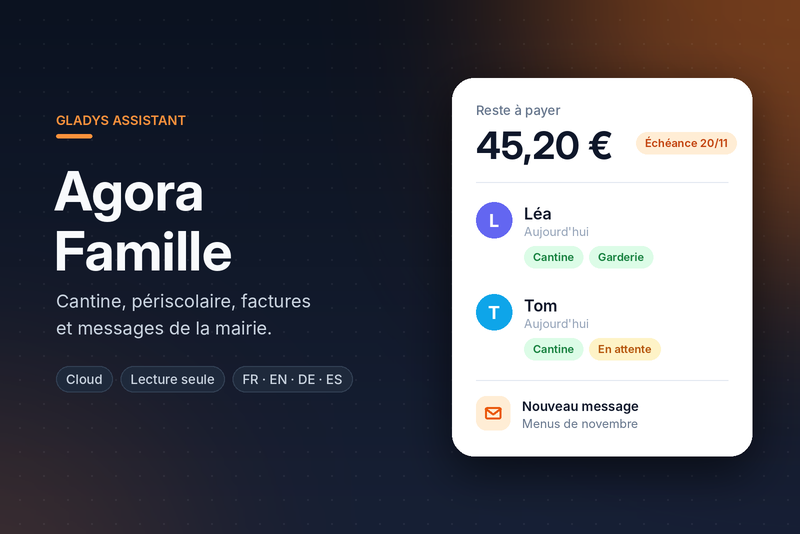
Canteen, after-school bookings, invoices and messages of the Agora Famille family portal.
Published by prohand
- Devices
- Version 2.0.1
- Requires Gladys >=5.3.0
- ★ 0
This integration connects Gladys to the Agora Famille family portal (published by Agora Plus) of your French municipality: school canteen, before/after-school care, holiday clubs, invoices and messages from the town hall.
It reads the portal the way your browser does, with your own account, and gives you in Gladys:
- one device per child: what is booked today and tomorrow, and whether they eat at the canteen;
- one family account device: the balance due, the next invoice, the last message;
- scene triggers (new invoice, invoice due soon, new message, booking accepted or refused);
- read-only scene actions (check a day, read the portal again);
- a dashboard widget.
Before you start
- Gladys 5.3 or later is required.
- You need an active account on your municipality's Agora Famille portal: the e-mail address and password you sign in with.
- The integration is a cloud one: it needs internet access to reach the portal.
Configuration
In Gladys: Integrations → Agora Famille → Configuration.
| Field | What to enter |
|---|---|
| Portal address | The address of your portal as your browser shows it, e.g. https://portalssl.agoraplus.fr/mycity/pck_home.home_view#/. The name of the municipality alone (mycity) works too. |
| Login (e-mail) | The e-mail of your family account. |
| Password | The portal password. Gladys stores it as a secret, and it never appears in the logs. |
| Refresh interval (min) | How often the portal is read (60 min by default, 15 min minimum). There is no point going faster: the portal changes little in a day. |
| Days of planning watched | How many days ahead are read and watched (14 by default). |
| Invoice reminder (days) | The "invoice due soon" trigger fires this many days before the due date (3 by default, 0 turns it off). |
| Invoices sent to the Trésor public | Numbers of the invoices the municipality sent to the Trésor public, separated by commas (e.g. 164513). See below. |
| Detailed logs | Logs every request to the portal, for troubleshooting. Never the password. |
Then click Test the connection: the answer lists your children, the number of planned days read, the invoices to pay and the unread messages. On failure, it says which step failed (sign-in, children, planning, invoices, messages).
Then open the Discover tab to create the devices.
Devices
Agora Famille (the account)
| Feature | Content |
|---|---|
| Balance due | What is left to pay, in euros (all unpaid invoices). |
| Next invoice | The next invoice to pay: amount, due date, label. |
| Last message | The subject of the last message from the municipality. |
One device per child
| Feature | Content |
|---|---|
| Today | The activities booked today ("Cantine, Garderie du soir"). |
| Tomorrow | The activities booked tomorrow. |
| Canteen today | 1 when the child eats at the canteen today, 0 otherwise. |
| Canteen tomorrow | 1 when the child eats at the canteen tomorrow, 0 otherwise. |
A day requested and not yet approved by the municipality counts as booked. The texts are in French, like the activities of the portal.
The meal is recognised by its name: "cantine", "repas", "restauration", "déjeuner", "pause méridienne"… Each municipality names its activities its own way.
The cloud badge of every device turns unreachable while the portal cannot be read.
Scenes (Gladys 5.1+)
Triggers
| Trigger | When | Variables |
|---|---|---|
| A new invoice is issued | An unpaid invoice appears. | label, amount, due_date, invoice_id |
| An invoice is due soon | An unpaid invoice reaches its due date within the configured days. Once. | label, amount, due_date, days_left, invoice_id |
| A message is received | The municipality sent a message. | subject, sender, date |
| A booking changes | A booked or requested day changed state (accepted, refused, cancelled…). Can be filtered by child and by state. | child_name, activity, date, status, previous_status, meal |
Use the variables in the following actions, e.g.
{{triggerEvent.data.amount}}.
The very first read of the portal fires nothing: everything would look new.
Changes are counted from there on, across restarts too (the integration keeps
the last read in /data).
Actions
| Action | What it does | Outputs |
|---|---|---|
| Read the family portal | Reads the portal right now. | success, balance, unpaid_invoices, unread_messages |
| Check a child's day | Whether the child is booked that day (0 = today, 1 = tomorrow…) and for what. | has_meal, booked_count, activities, date |
The integration only reads the portal: it never books nor cancels anything. Bookings and absences are made on the portal.
Examples
- Every evening at 7 p.m.: Check a child's day for tomorrow, then, when
has_mealis false, send "No canteen for Léa tomorrow". - An invoice is due soon → send "Invoice of {{triggerEvent.data.amount}} € to pay before {{triggerEvent.data.due_date}}".
- A booking changes, filtered on Refused → notification.
The widget
The Agora Famille dashboard widget shows:
- the balance due (live);
- for each child (5 at most), what is booked today and tomorrow (green: booked, orange: request pending, red: refused);
- the invoices to pay and the last 3 unread messages;
- the time of the last read, or the current error.
And two buttons: Refresh and Open portal. Absences and bookings are made on the portal.
Invoices sent to the Trésor public
When an invoice is not paid in time, the municipality sends it to the Trésor public (the French public treasury, "mise en impayé"). The portal then no longer follows its payment: it shows it unpaid forever, even once paid to the Trésor.
The integration sets these invoices apart:
- they are not counted in the balance due nor as the next invoice;
- they fire neither "new invoice" nor "invoice due soon";
- the widget shows them in grey, with the Treasury badge.
They are recognised in two ways:
- on their own, when the portal marks them (an invoice in litigation, or a state naming the Trésor);
- by their number, in the Invoices sent to the Trésor public field
(the number the portal shows, e.g.
164513).
Troubleshooting
- "The portal refused the login or the password": check them by signing in to the portal in a browser. An account still waiting for the town hall's approval cannot sign in yet.
- "The portal does not answer": the portal may be under maintenance; the integration tries again at every interval.
- "The portal answered something unexpected": tick Detailed logs, click Test the connection and read the integration logs (Integrations → Agora Famille → Supervision).
Important: no official API
Agora Plus publishes no API for its family portal. The integration makes the
same requests as the portal's own pages; they are gathered in a single file,
src/agora/endpoints.js. A portal update, or a
municipality configured differently, may require adjusting them: open an
issue naming the
failing step and the HTTP status returned (never your password).
Privacy
- The credentials are only used to sign in to your municipality's portal, over HTTPS.
- The password and the session cookies are never written to the logs.
- The last read of the portal (planning, invoices, messages) is kept in the
integration's private
/datavolume, to detect changes after a restart. Nothing is sent anywhere else.
Configuration settings
These are the settings Agora Famille asks for in its configuration screen in Gladys.
| Setting | Type | Required | Description |
|---|---|---|---|
| Your family portal | section | No | Use the address and the account you sign in with on your municipality's Agora Famille portal. The integration reads the portal like a browser would: nothing is shared with anyone else. |
| Portal address | string | Yes | The address of your portal, as your browser shows it, or just the name of your municipality in it. |
| Login (e-mail) | string | Yes | |
| Password | secret | Yes | |
| Refresh interval (min) | number | No | How often the portal is read, in minutes (15 minimum). |
| Days of planning watched | number | No | How many days ahead the bookings are read and watched for changes. |
| Invoice reminder (days) | number | No | The "invoice due soon" trigger fires this many days before the due date. 0 turns it off. |
| Invoices sent to the Trésor public | string | No | Numbers of the invoices the municipality sent to the Trésor public ("mise en impayé"), separated by commas. The portal keeps showing them unpaid: they are shown apart and not counted in the balance. Those the portal marks itself are found without this. |
| Detailed logs | boolean | No | Log every request to the portal (never the password). For troubleshooting. |
How to install Agora Famille in Gladys
- In Gladys, open Integrations: Agora Famille appears in the catalog, next to the native integrations, with a community badge.
- Click Install. Gladys pulls the Docker image (
ghcr.io/prohand/gladys-agorafamille:2.0.1), starts it in a sandbox isolated from the core, and generates the integration's interface (devices, discovery and configuration). - Open the Configuration screen of the integration, fill in the settings, and save.
- You can also install it directly from its repository URL: https://github.com/prohand/gladys-agorafamille.
Agora Famille requires Gladys >=5.3.0. The catalog inside Gladys refreshes every hour, so a new version becomes available at most one hour after its release.
Not running Gladys yet? It is free and open source: follow the installation guide to get started.
About external integrations
Agora Famille is an external integration: a community integration packaged as a Docker container and published on GitHub, that Gladys installs in one click and runs in a sandbox isolated from its core. It is published and maintained by prohand, not by the Gladys core team.
- Browse all integrations, native and community
- Build and publish your own external integration
- Source code on GitHub — source of this documentation