Agora Famille Calendrier smart home integration, free and open source
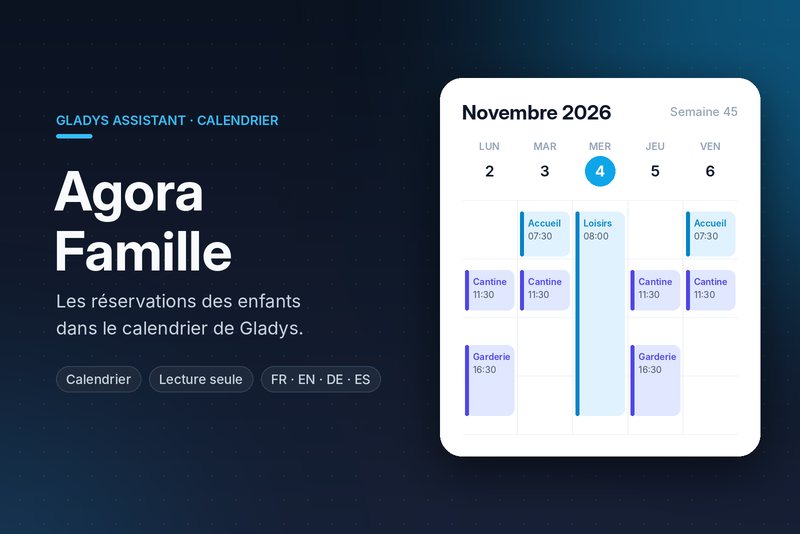
Agora Famille bookings (canteen, after-school, holiday club) and invoices in your calendar.
Published by prohand
- Devices
- Version 1.0.2
- Requires Gladys >=5.3.0
- ★ 0
This integration puts into the Gladys calendar what your French municipality's Agora Famille family portal (published by Agora Plus) knows about your children:
- one calendar per child: the booked days (school canteen, before/after-school care, holiday club…), at the hours the portal gives;
- an invoices calendar: every invoice to pay, on its due date, with the amount left to pay (never rounded).
It only reads the portal: it never books nor cancels anything. Bookings and absences are made on the portal; the calendar follows at the next read.
It complements the Agora Famille integration (devices, scene triggers, widget); both can run together.
Before you start
- Gladys 5.3 or later is required.
- You need an active account on your municipality's Agora Famille portal: the e-mail address and password you sign in with.
- The integration is a cloud one: it needs internet access to reach the portal.
Enabling the integration (each user)
A calendar is personal data: each Gladys user enables the integration for themselves, with their own account.
In Gladys: Integrations → Agora Famille Calendrier → Configuration, block "My calendars":
| Field | What to enter |
|---|---|
| Portal address | The address of your portal as your browser shows it, e.g. https://portalssl.agoraplus.fr/mycity/pck_home.home_view#/. The name of the municipality alone (mycity) works too. |
| Login (e-mail) | The e-mail of your family account. |
| Password | The portal password. Gladys stores it as a secret, and it never appears in the logs. |
| Invoices sent to the Trésor public (optional) | Numbers of the invoices the municipality sent to the Trésor public, separated by commas (e.g. 164513). See below. |
Then click Enable. Your calendars show up in the Gladys Calendar view after the first read of the portal.
Two parents can each enable the integration, with the same portal account or two different ones: each gets calendars of their own.
Private or shared
A calendar created by the integration starts private: only you see it. For it to serve the scenes (the "a calendar event is coming" trigger) and the rest of the household, share it in the calendar settings. You can also turn off the sync of a calendar: the integration then leaves it alone.
Integration settings (administrator)
| Field | What it does |
|---|---|
| Refresh interval (min) | How often the portal is read (60 min by default, 15 min minimum). |
| Days ahead | How many days ahead go into the calendars (30 by default, 90 at most). |
| Past days kept up to date | How many past days are still updated (7 by default). Older days stay as they were in the calendar. |
| Whole-day events | Shows every booking over the whole day instead of the portal's hours (off by default). |
| Invoices calendar | Adds the calendar of the invoices to pay (on by default). Turning it off removes that calendar. |
| Detailed logs | Logs every request to the portal, for troubleshooting. Never the password. |
The Sync now button reads the portal again for every user and says, for each one, how many children, events and calendars were updated, or what failed.
What goes into the calendars
One calendar per child ("Léa – Agora Famille")
- One event per booked activity, named as on the portal ("Restauration scolaire", "Garderie soir"…).
- A day requested and not yet approved by the municipality is marked "(pending)".
- The hours are the portal's; without hours, the event takes the whole day.
- The description gives the place and period the portal shows, and the state ("Booked", "Request pending"). A link opens the portal.
A day cancelled on the portal leaves the calendar at the next read.
The invoices calendar ("Agora Famille invoices")
- A whole-day event on the payment due date of each unpaid invoice: "Invoice to pay: €64.80".
- The description gives the label of the invoice and, when it is partly paid, the total amount and what is left to pay.
- A paid invoice leaves the calendar at the next read.
- This calendar does not exist when the municipality has no invoices module.
Invoices sent to the Trésor public
When an invoice is not paid in time, the municipality sends it to the Trésor public (the French public treasury, "mise en impayé"). The portal then no longer follows its payment and shows it unpaid forever, even once paid to the Trésor.
These invoices stay out of the invoices calendar. They are recognised on their own when the portal marks them (litigation, or a state naming the Trésor), otherwise by their number, in the Invoices sent to the Trésor public field of your account.
Scene examples
Once a child's calendar is shared:
- A calendar event is coming, calendar "Léa – Agora Famille", 1 hour before → notification "Léa is going to the holiday club soon".
- A calendar event is coming, calendar "Agora Famille invoices", 3 days before → notification "An Agora Famille invoice is due soon".
Troubleshooting
The state of each user is shown at the top of the Configuration screen.
- "Fill in the portal address… in "My calendars"": the account of that user is incomplete.
- "The portal refused the login or the password": check them by signing in to the portal in a browser. An account still waiting for the town hall's approval cannot sign in yet.
- "The portal does not answer": the portal may be under maintenance; the integration tries again at every interval. Nothing is removed from the calendars meanwhile.
- "The portal answered something unexpected": tick Detailed logs, click Sync now and read the integration logs.
Important: no official API
Agora Plus publishes no API for its family portal. The integration makes the
same requests as the portal's own pages; they are gathered in a single file,
src/agora/endpoints.js. A portal update may
require adjusting them: open an
issue
naming the failing step and the HTTP status returned (never your password).
Privacy
- Each user's credentials are only used to sign in to their municipality's portal, over HTTPS.
- The password and the session are never written to the logs.
- The planning and the invoices only go to the Gladys calendars of the user who enabled the integration. Nothing is written to disk, nothing is sent anywhere else.
Configuration settings
These are the settings Agora Famille Calendrier asks for in its configuration screen in Gladys.
| Setting | Type | Required | Description |
|---|---|---|---|
| Refresh interval (min) | number | No | How often the portal is read, in minutes (15 minimum). |
| Days ahead | number | No | How many days ahead the bookings and the invoices go into the calendars. |
| Past days kept up to date | number | No | How many past days are still updated from the portal. Older days stay as they were. |
| Whole-day events | boolean | No | Show every booking over the whole day instead of the hours the portal gives. |
| Invoices calendar | boolean | No | Add a calendar of the invoices to pay, on their due date. |
| Detailed logs | boolean | No | Log every request to the portal (never the password). For troubleshooting. |
How to install Agora Famille Calendrier in Gladys
- In Gladys, open Integrations: Agora Famille Calendrier appears in the catalog, next to the native integrations, with a community badge.
- Click Install. Gladys pulls the Docker image (
ghcr.io/prohand/gladys-calendar-agorafamille:1.0.2), starts it in a sandbox isolated from the core, and generates the integration's interface (devices, discovery and configuration). - Open the Configuration screen of the integration, fill in the settings, and save.
- You can also install it directly from its repository URL: https://github.com/prohand/gladys-calendar-agorafamille.
Agora Famille Calendrier requires Gladys >=5.3.0. The catalog inside Gladys refreshes every hour, so a new version becomes available at most one hour after its release.
Not running Gladys yet? It is free and open source: follow the installation guide to get started.
About external integrations
Agora Famille Calendrier is an external integration: a community integration packaged as a Docker container and published on GitHub, that Gladys installs in one click and runs in a sandbox isolated from its core. It is published and maintained by prohand, not by the Gladys core team.
- Browse all integrations, native and community
- Build and publish your own external integration
- Source code on GitHub — source of this documentation