SNCF Smart-Home-Integration, kostenlos und Open Source
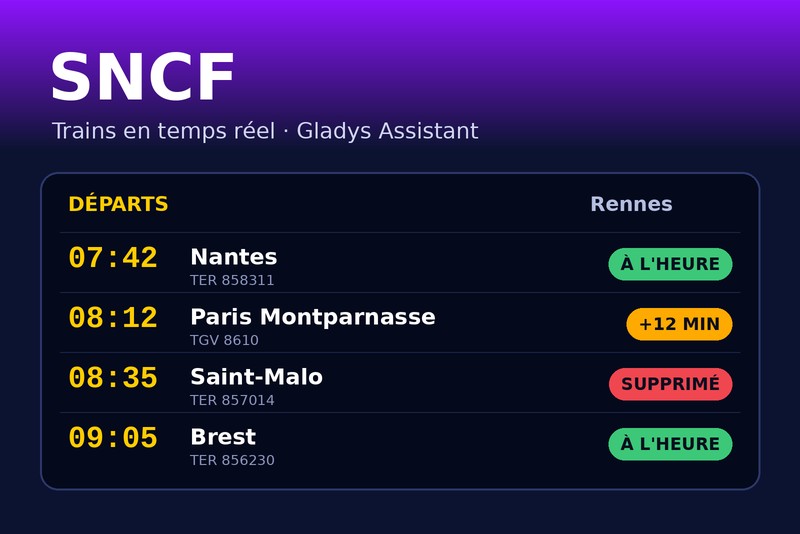
Deine SNCF-Züge in Echtzeit: Verspätungen, Ausfälle, Szenen, Widgets.
Veröffentlicht von William-De71
- Geräte
- Version 1.3.0
- Erfordert Gladys >=5.3.0
- ★ 0
Diese Integration verfolgt deine SNCF-Züge in Echtzeit in Gladys: die nächsten Abfahrten deiner Strecken (Wohnung → Arbeit, Rückfahrt…), ihre Verspätungen, die Zugausfälle und deren Grund. Daraus macht sie Geräte, Szenen-Auslöser („mein Zug fällt aus“, „mein Zug fährt in 15 Minuten“) und Dashboard-Widgets.
Die Daten stammen aus der offiziellen SNCF-API: Echtzeit für TGV INOUI, OUIGO, Intercités, TER, Lyria und Eurostar. Transilien-Züge gibt es dort nur als Fahrplan (keine Verspätungen, keine Ausfälle).
Community-Integration, nicht mit der SNCF verbunden und nicht von ihr unterstützt.
Konfiguration
1. API-Schlüssel anfordern (kostenlos)
- Öffne die SNCF-Seite Token développeur.
- Gib Vorname, Nachname und E-Mail-Adresse ein und akzeptiere die Nutzungsbedingungen.
- Der Schlüssel (eine 36-stellige Kennung wie
0f1e2d3c-4b5a-…) kommt per E-Mail.
Der kostenlose Schlüssel erlaubt 5 000 Anfragen pro Tag. Die Integration zählt sie selbst und wird vor dem Limit langsamer: Darüber hinaus sperrt die SNCF den Schlüssel für Stunden.
2. Integration ausfüllen
| Feld | Rolle |
|---|---|
| API-Schlüssel | Pflichtfeld |
| Strecke 1, 2, 3 | Abfahrts- und Ankunftsbahnhof (nur Direktzüge werden verfolgt) |
| Zeitfenster | optional, z. B. 07:00-09:30: die Züge, die in diesem Zeitfenster abfahren |
| Reisetage | optional, z. B. Montag bis Freitag (leer: jeden Tag) |
| Verfolgte Züge | wie viele nächste Züge pro Strecke (standardmäßig 4) |
| Verspätungsschwelle | ab wie vielen Minuten ein Zug als „verspätet“ gilt (standardmäßig 5) |
| Aktualisierung | alle 3 Minuten um das Zeitfenster, alle 30 Minuten in der übrigen Zeit (standardmäßig) |
| Sprache | der Gerätenamen und Szenentexte (automatisch: die Sprache deines Dashboards) |
Für einen Bahnhof kannst du Folgendes eingeben:
- seinen Namen: „Rennes“, „Lyon Part Dieu“, „Paris Montparnasse“ — das erste Ergebnis der SNCF-Suche wird übernommen;
- seinen UIC-Code: „87471003“;
- seine Kennung: „stop_area:SNCF:87471003“.
Liefert der Name nicht den richtigen Bahnhof, nutze die Schaltfläche Bahnhof suchen: Sie zeigt die passenden Bahnhöfe mit ihrer Kennung, die du in das Streckenfeld kopierst.
Speichere und klicke dann auf Verbindung testen: Für jede Strecke zeigt sie die Zahl der gefundenen Züge und die Uhrzeit des nächsten.
Das Zeitfenster
Mit einem Zeitfenster verfolgt die Integration die Züge des nächsten Zeitfensters: die des Tages, solange es nicht vorbei ist, danach die des nächsten Reisetags. Am Abend zeigt das Widget schon die Züge des nächsten Morgens, und ein am Vorabend angekündigter Ausfall löst deine Szene schon am Vorabend aus.
Außerdem fragt sie die API nur um das Zeitfenster herum häufig ab (von einer Stunde davor bis zu seinem Ende), was das Kontingent schont: etwa 250 Anfragen pro Tag für eine Strecke mit einem Zeitfenster von 2,5 Stunden, gegenüber 800 ohne Zeitfenster.
3. Geräte hinzufügen
Im Reiter Entdecken erscheint jede Strecke als Gerät „SNCF – Abfahrt → Ankunft“. Füge es hinzu und weise ihm einen Raum zu. Widgets und Szenen funktionieren auch ohne Gerät, aber die Auswahl der Strecke in ihren Einstellungen geht über die Geräteliste.
| Funktion | Wert |
|---|---|
| Nächster Zug | Text, z. B. „07:42 · TER 858311 · +5 min“ oder „… · ausgefallen“ |
| Verspätung des nächsten Zuges | in Minuten, die des nächsten Zuges, der fährt (0 bei Pünktlichkeit) |
| Gestörte Züge | wie viele verfolgte Züge verspätet (ab der Schwelle) sind oder ausfallen |
Beispiele für Szenen auf diesen Werten: „wenn die Verspätung des nächsten Zuges 10 Minuten übersteigt, die Flurlampe orange einschalten“, „wenn Züge gestört sind, es über den Lautsprecher ansagen“.
Im Bildschirm Geräte zeigt das Abzeichen jeder Strecke cloud, solange die SNCF-API antwortet, nicht erreichbar, wenn ihre letzte Abfrage fehlgeschlagen ist, und wird orange, wenn die Abfragen wegen des Tageskontingents pausieren.
Szenen
Auslöser
| Auslöser | Wann | Filter |
|---|---|---|
| SNCF: Zug verspätet | ein verfolgter Zug wird verspätet (ab der Schwelle), dann erneut über 15 und über 30 Minuten | Strecke, Verspätungsstufe |
| SNCF: Zug fällt aus | ein verfolgter Zug fällt aus oder hält nicht mehr an einem Bahnhof der Strecke | Strecke |
| SNCF: Zug fährt bald ab | ein verfolgter Zug fährt in 5, 10, 15, 20, 30, 45 oder 60 Minuten ab | Strecke, Minuten |
Zug fährt bald ab rechnet mit der Abfahrt in Echtzeit: Hat dein Zug um 7:42 Uhr 5 Minuten Verspätung, kommt „Abfahrt in 15 Minuten“ um 7:32 Uhr, nicht um 7:27 Uhr. Praktisch für ein „Jetzt losgehen“.
Jeder Auslöser liefert Variablen: Strecke, Zugnummer und Zugart, Richtung, Datum, planmäßige und voraussichtliche Zeiten, Verspätung, Grund und eine versandfertige Zusammenfassung, zum Beispiel:
Rennes → Nantes: Der TER 858311 um 07:42 hat 18 min Verspätung, Abfahrt um 08:00. Grund: Panne de signalisation.
Jedes Ereignis wird einmal pro Zug ausgelöst, auch nach einem Neustart der Integration. Der Grund kommt von der SNCF und bleibt auf Französisch.
Aktion
SNCF: nächste Züge liefert den nächsten Zug einer Strecke (Zeiten, Verspätung, Status, Grund, Minuten bis zur Abfahrt, Zahl der gestörten Züge) und einen Satz, der die folgenden zusammenfasst:
Rennes → Nantes: Der TER 858311 um 07:42 hat 5 min Verspätung, Abfahrt um 07:47. Danach: 08:12 pünktlich, 08:42 ausgefallen.
Beispiel: an jedem Werktag um 7 Uhr „SNCF: nächste Züge“, dann die Zusammenfassung per Telegram senden.
Widgets
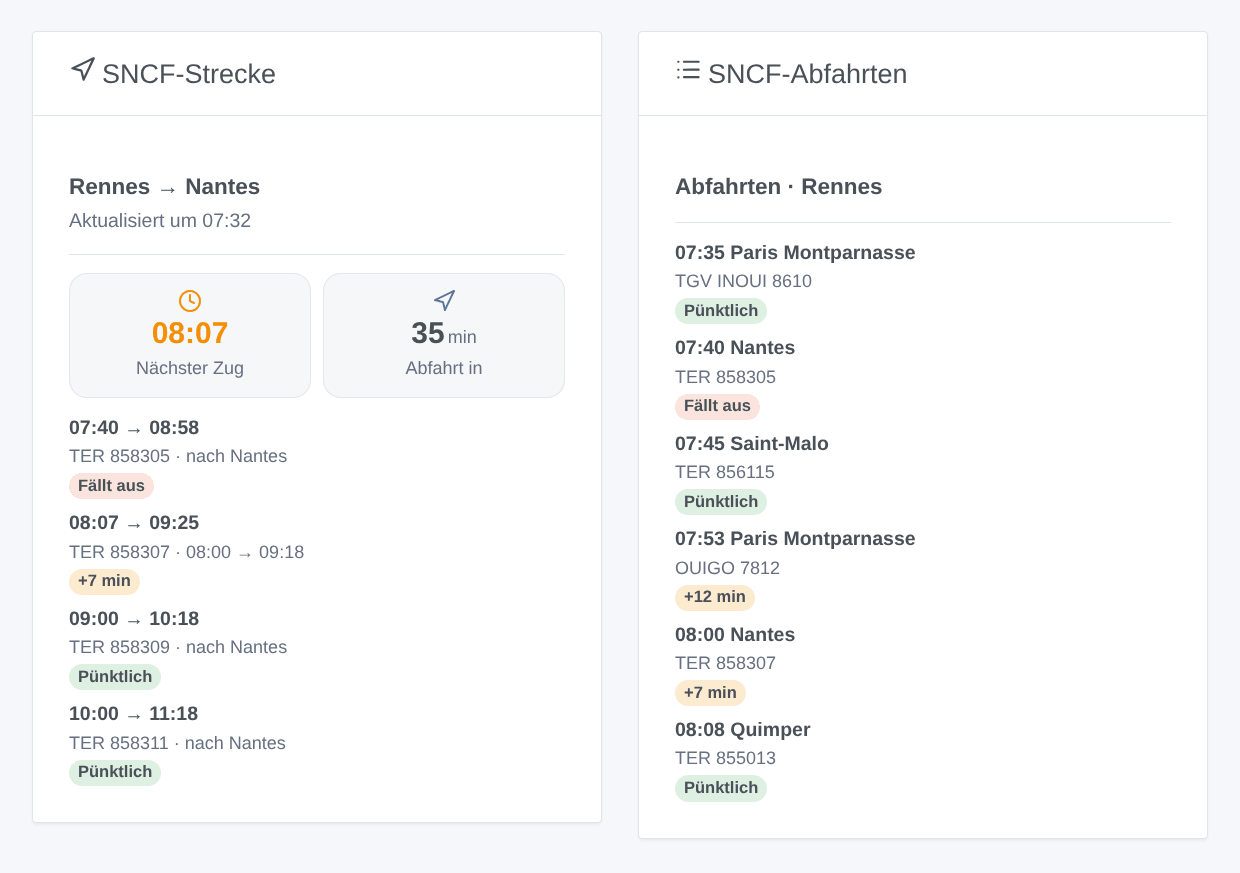
| Widget | Inhalt |
|---|---|
| SNCF-Strecke | die Uhrzeit der nächsten Abfahrt und die verbleibende Zeit, dann jeder Zug mit einem Abzeichen pünktlich / +N min / fällt aus; tippe auf einen gestörten Zug, um den Grund zu lesen |
| SNCF-Abfahrten | die Abfahrtstafel eines Bahnhofs, alle Richtungen: ein in den Widget-Einstellungen eingegebener Bahnhof oder der Abfahrtsbahnhof einer Strecke |
Grenzen
- Nur Direktzüge werden verfolgt (kein Umstieg).
- Transilien: nur Fahrplan, ohne Verspätungen und Ausfälle (eine Grenze der SNCF-API).
- Das Gleis liefert die offizielle API nicht.
- Ein ausgefallener Zug verschwindet aus den Echtzeitdaten der SNCF: Die Integration findet ihn durch den Vergleich mit dem Fahrplan und bestätigt ihn dann auf der Abfahrtstafel des Bahnhofs. Ist keine Bestätigung möglich, bleibt der Zug als planmäßig angezeigt, statt fälschlich als ausgefallen gemeldet zu werden.
Fehlerbehebung
| Meldung | Was tun |
|---|---|
| „Der SNCF-API-Schlüssel wird abgelehnt“ | prüfe den aus der E-Mail kopierten Schlüssel (ohne Leerzeichen) |
| „Bahnhof nicht gefunden: …“ | nutze die Schaltfläche Bahnhof suchen und kopiere die angebotene Kennung |
| „Tageskontingent der SNCF-API erreicht“ | die SNCF hat den Schlüssel bis zur angezeigten Uhrzeit gesperrt: weniger Strecken ohne Zeitfenster oder längere Intervalle |
| „Kein Zug im verfolgten Zeitraum gefunden“ | kein Direktzug im Zeitfenster: prüfe Bahnhöfe und Zeitfenster oder leere es |
| Gerätenamen oder Zusammenfassungen auf Englisch | stelle Sprache der Texte in den Einstellungen ein oder öffne einmal ein SNCF-Widget |
Konfigurationseinstellungen
Diese Einstellungen fragt SNCF in seinem Konfigurationsbildschirm in Gladys ab.
| Einstellung | Typ | Pflichtfeld | Beschreibung |
|---|---|---|---|
| SNCF-API-Schlüssel | section | Nein | Die Züge stammen aus der offiziellen SNCF-API: TER, TGV INOUI, OUIGO, Intercités, Lyria, Eurostar… in Echtzeit (Transilien: nur Fahrplan, ohne Verspätungen). Der Schlüssel ist kostenlos: Fülle das Formular auf der SNCF-Entwicklerseite aus, der Schlüssel kommt per E-Mail. Er erlaubt 5 000 Anfragen pro Tag; die Integration zählt sie und wird vor dem Limit langsamer. |
| API-Schlüssel | secret | Ja | Der per E-Mail erhaltene Schlüssel (eine UUID, 36 Zeichen). |
| Strecke 1 | section | Nein | Ein Bahnhofsname („Rennes“, „Lyon Part Dieu“), sein UIC-Code („87471003“) oder die Kennung, die die Schaltfläche „Bahnhof suchen“ liefert („stop_area:SNCF:87471003“). Nur Direktzüge werden verfolgt. Zeitfenster und Tage sind optional: Mit ihnen werden die Züge des nächsten Zeitfensters verfolgt, und die API wird nur um dieses herum häufig abgefragt (das schont das Tageskontingent). |
| Abfahrtsbahnhof | string | Nein | |
| Ankunftsbahnhof | string | Nein | |
| Zeitfenster | string | Nein | Abfahrten zwischen diesen Uhrzeiten, z. B. 07:00-09:30. Leer: die nächsten Züge, den ganzen Tag. |
| Reisetage | multi_select | Nein | Leer: jeden Tag. |
| Strecke 2 (optional) | section | Nein | Dieselben Felder wie bei Strecke 1, zum Beispiel für die Rückfahrt. Leer lassen, wenn nicht benötigt. |
| Abfahrtsbahnhof | string | Nein | |
| Ankunftsbahnhof | string | Nein | |
| Zeitfenster | string | Nein | Abfahrten zwischen diesen Uhrzeiten, z. B. 07:00-09:30. Leer: die nächsten Züge, den ganzen Tag. |
| Reisetage | multi_select | Nein | Leer: jeden Tag. |
| Strecke 3 (optional) | section | Nein | Dieselben Felder wie bei Strecke 1, zum Beispiel für die Rückfahrt. Leer lassen, wenn nicht benötigt. |
| Abfahrtsbahnhof | string | Nein | |
| Ankunftsbahnhof | string | Nein | |
| Zeitfenster | string | Nein | Abfahrten zwischen diesen Uhrzeiten, z. B. 07:00-09:30. Leer: die nächsten Züge, den ganzen Tag. |
| Reisetage | multi_select | Nein | Leer: jeden Tag. |
| Einstellungen | section | Nein | Mit Zeitfenster kostet eine Strecke mit den Standardwerten etwa 250 Anfragen pro Tag, ohne etwa 800. Drei Strecken und eine geöffnete Abfahrtstafel bleiben unter den 5 000 pro Tag. |
| Verfolgte Züge pro Strecke | number | Nein | Die nächsten Züge jeder Strecke, zwischen 1 und 8. |
| Verspätungsschwelle (min) | number | Nein | Ab wie vielen Minuten ein Zug als verspätet gilt (Szenen, gestörte Züge, Farben). |
| Aktualisierung um das Zeitfenster (min) | number | Nein | Von einer Stunde vor dem Zeitfenster bis zu seinem Ende (ohne Zeitfenster den ganzen Tag), zwischen 2 und 30 Minuten. |
| Aktualisierung in der übrigen Zeit (min) | number | Nein | Außerhalb des Zeitfensters (und nachts), zwischen 10 und 180 Minuten. |
| Sprache der Texte | select | Nein | Gerätenamen, Zusammenfassungen und Ausgaben der Szenen. Automatisch: die Sprache deines Dashboards, sobald ein SNCF-Widget angezeigt wurde. |
So installierst du SNCF in Gladys
- Öffne in Gladys Integrationen: SNCF erscheint im Katalog neben den nativen Integrationen, mit einem Community-Badge.
- Klicke auf Installieren. Gladys lädt das Docker-Image (
ghcr.io/william-de71/gladys-sncf:1.3.0) herunter, startet es in einer vom Kern isolierten Sandbox und erzeugt die Oberfläche der Integration (Geräte, Erkennung und Konfiguration). - Öffne den Bildschirm Konfiguration der Integration, fülle die Einstellungen aus und speichere.
- Du kannst sie auch direkt über die URL ihres Repositorys installieren: https://github.com/William-De71/gladys-sncf.
SNCF benötigt Gladys >=5.3.0. Der Katalog in Gladys wird stündlich aktualisiert, eine neue Version ist also spätestens eine Stunde nach ihrer Veröffentlichung verfügbar.
Du nutzt Gladys noch nicht? Es ist kostenlos und Open Source: folge der Installationsanleitung, um loszulegen.
Über externe Integrationen
SNCF ist eine externe Integration: eine Community-Integration, die als Docker-Container verpackt und auf GitHub veröffentlicht wird. Gladys installiert sie mit einem Klick und führt sie in einer vom Kern isolierten Sandbox aus. Sie wird von William-De71 veröffentlicht und gepflegt, nicht vom Gladys-Kernteam.
- Alle Integrationen durchsuchen, native und aus der Community
- Deine eigene externe Integration bauen und veröffentlichen
- Quellcode auf GitHub — Quelle dieser Dokumentation