Pellet Stock Smart-Home-Integration, kostenlos und Open Source
Verfolgen Sie Ihren Pelletvorrat: Lieferungen, Verbrauch und Reichweite, mit Dashboard-Widget.
Veröffentlicht von William-De71
- Geräte
- Version 1.5.0
- Erfordert Gladys >=5.3.0
- ★ 0
Diese Integration verfolgt Ihren Pelletvorrat, in Säcken oder in einem Silo mit losen Pellets, einen pro Haus: Lieferungen, Verbrauch, durchschnittlicher Tagesverbrauch, verbleibende Reichweite und Heizkosten. Sie fügt Dashboard-Widgets hinzu, ein virtuelles Gerät pro Vorrat für den Verlauf und die Szenen, Szenenaktionen und Szenenauslöser.
Weder Hardware noch ein Online-Konto sind nötig: Die Integration führt ein Buch über die Bewegungen der Säcke und leitet alles Weitere daraus ab.
Erste Schritte
- Öffnen Sie den Tab Konfiguration der Integration und prüfen Sie das Sackgewicht (standardmäßig 15 kg) und die Anzahl der Säcke pro Palette (standardmäßig 66).
- Starten Sie die Aktion „Vorrat korrigieren“ und geben Sie die Anzahl der Säcke ein, die Sie aktuell haben.
- Fügen Sie das Widget „Pelletvorrat“ Ihrem Dashboard hinzu (Dashboard bearbeiten → Box hinzufügen → Pelletvorrat).
Im Alltag
- Tippen Sie im Widget bei jedem Befüllen des Ofens auf „Säcke entnehmen“. Ein kurzes Formular öffnet sich, mit 1 Sack vorausgefüllt: Senden Sie es ab oder geben Sie eine andere Anzahl ein.
- Tippen Sie auf „Säcke hinzufügen“ für einzeln gekaufte Säcke (zum Beispiel im Baumarkt). Das Formular fragt nach den Säcken und dem Preis pro Sack, vorausgefüllt mit dem zuletzt bekannten Preis; der Preis ist optional.
- Tippen Sie auf „Palette geliefert“, wenn eine Palette geliefert wird. Das Formular ist mit den Säcken pro Palette, dem Preis einer Palette zum zuletzt bezahlten Sackpreis und dem Sackgewicht der Konfiguration vorausgefüllt: Korrigieren Sie sie bei Bedarf und senden Sie ab. Der Preis ist optional; geben Sie 0 für eine Lieferung ohne Preis ein.
- Auf einer Gladys-Version ohne diese Formulare entnehmen oder fügen die Schaltflächen 1 Sack hinzu, und „Palette geliefert“ fügt die Säcke pro Palette hinzu (nach einer Bestätigung).
- Falsch getippt? „Rückgängig“ entfernt den letzten Vorgang.
- Um mehrere Säcke auf einmal hinzuzufügen (eine halbe Palette, ein Posten von 10 Säcken …), verwenden Sie die Aktion „Lieferung erfassen“ der Konfiguration, in der auch der bezahlte Preis eingegeben werden kann.
Sie müssen nicht für jeden Sack tippen: Es genügt, den Vorrat ab und zu mit „Vorrat korrigieren“ nachzuzählen. Die seit der letzten Zählung fehlenden Säcke gelten als verbraucht.
Was das Widget zeigt
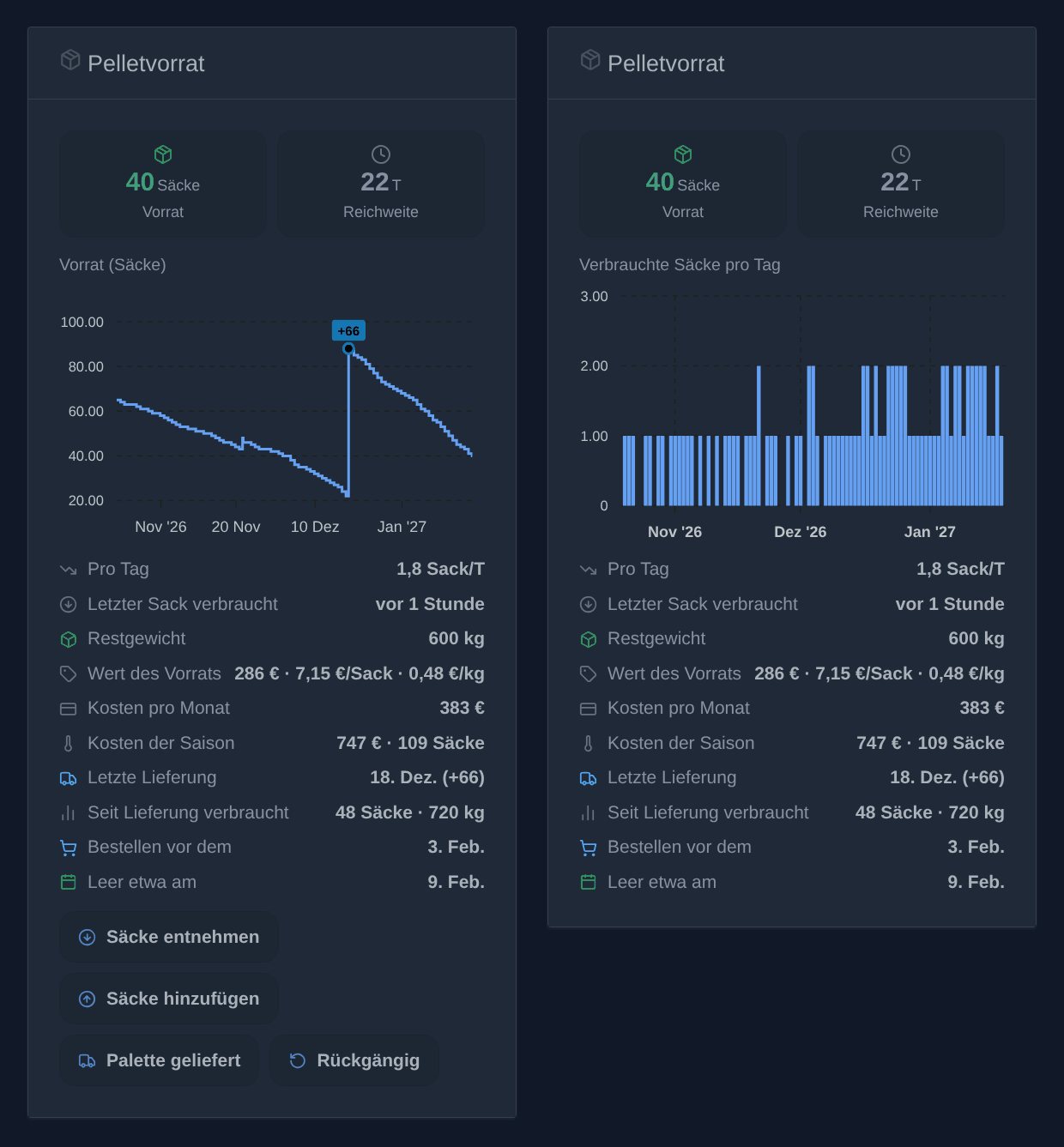
- Den Vorrat in Säcken: grün, dann orange unter der Schwelle für niedrigen Vorrat (standardmäßig 10 Säcke), rot bei null. Dann erscheint die Erinnerung „Zeit zu bestellen“.
- Die Reichweite in Tagen.
- Ein Diagramm, in den Widget-Einstellungen gewählt: der Vorrat im Zeitverlauf mit markierten Lieferungen, oder die verbrauchten Säcke pro Tag als Balken (pro Woche über 1 Jahr). Zeitraum: 1 Monat, 3 Monate, 1 Jahr. Um beides zu sehen, stellen Sie zwei Widgets nebeneinander. Die bei einer Nachzählung fehlenden Säcke werden am Tag der Nachzählung gezählt.
- Den durchschnittlichen Verbrauch pro Tag, den letzten verbrauchten Sack („vor 2 Tagen“), das Restgewicht, die letzte Lieferung und den Verbrauch seitdem (in Säcken und kg).
- Das Datum, vor dem bestellt werden sollte (wenn der Vorrat die Schwelle für niedrigen Vorrat erreicht), und das voraussichtliche Datum, an dem der Vorrat aufgebraucht ist.
- Sobald ein Preis bekannt ist: den Wert des Vorrats mit dem Preis pro Sack und pro kg und die Kosten pro Monat. Es zählt der für die letzte Lieferung bezahlte Preis, sonst der Palettenpreis der Konfiguration. Der Preis pro kg folgt dem Gewicht der Säcke dieser Lieferung.
- Die Kosten der Saison: was die seit Beginn der Heizsaison verbrauchten Säcke gekostet haben (standardmäßig Oktober, in den Widget-Einstellungen festgelegt), mit ihrer Anzahl.
Nur Lieferungen („Palette geliefert“, die Aktion „Lieferung erfassen“) zählen als Lieferungen: Mit „Säcke hinzufügen“ hinzugefügte Säcke, auch mehrere auf einmal, werden weder im Diagramm markiert noch für „Letzte Lieferung“ und den Verbrauch seitdem verwendet. Sie gehen aber in den Vorrat und seine Kosten ein.
In den Widget-Einstellungen können Sie die Schaltflächen ausblenden, zum Beispiel für eine reine Wandanzeige.
Heizkosten
Die ältesten Säcke werden zuerst verbraucht („first in, first out“): Jeder verbrauchte Sack kostet den Preis, zu dem er gekauft wurde. Wenn Sie 40 Säcke zu 6 € und dann 60 Säcke zu 8 € gekauft haben, zählen die ersten 40 verbrauchten Säcke je 6 €, die folgenden 8 €.
- Eine ohne Preis eingegebene Lieferung übernimmt den zuletzt bekannten Sackpreis.
- Der anfangs mit „Vorrat korrigieren“ eingegebene Vorrat hat keinen Preis: Er übernimmt den Palettenpreis der Konfiguration oder wird, ohne ihn, gesondert ausgewiesen („12 ohne Preis“). „Vorrat korrigieren“ nimmt einen optionalen Preis pro Sack für die Säcke an, die über den erfassten Vorrat hinaus gezählt wurden.
- Das Restgewicht und der Verbrauch in kg folgen dem Gewicht der Säcke jeder Lieferung.
Für einen bestimmten Zeitraum starten Sie die Aktion „Kosten analysieren“ mit einem Start- und einem Enddatum (TT/MM/JJJJ): „Vom 01.10.2026 bis 01.06.2027: 100 Sack/Säcke, 1.500 kg, 712 € (0,47 €/kg)“.
Widget „Pelletpreise“
Das Widget „Pelletpreise“ (Dashboard bearbeiten → Box hinzufügen → Pelletpreise) verfolgt, was die Pellets über die Jahre kosten, für einen Sackvorrat oder ein Silo (in € pro Tonne). Es ändert nichts: Es liest die mit den Lieferungen eingegebenen Preise.
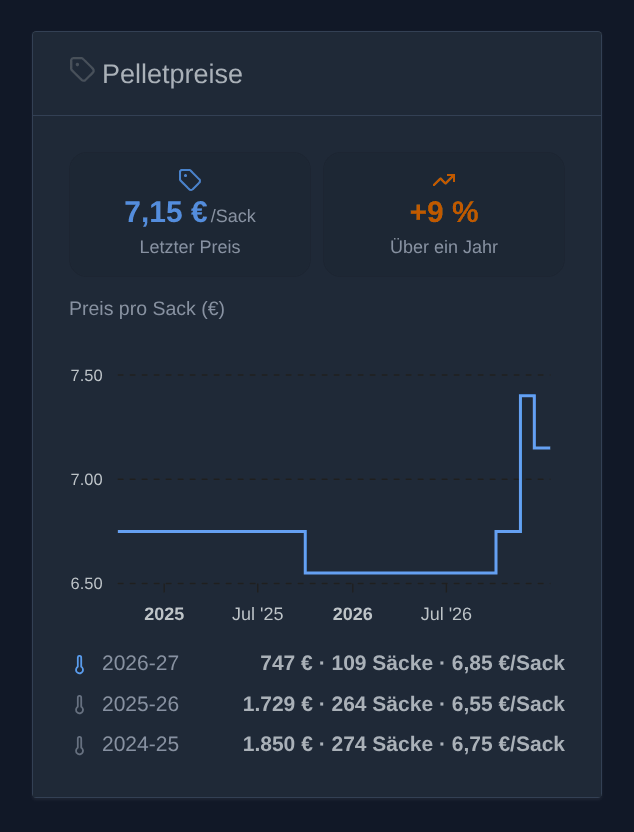
- Letzter Preis: der Preis pro Sack der letzten mit Preis eingegebenen Lieferung.
- Über ein Jahr: wie er sich gegenüber dem ein Jahr zuvor bezahlten Preis verändert hat (orange bei einem Anstieg, grün bei einem Rückgang).
- Ein Diagramm des Preises pro Sack, von einer Lieferung zur nächsten, über 1, 3 oder 5 Jahre (Widget-Einstellungen).
- Eine Zeile pro Heizsaison, die laufende in Blau: was die verbrauchten Säcke gekostet haben (first in, first out), wie viele, und der Durchschnittspreis eines Sacks. Die Saisons beginnen standardmäßig im Oktober (Widget-Einstellungen). Säcke ohne bekannten Preis werden gesondert ausgewiesen.
Wie die Reichweite berechnet wird
Der durchschnittliche Verbrauch wird über die letzten 14 Tage berechnet (3 bis 90 Tage, in der Konfiguration einstellbar). Kürzer folgt dem Wetter schneller, länger ist stabiler.
- Mit weniger als einem Tag Verlauf bleibt die Reichweite unbekannt (ein Strich wird angezeigt): Ein einzelner verbrauchter Sack reicht nicht zum Hochrechnen.
- Ganz ohne Verbrauch im Zeitraum (zum Beispiel im Sommer) ist die Reichweite ebenfalls unbekannt.
Gerät „Pelletvorrat“ (optional)
Im Tab Entdecken können Sie das Gerät „Pelletvorrat“ hinzufügen. Es stellt zwei Werte mit Verlauf bereit:
- Pelletvorrat (Anzahl der Säcke);
- Pellet-Reichweite (Tage).
Damit lässt sich der Verlauf in einer normalen Diagramm-Box anzeigen und vor allem lassen sich Szenen bauen: zum Beispiel „wenn der Vorrat unter 10 Säcke fällt, schick mir eine Nachricht“. Eine unbekannte Reichweite wird nie als 0 gesendet, sodass eine Szene „Vorrat leer“ nie versehentlich auslöst.
Das Widget funktioniert auch ohne dieses Gerät.
Mehrere Häuser
Um die Pellets eines anderen Hauses (Ferienhaus, Chalet …) zu verfolgen, starten Sie in der Konfiguration die Aktion „Vorrat hinzufügen“ und wählen das Haus in der Liste der Häuser von Gladys. Der Vorrat trägt den Namen des Hauses, ein Vorrat pro Haus. Jeder Vorrat hat seinen eigenen Verlauf und sein eigenes Gerät:
- Fügen Sie im Tab Entdecken das Gerät „Pelletvorrat – Chalet“ (mit dem Namen des Hauses) hinzu und ordnen Sie es einem Raum dieses Hauses zu.
- Starten Sie „Vorrat korrigieren“ mit diesem ausgewählten Vorrat, um seine aktuellen Säcke einzugeben.
- Fügen Sie ein Widget „Pelletvorrat“ hinzu und wählen Sie diesen Vorrat in seinen Einstellungen. Sein Name erscheint im Titel des Diagramms.
Die Aktionen der Konfiguration und die Szenenaktionen haben ein Feld Vorrat: Leer gelassen, gelten sie für den Hauptvorrat. Ein Zigbee-Taster im Chalet kann so nur den Vorrat des Chalets herunterzählen.
Die Einstellungen der Konfiguration (Sackgewicht, Säcke pro Palette, Schwelle, Zeitraum, Palettenpreis) sind die Standardeinstellungen jedes Vorrats. Soll ein Vorrat andere haben (zum Beispiel 10-kg-Säcke im Chalet), starten Sie „Vorrat einrichten“: Füllen Sie nur die zu ändernden Einstellungen aus, die anderen behalten ihren Wert. Die Antwort listet die geltenden Einstellungen auf, die eigenen des Vorrats oder die Standardwerte. Die Option „Zurück zu den Standardwerten“ entfernt die eigenen Einstellungen des Vorrats.
Der Hauptvorrat und die in einer früheren Version mit einem Namen angelegten Vorräte können mit „Vorrat einem Haus zuordnen“ einem Haus zugeordnet werden: Sie tragen dann den Namen des Hauses und behalten ihr Gerät und ihren Verlauf.
Um die Namen der Häuser zu lesen, bittet die Integration um Zugriff auf die Häuser von Gladys (bei der Installation angezeigt); ihre Koordinaten verwendet sie nicht.
„Vorrat entfernen“ entfernt einen hinzugefügten Vorrat und seinen Verlauf; der Hauptvorrat kann nicht entfernt werden.
Silo (lose Pellets)
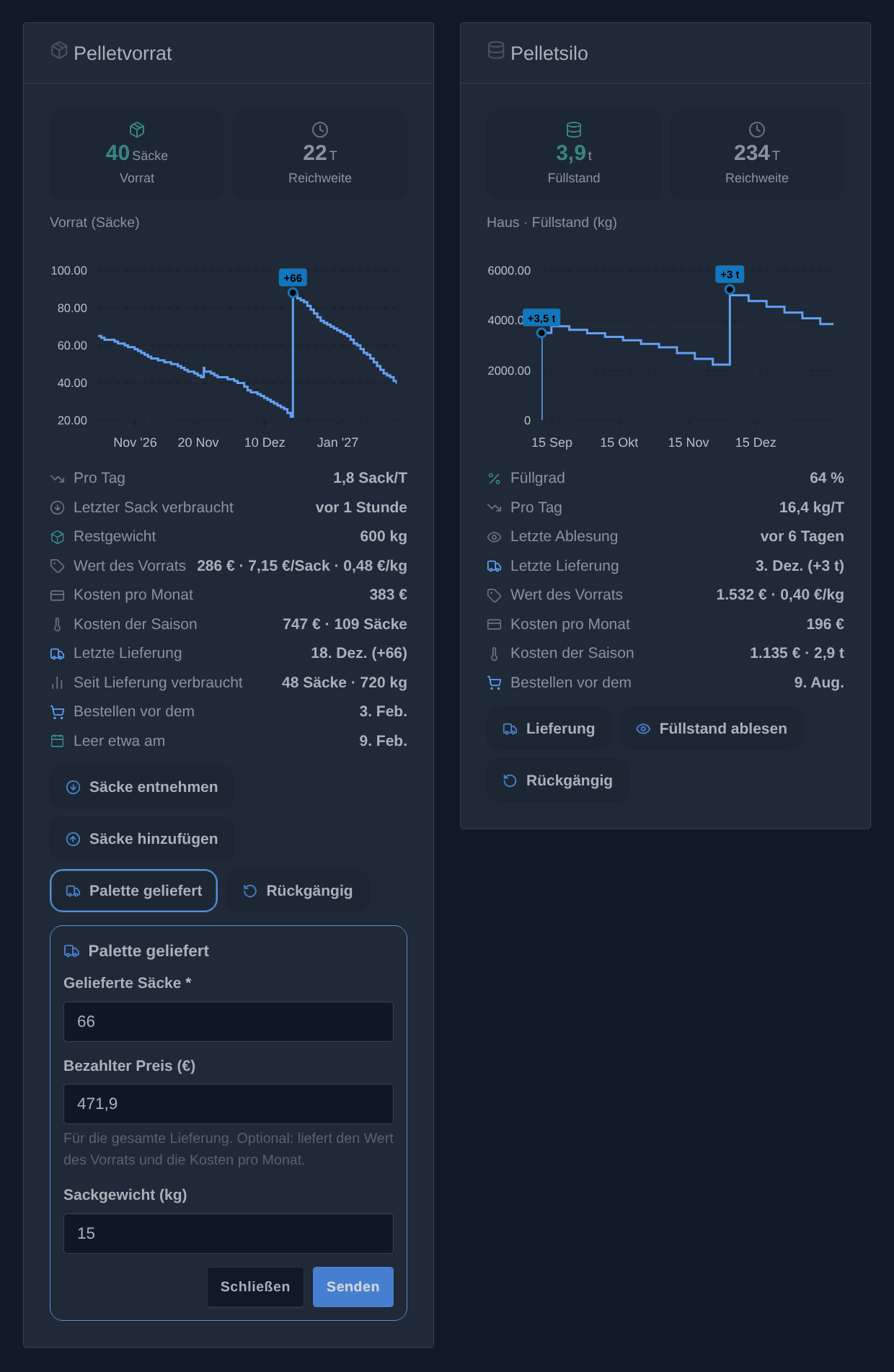
Für einen Kessel, der aus einem Silo gespeist wird, starten Sie „Vorrat hinzufügen“ mit dem Typ Silo (lose) und dem Haus. Ein Silo zählt in kg und hat sein eigenes Widget, „Pelletsilo“, und sein eigenes Gerät, „Pelletsilo – Haus“ (Füllstand in kg, Füllgrad in %, Reichweite). Ein Haus kann einen Sackvorrat und ein Silo haben.
- „Lieferung“: die gelieferten kg (mit der üblichen Liefermenge vorausgefüllt) und der bezahlte Preis.
- „Füllstand ablesen“: der am Silo abgelesene Füllstand, in kg oder in % seiner Kapazität (Einstellung „Füllstandsablesung“). Ein niedrigerer Füllstand als der letzte zählt als Verbrauch: Verbrauch pro Tag, Reichweite, Bestelldatum und Kosten der Saison funktionieren wie bei den Säcken.
- „Rückgängig“ entfernt den letzten Vorgang.
Das Widget zeigt den Füllstand (in Tonnen ab 1.000 kg), die Reichweite, den Füllstand im Zeitverlauf oder die verbrauchten kg pro Tag, den Füllgrad, die letzte Ablesung, die letzte Lieferung, den Wert des Vorrats und den Preis pro kg, die Kosten pro Monat und der Saison sowie das Datum, vor dem bestellt werden sollte.
Die Standardwerte der Silos stehen im Abschnitt „Silo“ der Konfiguration: Kapazität, Schwelle für niedrigen Vorrat (kg), übliche Liefermenge, Preis pro Tonne, Ablesung in kg oder in %. „Vorrat einrichten“ ändert sie für ein Silo. Ohne gewählten Vorrat verwenden das Silo-Widget und die Silo-Szenenaktionen das einzige Silo.
Zwei Szenenaktionen, „Silolieferung erfassen“ und „Silofüllstand ablesen“, können zum Beispiel den Füllstand von einem Sensor übernehmen. Die Szenenauslöser zählen in Säcken und lassen die Silos aus: Verwenden Sie für eine Warnung das Gerät des Silos („Silofüllstand unter …“).
Szenen
Aktionen
- „Pelletsäcke verbrauchen“ entnimmt Säcke aus dem Vorrat. Beispiel: ein Zigbee-Taster neben dem Ofen, der eine Szene auslöst, die bei jedem Druck einen Sack entnimmt. Die Aktion schlägt fehl, wenn der erfasste Vorrat zu niedrig ist: Zählen Sie Ihren Vorrat nach.
- „Pelletsäcke hinzufügen“ fügt Säcke hinzu (eine Lieferung, einzeln gekaufte Säcke), mit optionalem Preis pro Sack und Sackgewicht.
- „Pelletvorrat korrigieren“ setzt den Vorrat auf die gezählte Anzahl Säcke.
- „Pelletvorrat lesen“ ändert nichts: Sie holt die Zahlen für den Rest der Szene, zum Beispiel für eine wöchentliche Nachricht. Sie liefert auch den Typ des Vorrats (
bagsoderbulk), seine Einheit (bagoderkg) und die Kosten der Saison: die Kosten (€), die Säcke (kg bei einem Silo) und die kg, die seit Beginn der Saison verbraucht wurden (standardmäßig Oktober, in der Aktion festgelegt), sowie die ohne bekannten Preis.
Jede Aktion hat ein Feld Vorrat (leer: der Hauptvorrat) und gibt an die nächsten Aktionen die verbleibenden Säcke, die Reichweite (Tage), die Säcke pro Tag, die Tage bis zur Bestellung und das Restgewicht (kg) weiter. Eine noch unbekannte Zahl (zum Beispiel die Reichweite ohne bisherigen Verbrauch) wird weggelassen statt als 0 gesendet.
Auslöser
- „Pelletvorrat niedrig“: Der Vorrat fällt auf die Schwelle für niedrigen Vorrat der Konfiguration. Er löst einmal aus, beim Überschreiten der Schwelle, nicht bei jedem Sack darunter.
- „Pelletvorrat leer“: Der letzte Sack wurde verbraucht.
- „Pelletpalette geliefert“: Eine Lieferung mehrerer Säcke wurde über das Widget oder die Konfiguration erfasst.
Jeder Auslöser hat ein Feld Vorrat (leer: alle Vorräte) und liefert dieselben Zahlen wie die Aktionen, für die Palette zusätzlich die gelieferten Säcke. Beispiel: „Pelletvorrat niedrig → schick mir „Noch {{triggerEvent.data.bags_left}} Säcke, Zeit zu bestellen““.
Eine von einer Szene hinzugefügte Lieferung löst „Palette geliefert“ nicht aus, damit sich eine Szene nie in einer Schleife selbst neu starten kann. Die Auslöser für niedrigen und leeren Vorrat lösen unabhängig vom Ursprung aus, auch über einen Zigbee-Taster, der eine Szene durchläuft.
Sprachen
Die Integration spricht Deutsch, Englisch, Französisch und Spanisch: Die Widgets und die Meldungen folgen der Sprache jedes Gladys-Benutzers. Gladys teilt einer Integration die Sprache ihrer Benutzer nur mit, wenn sie ein Widget anzeigen: Standardmäßig („Sprache der Gerätenamen“ auf „Sprache des Benutzers“) folgen die Namen der im Tab „Entdecken“ angebotenen Geräte der Sprache des letzten Benutzers, der ein Widget der Integration angezeigt hat, bis dahin Englisch. Die Einstellung kann auch eine Sprache erzwingen. Ein bereits hinzugefügtes Gerät behält seinen Namen; benennen Sie es bei Bedarf in seinen Einstellungen um.
Sicherung
Das Bewegungsbuch (die letzten 2.000; darüber hinaus werden die ältesten zusammengefasst, wobei der Preis der noch vorrätigen Säcke erhalten bleibt) wird in der Datenbank von Gladys gespeichert: Es ist Teil der Gladys-Sicherungen und übersteht ein Update der Integration. Es wird gelöscht, wenn Sie die Integration deinstallieren.
Konfigurationseinstellungen
Diese Einstellungen fragt Pellet Stock in seinem Konfigurationsbildschirm in Gladys ab.
| Einstellung | Typ | Pflichtfeld | Beschreibung |
|---|---|---|---|
| So funktioniert es | section | Nein | Geben Sie zuerst Ihren aktuellen Vorrat mit der Aktion „Vorrat korrigieren“ unten ein. Fügen Sie dann das Widget „Pelletvorrat“ Ihrem Dashboard hinzu: Tippen Sie bei jedem Befüllen des Ofens auf „Säcke entnehmen“, auf „Säcke hinzufügen“ für einzeln gekaufte Säcke und auf „Palette geliefert“, wenn eine Palette ankommt. Es genügt auch, den Vorrat ab und zu mit „Vorrat korrigieren“ nachzuzählen: Die fehlenden Säcke gelten als verbraucht. |
| Sprache der Gerätenamen | select | Nein | Die Namen, die im Tab „Entdecken“ für die Vorrats- und Silogeräte vorgeschlagen werden. Gladys teilt einer Integration die Sprache ihrer Benutzer nur mit, wenn sie ein Widget anzeigen: „Sprache des Benutzers“ übernimmt die des letzten Benutzers, der das getan hat (bis dahin Englisch). Bereits hinzugefügte Geräte behalten ihren Namen. |
| Standardeinstellungen | section | Nein | Gelten für jeden Vorrat, außer den Einstellungen, die einem Vorrat mit der Aktion „Vorrat einrichten“ gegeben wurden. |
| Sackgewicht (kg) | number | Nein | Dient zur Anzeige des Restgewichts. Die meisten Säcke wiegen 15 kg. |
| Säcke pro Palette | number | Nein | Anzahl der Säcke, die die Schaltfläche „Palette geliefert“ hinzufügt. Eine Palette mit 15-kg-Säcken umfasst meist 66 oder 72 Säcke. |
| Schwelle für niedrigen Vorrat (Säcke) | number | Nein | Ab dieser Anzahl Säcke zeigt das Widget den Vorrat in Orange an und erinnert Sie an die Bestellung. |
| Berechnungszeitraum (Tage) | number | Nein | Der durchschnittliche Tagesverbrauch und damit die Reichweite werden über diese Anzahl vergangener Tage berechnet. Kürzer folgt dem Wetter schneller, länger ist stabiler. |
| Palettenpreis (€) | number | Nein | Optional. Zeigt im Widget den Wert des Vorrats und die Kosten pro Monat an. Der Preis eines Sacks ist dieser Preis geteilt durch die Säcke pro Palette. Sobald eine Lieferung mit ihrem Preis im Widget eingegeben wurde, gilt dieser Preis. |
| Silo (lose Pellets) | section | Nein | Die Standardwerte der Silos, die mit „Vorrat hinzufügen“ (Typ: Silo) angelegt und mit dem Widget „Pelletsilo“ verfolgt werden. |
| Silokapazität (kg) | number | Nein | Optional. Liefert den Füllgrad und erlaubt, den Füllstand in % abzulesen. |
| Schwelle für niedrigen Vorrat (kg) | number | Nein | Ab diesem Füllstand wird das Silo-Widget orange und erinnert Sie an die Bestellung. |
| Übliche Liefermenge (kg) | number | Nein | Füllt das Formular „Lieferung“ des Silo-Widgets vor. |
| Preis pro Tonne (€) | number | Nein | Optional. Der bei der letzten Lieferung bezahlte Preis hat Vorrang. |
| Füllstandsablesung | select | Nein | Wie das Formular „Füllstand ablesen“ nach dem Füllstand fragt. In % erfordert die Kapazität. |
So installierst du Pellet Stock in Gladys
- Öffne in Gladys Integrationen: Pellet Stock erscheint im Katalog neben den nativen Integrationen, mit einem Community-Badge.
- Klicke auf Installieren. Gladys lädt das Docker-Image (
ghcr.io/william-de71/gladys-pellet-stock:1.5.0) herunter, startet es in einer vom Kern isolierten Sandbox und erzeugt die Oberfläche der Integration (Geräte, Erkennung und Konfiguration). - Öffne den Bildschirm Konfiguration der Integration, fülle die Einstellungen aus und speichere.
- Du kannst sie auch direkt über die URL ihres Repositorys installieren: https://github.com/William-De71/gladys-pellet-stock.
Pellet Stock benötigt Gladys >=5.3.0. Der Katalog in Gladys wird stündlich aktualisiert, eine neue Version ist also spätestens eine Stunde nach ihrer Veröffentlichung verfügbar.
Du nutzt Gladys noch nicht? Es ist kostenlos und Open Source: folge der Installationsanleitung, um loszulegen.
Über externe Integrationen
Pellet Stock ist eine externe Integration: eine Community-Integration, die als Docker-Container verpackt und auf GitHub veröffentlicht wird. Gladys installiert sie mit einem Klick und führt sie in einer vom Kern isolierten Sandbox aus. Sie wird von William-De71 veröffentlicht und gepflegt, nicht vom Gladys-Kernteam.
- Alle Integrationen durchsuchen, native und aus der Community
- Deine eigene externe Integration bauen und veröffentlichen
- Quellcode auf GitHub — Quelle dieser Dokumentation