National Weather Service Smart-Home-Integration, kostenlos und Open Source
Offizielle US-Vorhersagen und -Warnungen des National Weather Service.
Veröffentlicht von William-De71
- Geräte
- Version 1.2.0
- Erfordert Gladys >=5.3.0
- ★ 0
Diese Integration bringt die Vorhersagen und offiziellen Warnungen des National Weather Service (NWS), des Wetterdienstes der Vereinigten Staaten, zu Gladys. Sie versorgt das Wetter-Widget des Dashboards, den Assistenten und die von Warnungen ausgelösten Szenen und fügt drei Widgets hinzu.
Community-Integration, nicht mit dem National Weather Service oder der NOAA verbunden und nicht von ihnen unterstützt.
Sofort einsatzbereit
Keine Konfiguration nötig: Die API des NWS ist kostenlos und braucht keinen Schlüssel. Installiere die Integration, und sie funktioniert sofort.
Der NWS deckt nur die Vereinigten Staaten und ihre Territorien ab (Alaska, Hawaii, Puerto Rico, Guam…). Für ein Zuhause anderswo nutzt Gladys automatisch einen anderen Wetteranbieter.
Lege den Standort jedes Zuhauses in seinen Einstellungen fest: Die Warnungsüberwachung, die Szenen-Aktionen und die Widgets brauchen ihn.
Was die Integration liefert
- Aktuelle Bedingungen, gemessen an der nächsten Wetterstation (Temperatur, gefühlte Temperatur, Luftfeuchtigkeit, Taupunkt, Luftdruck, Wind, Böen, Sichtweite). Hat zuletzt keine Station gemeldet, wird die Vorhersage der laufenden Stunde verwendet.
- Stündliche Vorhersage für 24 Stunden: Temperatur, gefühlte Temperatur, Luftfeuchtigkeit, Bewölkung, Wind und Böen, Regenmenge und -wahrscheinlichkeit.
- Tägliche Vorhersage für 6 bis 7 Tage: Höchstwert des Tages, Tiefstwert der folgenden Nacht, Himmel, Regenwahrscheinlichkeit, Menge, Wind und Böen.
- Sonnenauf- und -untergang, lokal berechnet.
- Offizielle Warnungen (Vorwarnungen, Warnungen, Hinweise) mit ihrem vollständigen Text und den Verhaltenshinweisen.
Der NWS veröffentlicht keinen UV-Index.
Der NWS schreibt seine Texte nur auf Englisch: Namen der Warnungen, Texte der Meteorologen und Bulletins bleiben auf Englisch; alles andere folgt der Sprache von Gladys (Englisch, Französisch, Deutsch oder Spanisch).
Warnstufen
| Stufe | Bedeutung |
|---|---|
| Warning | das Ereignis tritt ein oder steht unmittelbar bevor: jetzt handeln |
| Watch | die Bedingungen dafür sind günstig: vorbereitet sein |
| Advisory | eine weniger ernste Gefahr, die Unannehmlichkeiten verursachen kann |
| Statement | Information oder Nachverfolgung |
Von Warnungen ausgelöste Szenen
Gladys bietet bereits die allgemeinen Auslöser „Wetterwarnung ausgelöst“ und „Wetterwarnung beendet“. Gladys prüft die Warnungen alle 30 Minuten; diese Integration überwacht sie zusätzlich jede Minute und benachrichtigt Gladys, sobald sich eine ändert, sodass deine Szene innerhalb von Sekunden auslöst.
Die Integration fügt im Szenen-Editor unter National Weather Service eigene, feinere Auslöser hinzu:
| Auslöser | Löst aus, wenn… | Filter |
|---|---|---|
| NWS-Warnung ausgegeben | eine neue Vorwarnung, Warnung oder ein Hinweis das Zuhause betrifft | Zuhause, Art der Warnung, Stufe, Schweregrad |
| NWS-Warnung beendet | eine Warnung abgelaufen ist oder aufgehoben wurde | Zuhause, Art der Warnung, Stufe |
Arten: Tornado, Hurrikan / Tropensturm, schweres Gewitter, Hochwasser, Wintersturm, Kälte, Hitze, Wind, Brandgefahr, Nebel, Luftqualität, Meer, Sonstiges.
Zum Beispiel, um vor einem Tornado gewarnt zu werden: Auslöser NWS-Warnung ausgegeben, Art Tornado, Stufe Warning, dann eine Aktion „Nachricht senden“ mit den Variablen Zusammenfassung und Verhaltenshinweise.
Gut zu wissen:
- Das Feld Zuhause muss den Namen des Zuhauses genau wie in Gladys enthalten, mit Groß-/Kleinschreibung. Leer = alle Zuhause.
- Der NWS bearbeitet nie eine Warnung: Er gibt eine neue aus, die die vorherige ersetzt. Die Integration verfolgt diese Aktualisierungen: Eine verlängerte oder geänderte Warnung löst deine Szene nicht erneut aus.
- Eine Warnung, die ihre Stufe wechselt (zum Beispiel eine Hurricane Watch, ersetzt durch eine Hurricane Warning), zählt als neue Warnung: NWS-Warnung beendet für die alte, NWS-Warnung ausgegeben für die neue.
- Beim Start der Integration bereits aktive Warnungen lösen nichts aus: nur neue.
- Eine Warnung endet, sobald ihre Endzeit vorbei ist oder sobald sie bei zwei aufeinanderfolgenden Prüfungen und mindestens 5 Minuten lang fehlt. Kommt sie danach zurück, löst sie erneut NWS-Warnung ausgegeben aus: Auf jedes Ende folgt ein neuer Beginn, nie ein zweites Ende.
Szenen-Aktionen
| Aktion | Liefert |
|---|---|
| NWS-Warnungen abrufen | Anzahl der Warnungen, Warnings, Watches und Advisories, Liste der Ereignisse, die schwerste (Art, Stufe, Hinweise, Ende), eine Zusammenfassung |
| NWS-Vorhersage eines Tages abrufen | heute bis in 6 Tagen: Höchst- und Tiefstwert, Himmel, Regenwahrscheinlichkeit, Wind, der Text des Meteorologen (Tag und Nacht), eine Zusammenfassung |
| Aktuelle NWS-Bedingungen abrufen | Temperatur, gefühlte Temperatur, Luftfeuchtigkeit, Taupunkt, Luftdruck, Wind, Böen, Sichtweite, Himmel, Station, eine Zusammenfassung |
Jede Aktion hat eine Ausgabe Zusammenfassung, einen Satz, fertig zum Versenden in einer Nachricht.
Dashboard-Widgets
| Widget | Inhalt |
|---|---|
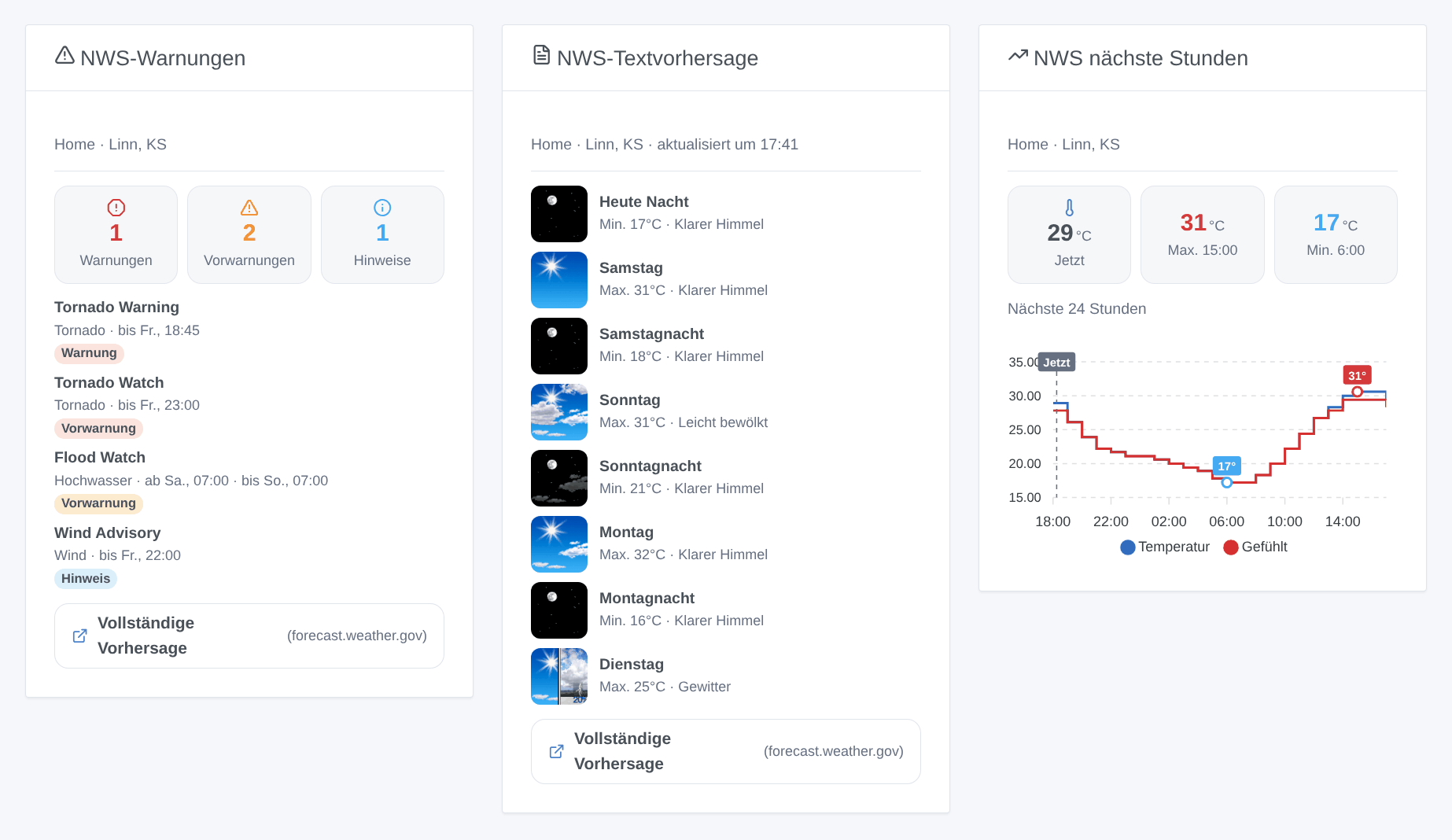
| NWS-Warnungen | Zähler für Warnings / Watches / Advisories, dann jede Warnung; tippe auf eine für ihren vollständigen Text und die Hinweise. Aktualisiert, sobald sich eine Warnung ändert. |
| NWS-Textvorhersage | der Text des Meteorologen, Zeitraum für Zeitraum (Heute Nacht, Samstag, Samstagnacht…), mit den Symbolen des NWS |
| NWS nächste Stunden | 12, 24 oder 48 Stunden als Kurve: Temperatur und gefühlte Temperatur, Regenwahrscheinlichkeit oder Wind und Böen |
Jedes Widget hat eine Einstellung Zuhause (leer = erstes Zuhause mit Standort), genau wie in Gladys geschrieben.
Konfiguration (optional)
| Einstellung | Standard | Rolle |
|---|---|---|
| Kontakt-E-Mail | — | der NWS verlangt, dass sich jede Anwendung ausweist; deine E-Mail erlaubt ihm, dich zu erreichen, bevor er missbräuchlichen Verkehr sperrt |
| Cache-Dauer (s) | 600 | wie lange eine Vorhersage wiederverwendet wird (der NWS aktualisiert sie etwa einmal pro Stunde) |
| Prüfintervall der Warnungen (s) | 60 | wie oft die Warnungen deiner Zuhause geprüft werden, 30 bis 900 Sekunden |
Fehlerbehebung
| Symptom | Was tun |
|---|---|
| „Kein Zuhause in Gladys hat einen Standort“ | lege den Standort eines Zuhauses unter Einstellungen → Zuhause fest |
| „Außerhalb des Gebiets des National Weather Service“ | das Zuhause liegt nicht in den USA: Gladys nutzt dafür einen anderen Wetteranbieter |
| Eine nach Zuhause gefilterte Szene löst nie aus | das Feld Zuhause muss den Namen genau enthalten, mit Groß-/Kleinschreibung |
| Nach einem Neustart hat eine Warnung nichts ausgelöst | beim Start der Integration bereits aktive Warnungen werden absichtlich ignoriert |
| Szenentexte in der falschen Sprache | sie folgen der letzten Anfrage von Gladys: zeige einmal eines der Widgets an |
Um ein Problem zu melden, gib die Version von Gladys und der Integration, die Stadt des Zuhauses und die Logs der Integration an (DEBUG=gladys-integration-sdk für Details), auf GitHub oder im Forum-Thread.
Konfigurationseinstellungen
Diese Einstellungen fragt National Weather Service in seinem Konfigurationsbildschirm in Gladys ab.
| Einstellung | Typ | Pflichtfeld | Beschreibung |
|---|---|---|---|
| Sofort einsatzbereit | section | Nein | Vorhersagen und Warnungen funktionieren ohne Konfiguration: Die API des National Weather Service ist kostenlos und braucht keinen Schlüssel. Sie deckt nur die Vereinigten Staaten und ihre Territorien ab — ein Zuhause anderswo bekommt sein Wetter von einem anderen Anbieter. |
| Kontakt-E-Mail (optional) | string | Nein | Wird der Kennung hinzugefügt, die der NWS von jeder Anwendung verlangt, damit er dich erreichen kann, bevor er Datenverkehr sperrt, den er für missbräuchlich hält. Wird an niemanden sonst weitergegeben. |
| Cache-Dauer (s) | number | Nein | In Sekunden, zwischen 0 und 3600. Wie lange eine Vorhersage wiederverwendet wird, bevor der NWS erneut abgefragt wird. Der NWS aktualisiert seine Vorhersagen etwa einmal pro Stunde: Der Standardwert von 600 (10 min) kostet keine Aktualität. 0 ruft die API jedes Mal ab. Warnungen sind nicht betroffen: Sie werden in ihrem eigenen Rhythmus geprüft. |
| Prüfintervall der Warnungen (s) | number | Nein | In Sekunden, zwischen 30 und 900. Wie oft die offiziellen Warnungen deiner Zuhause geprüft werden, für die Szenen-Auslöser und das Warnungs-Widget. Eine Tornado Warning dauert etwa 30 Minuten: Der Standardwert von 60 s löst deine Szenen weniger als eine Minute nach ihrer Ausgabe aus. |
So installierst du National Weather Service in Gladys
- Öffne in Gladys Integrationen: National Weather Service erscheint im Katalog neben den nativen Integrationen, mit einem Community-Badge.
- Klicke auf Installieren. Gladys lädt das Docker-Image (
ghcr.io/william-de71/gladys-national-weather-service:1.2.0) herunter, startet es in einer vom Kern isolierten Sandbox und erzeugt die Oberfläche der Integration (Geräte, Erkennung und Konfiguration). - Öffne den Bildschirm Konfiguration der Integration, fülle die Einstellungen aus und speichere.
- Du kannst sie auch direkt über die URL ihres Repositorys installieren: https://github.com/William-De71/gladys-national-weather-service.
National Weather Service benötigt Gladys >=5.3.0. Der Katalog in Gladys wird stündlich aktualisiert, eine neue Version ist also spätestens eine Stunde nach ihrer Veröffentlichung verfügbar.
Du nutzt Gladys noch nicht? Es ist kostenlos und Open Source: folge der Installationsanleitung, um loszulegen.
Über externe Integrationen
National Weather Service ist eine externe Integration: eine Community-Integration, die als Docker-Container verpackt und auf GitHub veröffentlicht wird. Gladys installiert sie mit einem Klick und führt sie in einer vom Kern isolierten Sandbox aus. Sie wird von William-De71 veröffentlicht und gepflegt, nicht vom Gladys-Kernteam.
- Alle Integrationen durchsuchen, native und aus der Community
- Deine eigene externe Integration bauen und veröffentlichen
- Quellcode auf GitHub — Quelle dieser Dokumentation