Last.fm Smart-Home-Integration, kostenlos und Open Source

Was du auf Last.fm hörst: Scrobbles, Musikszenen und Widgets.
Veröffentlicht von William-De71
- Geräte
- Version 1.2.0
- Erfordert Gladys >=5.3.0
- ★ 0
Diese Integration bringt deine Last.fm-Hörgewohnheiten in Gladys: was du gerade hörst, deine Scrobbles, Szenen, die auf die Musik reagieren, und drei Dashboard-Widgets.
Last.fm zeichnet jeden Titel auf („scrobbelt“), der auf Spotify, Deezer, Apple Music, YouTube Music, Tidal, Plex, Sonos und vielen weiteren Playern läuft. Der Player spielt keine Rolle: Wenn deine Titel in deinem Last.fm-Profil ankommen, sieht Gladys sie.
Community-Integration, nicht mit Last.fm verbunden.
Einrichtung
1. API-Schlüssel anlegen (kostenlos)
- Melde dich bei Last.fm an und öffne API-Konto anlegen.
- Gib einen Anwendungsnamen (z. B. „Gladys“) und eine Beschreibung ein. Die Callback-URL kann leer bleiben.
- Last.fm zeigt einen API-Schlüssel (32 Zeichen) und ein gemeinsames Geheimnis an. Du findest beide jederzeit unter Meine API-Konten.
2. Integration ausfüllen
| Feld | Zweck |
|---|---|
| API-Schlüssel | Pflichtfeld |
| Gemeinsames Geheimnis | nur, um ein Konto zu verknüpfen (Titel aus Gladys heraus lieben) |
| Abonnierte Profile | Last.fm-Benutzernamen, durch Kommas getrennt (höchstens 10): deiner, der eines Angehörigen… |
| Abfrageintervall | standardmäßig 30 Sekunden (15 bis 300): So schnell reagieren die Szenen |
| Sprache der Texte | Gerätenamen und Szenen-Zusammenfassungen; Automatisch folgt deinem Dashboard, sobald ein Last.fm-Widget lief |
Speichere. Die Schaltfläche Verbindung testen prüft den Schlüssel und liest jedes Profil.
Ein Profil, das seine zuletzt gehörten Titel verbirgt (Datenschutzeinstellungen von Last.fm), kann nicht abonniert werden: Last.fm gibt sie nicht heraus.
3. Geräte hinzufügen
Im Reiter Entdecken erscheint jedes abonnierte Profil als Gerät „Last.fm – Name“. Füge es hinzu und weise ihm einen Raum zu. Widgets und Szenen funktionieren auch ohne Gerät, aber die Auswahl des Profils in ihren Einstellungen läuft über die Geräteliste.
4. Konto verknüpfen (optional)
Nur nötig, um Titel aus Gladys heraus zu lieben oder nicht mehr zu lieben (Widget-Schaltfläche, Szenenaktionen):
- Trage das gemeinsame Geheimnis ein und speichere;
- klicke auf Verbinden: Eine Last.fm-Seite öffnet sich;
- klicke auf Ja, Zugriff erlauben. Gladys erkennt das innerhalb weniger Sekunden: Die Konfiguration zeigt „Konto Name verknüpft“.
Mehr ist nicht nötig: keine Weiterleitungs-URL anzugeben. Die Seite bleibt 15 Minuten gültig; danach klicke erneut auf Verbinden.
Zum Trennen: Schaltfläche Konto trennen, und optional den Zugriff in deinen Last.fm-Einstellungen widerrufen (Bereich Anwendungen).
Das Gerät eines Profils
| Funktion | Wert |
|---|---|
| Hört gerade | 1, solange ein Titel läuft, sonst 0 |
| Aktueller oder letzter Titel | „Künstler – Titel“; behält den letzten Titel, wenn die Wiedergabe endet |
| Scrobbles heute | seit Mitternacht, in der Zeitzone von Gladys |
| Scrobbles insgesamt | seit der Erstellung des Kontos |
| Titel, Interpret, Album, Cover | der gerade laufende Titel (Musikfunktionen von Gladys 5.3), leer, wenn nichts läuft |
Titel, Interpret, Album und Cover erscheinen in der Karte „Geräte im Raum“. Dauer und Position gibt es nicht (Last.fm liefert sie nicht), und die Musikbox des Dashboards bietet das Profil nicht an: Es ist kein steuerbarer Player. Ein vor diesen Funktionen hinzugefügtes Gerät erhält sie mit der Schaltfläche Aktualisieren im Reiter Entdecken.
Der Verlauf wird gespeichert: Die Dashboard-Karte „Diagramm“ zeigt zum Beispiel deine Woche, und die üblichen Szenen auf einen Gerätewert funktionieren („mehr als 100 Scrobbles heute“…).
Szenen: Auslöser
Im Szeneneditor, unter Last.fm:
| Auslöser | Wird ausgelöst, wenn… | Filter |
|---|---|---|
| Last.fm: neuer Titel | ein Profil beginnt, einen Titel zu hören | Profil, Künstler |
| Last.fm: Wiedergabe gestartet | ein Profil nach einer Pause wieder zu hören beginnt | Profil |
| Last.fm: Wiedergabe beendet | seit zwei Prüfungen in Folge nichts mehr läuft | Profil |
| Last.fm: Titel geliebt | ein Profil einen Titel liebt (auf Last.fm oder in einem verbundenen Player) | Profil, Künstler |
An die Aktionen der Szene übergeben: Benutzername, Künstler, Titel, Album, Lieblingstitel, Last.fm-Link und eine versandfertige Zusammenfassung; beim Ende der Wiedergabe außerdem die Dauer der Sitzung (Minuten) und die Anzahl gespielter Titel.
Beispiele:
- Wiedergabe gestartet → Wohnzimmer dimmen und den Verstärker einschalten;
- Wiedergabe beendet → Verstärker ausschalten;
- Neuer Titel, Künstler „Daft Punk“ → Disco-Licht.
Gut zu wissen:
- Der Filter Künstler vergleicht den Namen genau so, wie Last.fm ihn schreibt, Groß-/Kleinschreibung eingeschlossen („Daft Punk“, nicht „daft punk“).
- Last.fm sendet nichts von sich aus: Die Integration liest die Profile standardmäßig alle 30 Sekunden. Eine Szene reagiert also mit einigen Sekunden bis einer halben Minute Verzögerung.
- Beim Start der Integration löst eine bereits laufende Wiedergabe nicht „Wiedergabe gestartet“ aus; erst der nächste Titel zählt.
- Derselbe Titel zweimal hintereinander zählt nur einmal (Last.fm erlaubt keine Unterscheidung der beiden Wiedergaben).
Szenen: Aktionen
| Aktion | Ergebnis |
|---|---|
| Last.fm: was gerade läuft | hört gerade (ja/nein), Künstler, Titel, Album, Lieblingstitel, Link, Zeitpunkt, Zusammenfassung |
| Last.fm: Hörstatistiken | Scrobbles heute und insgesamt, Top-Künstler / -Album / -Titel über einen Zeitraum, Zusammenfassung |
| Last.fm: Titel lieben | fügt einen Titel zu den Lieblingstiteln des verknüpften Kontos hinzu |
| Last.fm: Titel nicht mehr lieben | entfernt ihn wieder |
Zum Lieben oder Nicht-mehr-Lieben: Lass Künstler und Titel leer, um den gerade laufenden (oder zuletzt gehörten) Titel des verknüpften Kontos zu treffen, oder fülle sie aus (Szenenvariablen sind erlaubt). Beide Aktionen benötigen ein verknüpftes Konto.
Dashboard-Widgets
| Widget | Inhalt |
|---|---|
| Last.fm läuft gerade | Cover, Titel, Künstler und Album, Scrobbles heute und insgesamt, Status, Schaltfläche Lieben (verknüpftes Konto), Link |
| Last.fm zuletzt gehört | die letzten Titel mit ihren Covern; der laufende Titel und die Lieblingstitel sind markiert |
| Last.fm Top-Listen | Top-Künstler, -Alben (als Cover-Raster) oder -Titel über 7 Tage, 1, 3, 6 oder 12 Monate oder die gesamte Zeit |
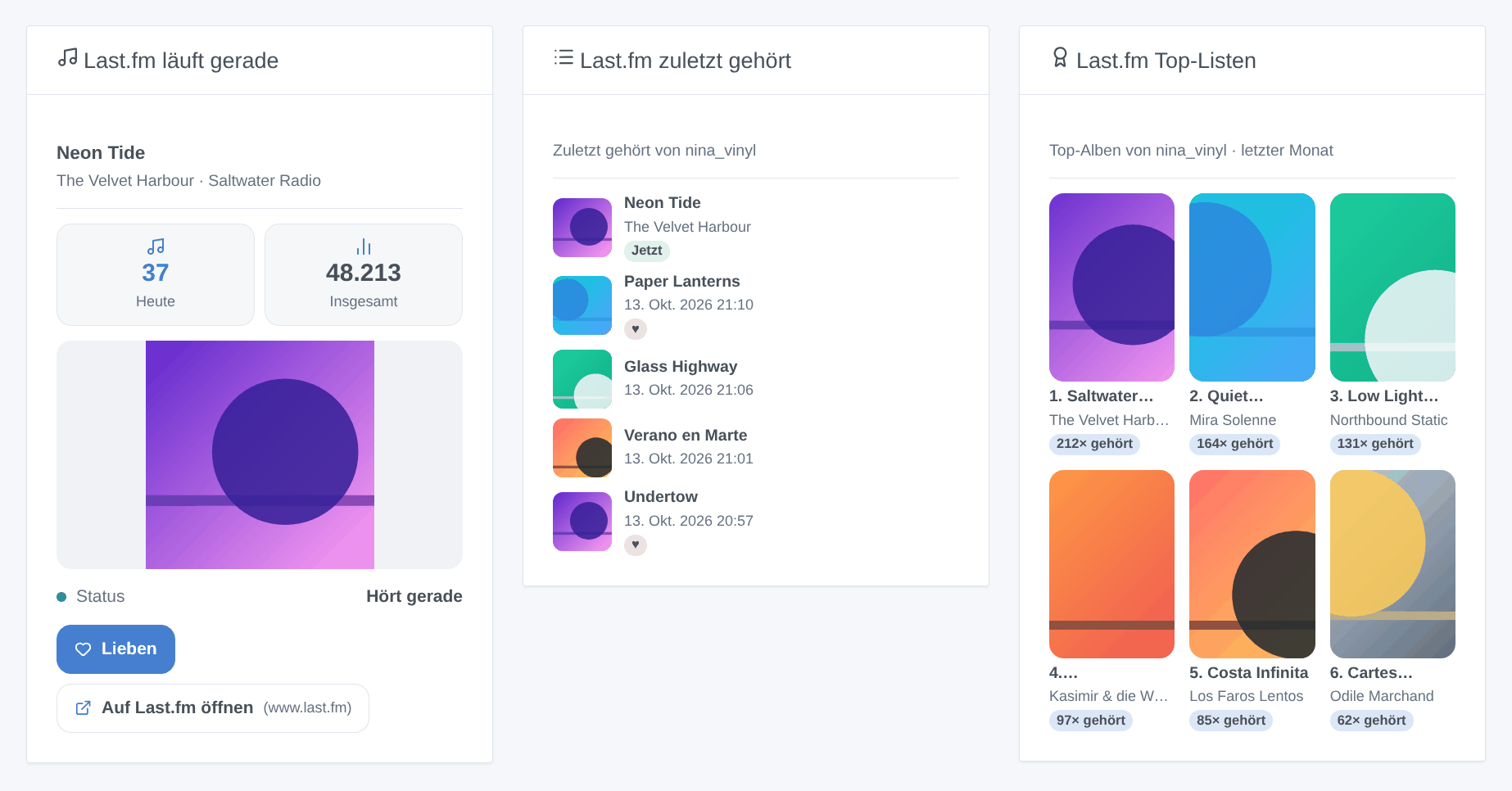
Jedes Widget wird auf ein Profil eingestellt (leer = das erste abonnierte Profil). Das Widget „läuft gerade“ aktualisiert sich, sobald ein neuer Titel beginnt.
Last.fm liefert seit 2019 keine Künstlerfotos mehr: Die Top-Künstler erscheinen daher ohne Bild.
Fehlerbehebung
| Symptom | Wahrscheinliche Ursache |
|---|---|
| „Last.fm lehnt den API-Schlüssel ab“ | Schlüssel falsch kopiert, oder falsches gemeinsames Geheimnis beim Verknüpfen |
| Ein Profil fehlt im Reiter Entdecken | der Benutzername existiert nicht (siehe Protokolle der Integration) |
| „verbirgt die zuletzt gehörten Titel“ | das Profil hat die entsprechende Datenschutzoption auf Last.fm aktiviert |
| Beim Hören passiert nichts | der Player scrobbelt nicht: Prüfe, ob der Titel in deinem Last.fm-Profil erscheint |
| Die Schaltfläche Verbinden schlägt fehl | gemeinsames Geheimnis fehlt: Trage es ein und speichere vor dem Klicken |
Konfigurationseinstellungen
Diese Einstellungen fragt Last.fm in seinem Konfigurationsbildschirm in Gladys ab.
| Einstellung | Typ | Pflichtfeld | Beschreibung |
|---|---|---|---|
| Last.fm-API-Schlüssel | section | Nein | Last.fm zeichnet auf, was du auf Spotify, Deezer, Apple Music, YouTube Music, Plex und vielen weiteren Diensten hörst. Zum Lesen deiner Titel ist ein kostenloser API-Schlüssel nötig: Lege auf Last.fm ein API-Konto an (beliebiger Anwendungsname; die Callback-URL kann leer bleiben) und kopiere dann seinen API-Schlüssel und sein gemeinsames Geheimnis hierher. |
| API-Schlüssel | secret | Ja | 32 Zeichen. |
| Gemeinsames Geheimnis | secret | Nein | Nur nötig, um ein Konto zu verknüpfen (Titel lieben). |
| Abonnierte Profile | string | Ja | Last.fm-Benutzernamen, durch Kommas getrennt (höchstens 10). Jeder wird zu einem Gerät im Reiter Entdecken. |
| Abfrageintervall (s) | number | Nein | Wie oft die Profile gelesen werden, zwischen 15 und 300 Sekunden. Last.fm sendet nichts von sich aus: Das ist die Reaktionszeit der Szenen. |
| Sprache der Texte | select | Nein | Gerätenamen, Zusammenfassungen und Ausgaben der Szenen. Automatisch: die Sprache deines Dashboards, sobald ein Last.fm-Widget angezeigt wurde. |
| Konto verknüpfen (optional) | section | Nein | Nur nötig, um Titel aus Gladys heraus zu lieben oder nicht mehr zu lieben (Widget-Schaltfläche, Szenenaktionen). Trage zuerst das gemeinsame Geheimnis ein und speichere, klicke dann auf Verbinden und erlaube den Zugriff auf der Last.fm-Seite, die sich öffnet. Gladys erkennt die Freigabe innerhalb weniger Sekunden. |
| Last.fm-Konto | account_link | Nein |
So installierst du Last.fm in Gladys
- Öffne in Gladys Integrationen: Last.fm erscheint im Katalog neben den nativen Integrationen, mit einem Community-Badge.
- Klicke auf Installieren. Gladys lädt das Docker-Image (
ghcr.io/william-de71/gladys-lastfm:1.2.0) herunter, startet es in einer vom Kern isolierten Sandbox und erzeugt die Oberfläche der Integration (Geräte, Erkennung und Konfiguration). - Öffne den Bildschirm Konfiguration der Integration, fülle die Einstellungen aus und speichere.
- Du kannst sie auch direkt über die URL ihres Repositorys installieren: https://github.com/William-De71/gladys-lastfm.
Last.fm benötigt Gladys >=5.3.0. Der Katalog in Gladys wird stündlich aktualisiert, eine neue Version ist also spätestens eine Stunde nach ihrer Veröffentlichung verfügbar.
Du nutzt Gladys noch nicht? Es ist kostenlos und Open Source: folge der Installationsanleitung, um loszulegen.
Über externe Integrationen
Last.fm ist eine externe Integration: eine Community-Integration, die als Docker-Container verpackt und auf GitHub veröffentlicht wird. Gladys installiert sie mit einem Klick und führt sie in einer vom Kern isolierten Sandbox aus. Sie wird von William-De71 veröffentlicht und gepflegt, nicht vom Gladys-Kernteam.
- Alle Integrationen durchsuchen, native und aus der Community
- Deine eigene externe Integration bauen und veröffentlichen
- Quellcode auf GitHub — Quelle dieser Dokumentation