Free Mobile SMS Smart-Home-Integration, kostenlos und Open Source
Senden Sie SMS-Benachrichtigungen an Ihre eigene Rufnummer über die SMS-API von Free Mobile.
Veröffentlicht von William-De71
- Messaging
- Version 1.4.0
- Erfordert Gladys >=5.3.0
- ★ 0
Diese Integration sendet SMS-Benachrichtigungen an Ihre eigene Rufnummer und nutzt dafür die kostenlose SMS-API von Free Mobile. Es ist ein reiner Sendekanal: Gladys kann Ihnen eine SMS schicken (Benachrichtigung einer Szene, Alarm…), aber es gibt keinen Empfangskanal — Sie können nicht auf die SMS antworten, um Gladys zu steuern.
Voraussetzungen
- Ein Free-Mobile-Vertrag (das Mobilfunkangebot von Free, nicht die Freebox).
- Die Option „Notifications par SMS“ (SMS-Benachrichtigungen) ist in Ihrem Konto aktiviert.
- Gladys Assistant 5.3.0 oder neuer. Unter Gladys 4.86 bis 5.2 versendet eine bereits installierte Version weiterhin SMS, erhält aber keine Updates mehr (ihr Hinweis „Update verfügbar“ lässt sich nicht anwenden): Aktualisieren Sie zuerst Gladys.
Option aktivieren und Zugangsdaten abrufen
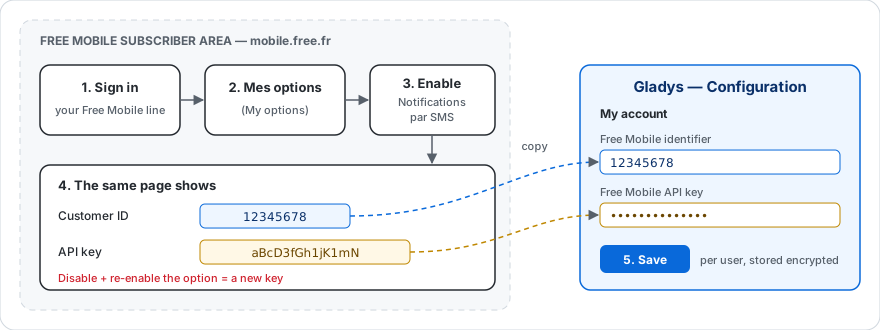
- Melden Sie sich in Ihrem Free-Mobile-Kundenbereich unter https://mobile.free.fr an.
- Öffnen Sie das Menü „Mes options“ (Meine Optionen).
- Suchen Sie die Zeile „Notifications par SMS“ und aktivieren Sie sie.
- Auf derselben Seite zeigt Free Mobile zwei Angaben an, die Sie benötigen:
- Ihre Kennung („Customer ID“, ein 8-stelliger Login);
- einen API-Schlüssel (für Sie erzeugt; Sie können ihn bei Bedarf neu erzeugen).
Halten Sie beide Werte bereit: Sie geben sie in Gladys ein.
Wichtig: Wenn Sie die Option „Notifications par SMS“ deaktivieren und wieder aktivieren, wird ein neuer API-Schlüssel erzeugt. Denken Sie dann daran, ihn in der Gladys-Konfiguration zu aktualisieren.
Integration in Gladys konfigurieren
- Öffnen Sie in Gladys die Seite Konfiguration der Integration Free Mobile SMS.
- Füllen Sie im Block „Mein Konto“ aus:
- Free-Mobile-Kennung → Ihr 8-stelliger Login;
- Free-Mobile-API-Schlüssel → der Schlüssel aus dem vorigen Schritt (er wird verschlüsselt gespeichert und nie wieder angezeigt).
- Speichern. Fertig.
Jeder Gladys-Benutzer gibt seine eigenen Zugangsdaten in seinem Block „Mein Konto“ ein. Die SMS gehen immer an die Rufnummer des zugehörigen Free-Mobile-Kontos.
Verwendung
Nach der Konfiguration empfängt die Integration die ausgehenden Nachrichten, die Gladys an Sie richtet (zum Beispiel die Aktion „Nachricht senden“ einer Szene oder einen Alarm), und leitet sie per SMS an Ihr Telefon weiter. Weitere Schritte sind nicht nötig.
Standardmäßig geht eine Szenen-Nachricht an alle Nachrichtendienste, die Sie konfiguriert haben. Um sie nur per SMS zu senden, wählen Sie Free Mobile SMS in der Liste „Senden über“ der Aktion.
Szenen: wenn eine SMS nicht gesendet wird
Der Auslöser „SMS nicht gesendet“ startet eine Szene, wenn Free Mobile eine SMS ablehnt oder nicht empfängt: falscher API-Schlüssel, deaktivierte Option, zu viele SMS, Free Mobile außer Betrieb… Nutzen Sie ihn, um über einen anderen Kanal gewarnt zu werden (Telegram, eine Benachrichtigung, ein Licht, das rot wird).
- Er löst beim ersten Fehler eines Free-Mobile-Anschlusses aus, danach erst wieder, nachdem eine SMS dieses Anschlusses durchgegangen ist. Eine Szene, die Sie über denselben Kanal warnt, kann daher keine Schleife bilden.
- Der Filter Ursachen beschränkt die Szene auf bestimmte Ursachen; leer lassen, um auf alle zu reagieren.
- Die Aktionen der Szene können diese Variablen verwenden:
| Variable | Inhalt |
|---|---|
{{triggerEvent.data.reason}} | Code der Ursache: access_denied, rate_limited, server_error, timeout, unreachable, invalid_message oder unexpected |
{{triggerEvent.data.status}} | HTTP-Status, den Free Mobile zurückgibt (403, 402…), leer ohne Antwort |
{{triggerEvent.data.error}} | Fehlermeldung auf Englisch, wie in den Protokollen |
{{triggerEvent.data.account}} | maskierte Kennung des Anschlusses, zum Beispiel 12****78 |
timeout bedeutet, dass Free Mobile nicht rechtzeitig geantwortet hat: Die SMS kann trotzdem ankommen.
Beispiel: Auslöser „SMS nicht gesendet“ mit der Ursache „Zugriff verweigert“, dann eine Aktion „Nachricht senden“ über Telegram: Free Mobile hat eine SMS abgelehnt ({{triggerEvent.data.error}}): Prüfen Sie den API-Schlüssel.
Einschränkungen
- Versand nur an Ihre eigene Rufnummer: Die Free-Mobile-API erlaubt keinen Versand an beliebige Nummern.
- Kein Empfang: Sie können nicht auf die SMS antworten, um mit Gladys zu sprechen.
- Nur Text-SMS: Anhänge (Bilder) werden nicht weitergeleitet.
- Lange Nachrichten: Free Mobile akzeptiert bis zu 999 Zeichen pro SMS. Eine längere Nachricht wird als mehrere SMS verschickt, nummeriert mit „(1/2)“, „(2/2)“…
- Sendelimit: Free Mobile lehnt zu dicht aufeinanderfolgende Nachrichten ab. Die Integration sendet die Nachrichten eines Benutzers nacheinander und versucht es, wenn Free Mobile um eine Pause bittet, zweimal erneut (nach 2 und dann 5 Sekunden), bevor sie aufgibt.
Fehlerbehebung
- Keine SMS erhalten: Prüfen Sie, ob die Option „Notifications par SMS“ aktiviert ist und ob Kennung und API-Schlüssel stimmen.
- Fehler „Zugriff verweigert“: Kennung oder Schlüssel sind wahrscheinlich falsch, oder die Option wurde deaktiviert. Erzeugen Sie den Schlüssel in Ihrem Kundenbereich neu und aktualisieren Sie ihn in Gladys.
- Fehler „zu viele SMS gesendet“: Mehrere Nachrichten wurden innerhalb weniger Sekunden verschickt, und Free Mobile hat sie auch nach den erneuten Versuchen abgelehnt. Verteilen Sie die Aktionen „Nachricht senden“ Ihrer Szenen zeitlich (eine kurze Wartezeit zwischen zwei Aktionen genügt).
So installierst du Free Mobile SMS in Gladys
- Öffne in Gladys Integrationen: Free Mobile SMS erscheint im Katalog neben den nativen Integrationen, mit einem Community-Badge.
- Klicke auf Installieren. Gladys lädt das Docker-Image (
ghcr.io/william-de71/gladys-free-mobile:1.4.0) herunter, startet es in einer vom Kern isolierten Sandbox und erzeugt die Oberfläche der Integration (Geräte, Erkennung und Konfiguration). - Öffne den Bildschirm Konfiguration der Integration, fülle die Einstellungen aus und speichere.
- Du kannst sie auch direkt über die URL ihres Repositorys installieren: https://github.com/William-De71/gladys-free-mobile.
Free Mobile SMS benötigt Gladys >=5.3.0. Der Katalog in Gladys wird stündlich aktualisiert, eine neue Version ist also spätestens eine Stunde nach ihrer Veröffentlichung verfügbar.
Du nutzt Gladys noch nicht? Es ist kostenlos und Open Source: folge der Installationsanleitung, um loszulegen.
Über externe Integrationen
Free Mobile SMS ist eine externe Integration: eine Community-Integration, die als Docker-Container verpackt und auf GitHub veröffentlicht wird. Gladys installiert sie mit einem Klick und führt sie in einer vom Kern isolierten Sandbox aus. Sie wird von William-De71 veröffentlicht und gepflegt, nicht vom Gladys-Kernteam.
- Alle Integrationen durchsuchen, native und aus der Community
- Deine eigene externe Integration bauen und veröffentlichen
- Quellcode auf GitHub — Quelle dieser Dokumentation