ecojoko Smart-Home-Integration, kostenlos und Open Source
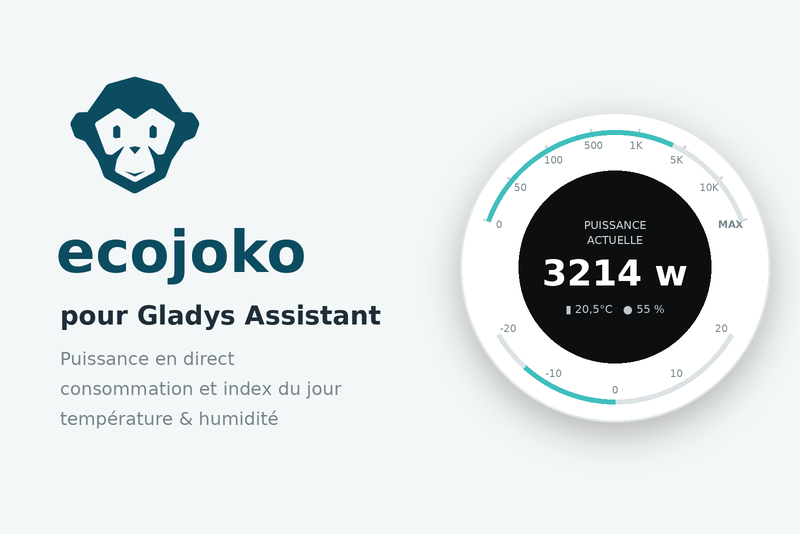
Aktuelle Leistung, Tagesverbrauch und Raumklimasensoren deines ecojoko-Energieassistenten.
Veröffentlicht von guim31
- Geräte
- Version 1.2.2
- Erfordert Gladys >=5.1.0
- ★ 0
Die Dokumentation dieser Integration wird von ihrem Autor geschrieben und ist bisher nur auf Englisch verfügbar.
Bring the readings of your ecojoko energy assistant into Gladys: the live power draw, today's consumption and, when your display reports them, the temperature and humidity. The integration also builds a cumulative index from the daily totals, so Gladys can drive its energy dashboard (half-hour consumption and cost from your contract).
| Sensor | Unit | Meaning |
|---|---|---|
| Live power | W | What the home draws from the grid right now |
| Consumption index | kWh | Cumulative counter since install (the base of the energy dashboard) |
| Today's consumption | kWh | Today's total, reset every night |
| Period today | kWh | Same per tariff period (off-peak/peak, Tempo colours…), optional |
| Solar surplus today | kWh | Energy exported to the grid, if ecojoko measures it at your place |
| Temperature / humidity | °C, % | Indoor (display) and outdoor, as a second device |
Requirements
- An ecojoko sensor installed and linked to the ecojoko cloud.
- The credentials of your ecojoko account (the mobile app's, or service.ecojoko.com).
Setup
- Enter your ecojoko email and password, then save.
- Click Test the connection: the message confirms the gateway found, the current power and what your account exposes (tariff periods, solar surplus, ambient sensor).
- Open the integration's Devices tab and add the
ecojokodevice (andecojoko (ambiance)if it shows up). - For the energy dashboard, pick the Consumption index feature as the main meter in Gladys' energy settings and fill in your contract.
Both refresh rates are configurable: live power (30 s by default) and daily statistics (5 min by default). Every reading is a request to the ecojoko cloud: going below a few seconds is pointless, the display itself is not faster.
Showing the power as a gauge
The power is published as a signed grid exchange: positive when you draw from the grid, negative when your panels export. The declared scale runs from −12,000 to +12,000 W, so 0 W sits in the middle.
On a Gladys dashboard, add a Gauge box, pick the Live power feature, then turn on custom colours:
- low threshold at 0 with a green low colour: every negative value, so every surplus, shows green;
- high threshold at whatever you consider heavy draw (3,000 W for example) with a red high colour;
- the in-range colour applies between the two.
If you produce
When your ecojoko account reports a solar surplus, two extra sensors show up: the surplus today, reset every night, and an exported energy index, cumulative and never reset. The latter is the shape Gladys tracks production from, as it already does for consumption.
Dashboard widgets
With Gladys 5.1 or later, the integration offers three widgets (Edit the
dashboard → Add a widget). They read the last readings the integration
already holds in memory: a widget adds no request to the ecojoko cloud. The
tiles and the charts follow the sensors of the ecojoko device live: add the
device to Gladys before placing a widget, or they stay empty.
- Energy — three live tiles, the power (positive when you draw from the grid, negative when you export), today's consumption and, when your account reports a solar surplus, today's exported surplus; the power curve over the window chosen in the widget settings (last hour, last 24 hours by default, last 7 days); then a list with today's kWh per tariff period (when the "One sensor per tariff period" option is on and your tariff declares some) and the time of the last reading, orange (with its date) once it is older than three statistics cycles. Refreshed every 30 s.
- This week — one bar per day of the current week (Monday to today, the days ahead are omitted; early on a Monday, before the first value of the week, last week is shown instead when it is in memory), plus an Exported series when you produce; below, the week total, the daily average, the hungriest day and, when the integration read it to backfill the index (the first reading of a Monday, or after a stop), last week. No setting. Refreshed every 15 min.
- Indoor climate — the indoor and outdoor temperatures and
humidities as tiles (the ones your display reports), and the
temperature curve over 24 hours. Without the
ecojoko (ambiance)device, or when the "Ambient temperature and humidity" option is off, the widget says so instead of showing empty tiles. Refreshed every 5 min.
The power and temperature curves are the history Gladys keeps: they fill up from the moment the device is added, not before. The kWh of the widgets are rounded to one decimal, as in the ecojoko app.
The energy dashboard
Half-hour consumption and its cost are not computed by the integration: Gladys derives them from the Consumption index. Two conditions must be met, or the tile reads "no recent value":
- an electricity contract filled in in Gladys' energy settings;
- at least 30 minutes of index history, so a first delta exists.
Good to know
- No official API. ecojoko publishes none; the integration uses the interface of its own web app, like the community integrations for Home Assistant do. It may stop working if ecojoko changes it. Nothing is ever written to your account.
- The index starts at zero on install, not at your Linky's value: ecojoko does not expose the meter index. Only differences matter to Gladys. The state lives in the integration's volume: a restart does not reset it, and days missed while stopped are backfilled from ecojoko's weekly statistics.
- Tariff periods come from the tariff you declared in the ecojoko app. If you change it, save the configuration again: the new sensors will show up in Devices.
- One account, one gateway: when several gateways are attached to the account, only the first one is supported.
- The "today" sensors reset at midnight (Paris time), like the ecojoko app. Only the cumulative index keeps growing.
Troubleshooting
- "ecojoko rejected the email or password": check them on service.ecojoko.com. The integration stops on purpose until the configuration is fixed, so your account never gets locked.
- "ecojoko cloud not answering": outage on ecojoko's side or Internet down; retries resume by themselves, no action needed.
- No "ambiance" device: your account reports no temperature/humidity sensor, or the option is disabled in the configuration.
- The widgets do not show up: they need Gladys 5.1 or later. Empty tiles:
the
ecojoko(orecojoko (ambiance)) device has not been added to Gladys yet, or has not received its first reading.
Independent community project, not affiliated with the ecojoko company.
Konfigurationseinstellungen
Diese Einstellungen fragt ecojoko in seinem Konfigurationsbildschirm in Gladys ab.
| Einstellung | Typ | Pflichtfeld | Beschreibung |
|---|---|---|---|
| So funktioniert es | section | Nein | Dein ecojoko-Sensor sendet seine Messwerte an die ecojoko-Cloud; diese Integration liest sie mit deinem ecojoko-Konto (dem der mobilen App) wieder aus. ecojoko veröffentlicht keine offizielle API: Verwendet wird die Schnittstelle der eigenen Web-App von ecojoko, sie kann sich ohne Vorankündigung ändern. In deinem Konto wird nie etwas geändert. |
| ecojoko-E-Mail | string | Ja | |
| ecojoko-Passwort | secret | Ja | |
| Aktualisierung der Leistung (s) | number | Nein | Sekunden zwischen zwei Abfragen der aktuellen Leistung. Bleib vernünftig: Jede Abfrage ist eine Anfrage an die ecojoko-Cloud. |
| Aktualisierung der Tagesstatistik (s) | number | Nein | Sekunden zwischen zwei Aktualisierungen des Tagesverbrauchs, des kumulierten Zählerstands und der Raumklimasensoren. |
| Ein Sensor pro Tarifzeit | boolean | Nein | Fügt die heutigen kWh pro Zeitraum hinzu, die ecojoko meldet (Haupt-/Nebenzeiten, Tempo-Farben), wenn dein Tarif welche angibt. |
| Raumtemperatur und Luftfeuchtigkeit | boolean | Nein | Veröffentlicht die Innen-/Außentemperatur und -luftfeuchtigkeit des ecojoko-Displays als zweites Gerät. |
So installierst du ecojoko in Gladys
- Öffne in Gladys Integrationen: ecojoko erscheint im Katalog neben den nativen Integrationen, mit einem Community-Badge.
- Klicke auf Installieren. Gladys lädt das Docker-Image (
ghcr.io/guim31/gladys-ecojoko:1.2.2) herunter, startet es in einer vom Kern isolierten Sandbox und erzeugt die Oberfläche der Integration (Geräte, Erkennung und Konfiguration). - Öffne den Bildschirm Konfiguration der Integration, fülle die Einstellungen aus und speichere.
- Du kannst sie auch direkt über die URL ihres Repositorys installieren: https://github.com/guim31/gladys-ecojoko.
ecojoko benötigt Gladys >=5.1.0. Der Katalog in Gladys wird stündlich aktualisiert, eine neue Version ist also spätestens eine Stunde nach ihrer Veröffentlichung verfügbar.
Du nutzt Gladys noch nicht? Es ist kostenlos und Open Source: folge der Installationsanleitung, um loszulegen.
Über externe Integrationen
ecojoko ist eine externe Integration: eine Community-Integration, die als Docker-Container verpackt und auf GitHub veröffentlicht wird. Gladys installiert sie mit einem Klick und führt sie in einer vom Kern isolierten Sandbox aus. Sie wird von guim31 veröffentlicht und gepflegt, nicht vom Gladys-Kernteam.
- Alle Integrationen durchsuchen, native und aus der Community
- Deine eigene externe Integration bauen und veröffentlichen
- Quellcode auf GitHub — Quelle dieser Dokumentation