Gladys Assistant 5.3.6: follow Zigbee pairing live, and edit your dashboard from your phone

Hey everyone!
New version of Gladys today, 5.3.6 🎉
5.3.4 brought a new Zigbee2MQTT setup. This release keeps going: you now watch each Zigbee device pair, live, devices that Zigbee2MQTT does not support no longer vanish, and the Zigbee2MQTT interface is protected by a password.
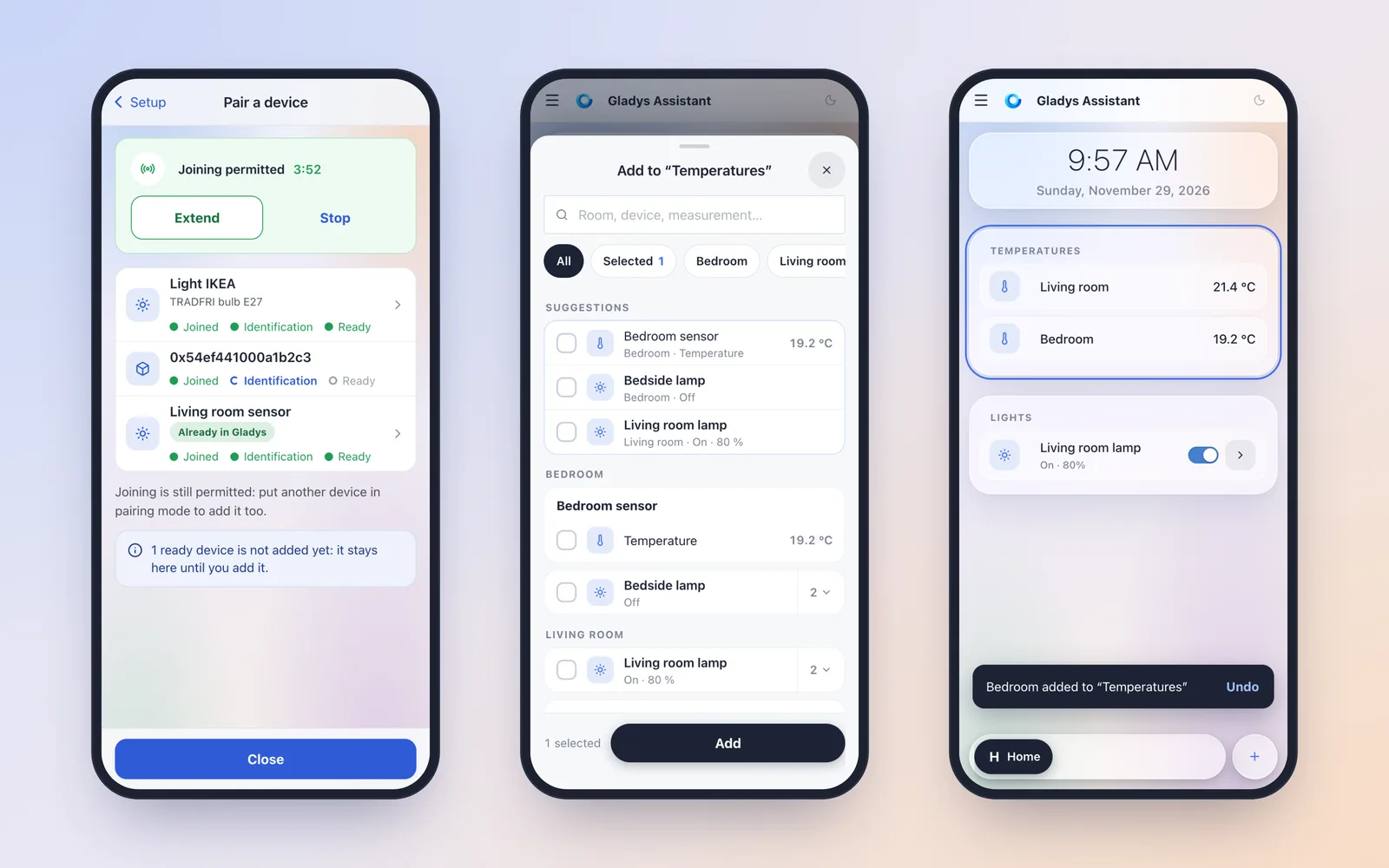
On the phone, the content of a dashboard now changes from the dashboard itself: a long press on a widget, and the change is saved at once, with an "Undo".
Zigbee2MQTT: follow pairing live
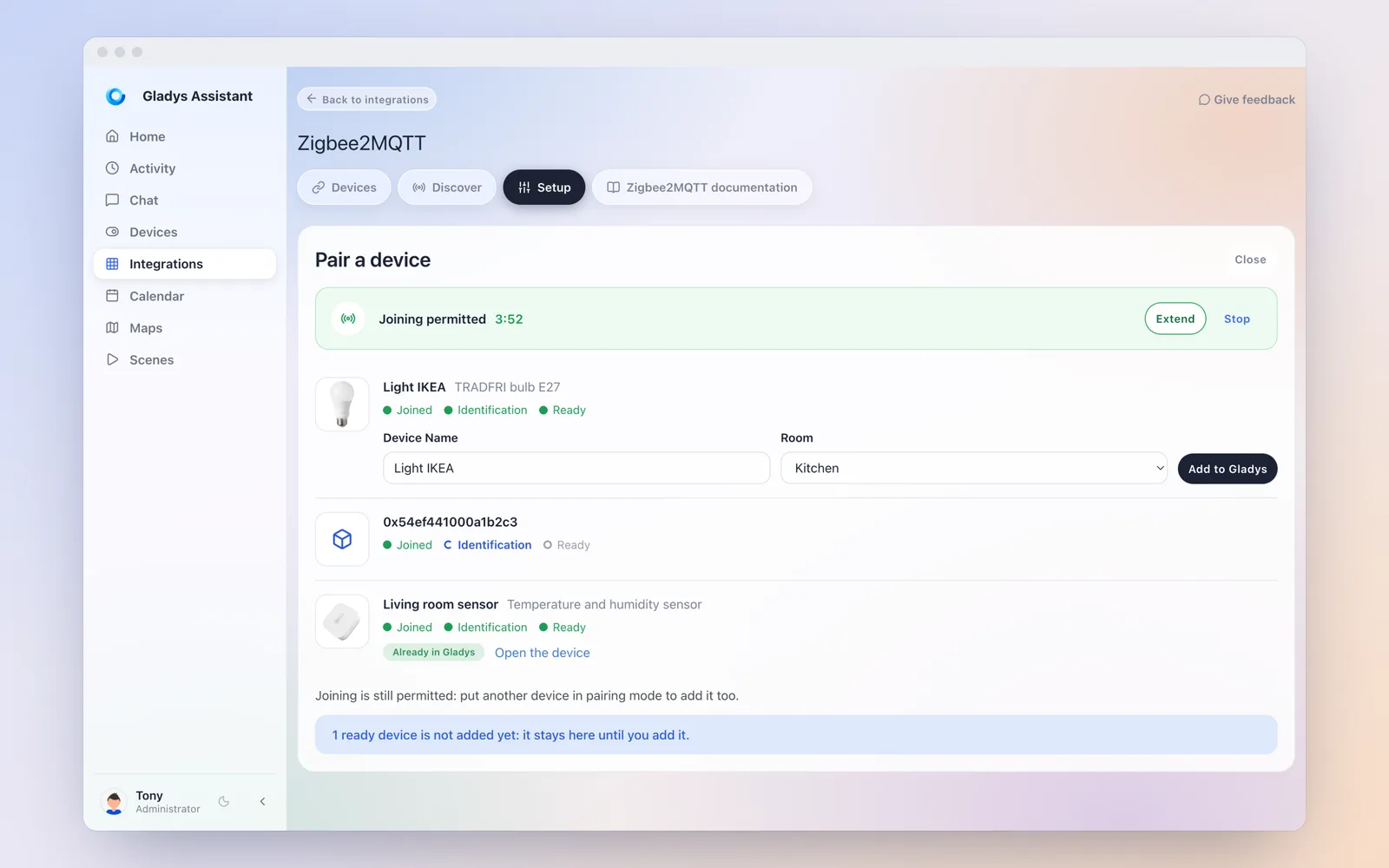
Until now, pairing a Zigbee device meant permitting joining, then going to the Discover tab and waiting, without knowing whether anything was happening. A pairing window now follows each device live.
- Joining with a countdown: "Joining permitted 3:52", with Extend and Stop. Every request waits for Zigbee2MQTT to confirm it, and joining closes by itself after about 4 minutes: no more reminder to turn it off.
- One row per device that joins, with its steps: Joined → Identification → Ready.
- A ready device shows the photo of its model (from zigbee2mqtt.io), a suggested name ("Light IKEA") and a room. One click on Add to Gladys and it's done.
- A device already in Gladys (paired again) shows a link to its page, and a failed identification gives the advice to bring the device closer and pair it again.
The window opens from step ④ of the setup wizard, from Pair a device on the Zigbee2MQTT dashboard, and from the Discover tab.
Zigbee2MQTT: the devices it does not support
A Zigbee device that Zigbee2MQTT does not support used to be dropped by Gladys without a word: it showed up nowhere. It now has its own section at the bottom of the Discover tab, "Not supported by Zigbee2MQTT", which tells you what can be done with each device.
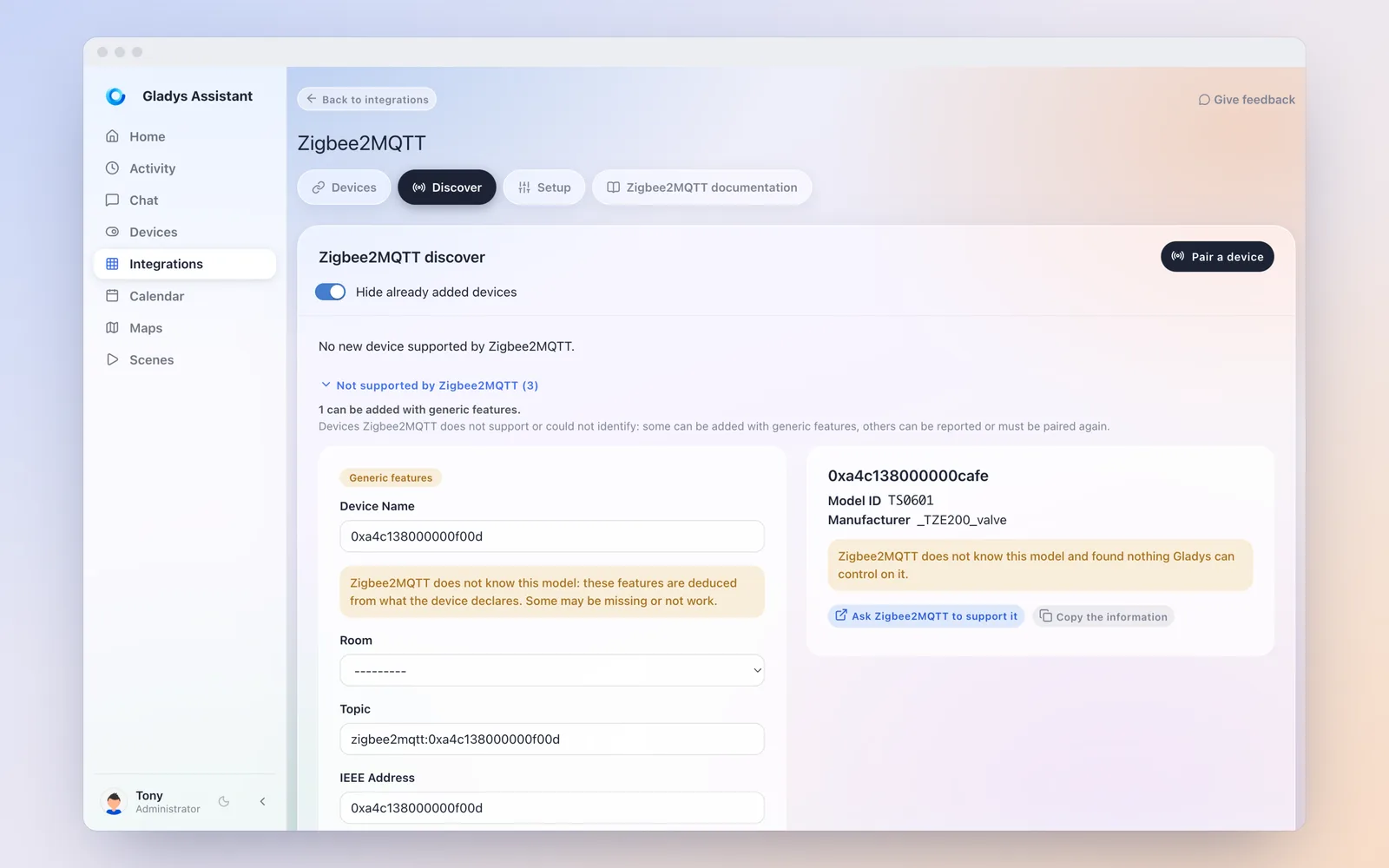
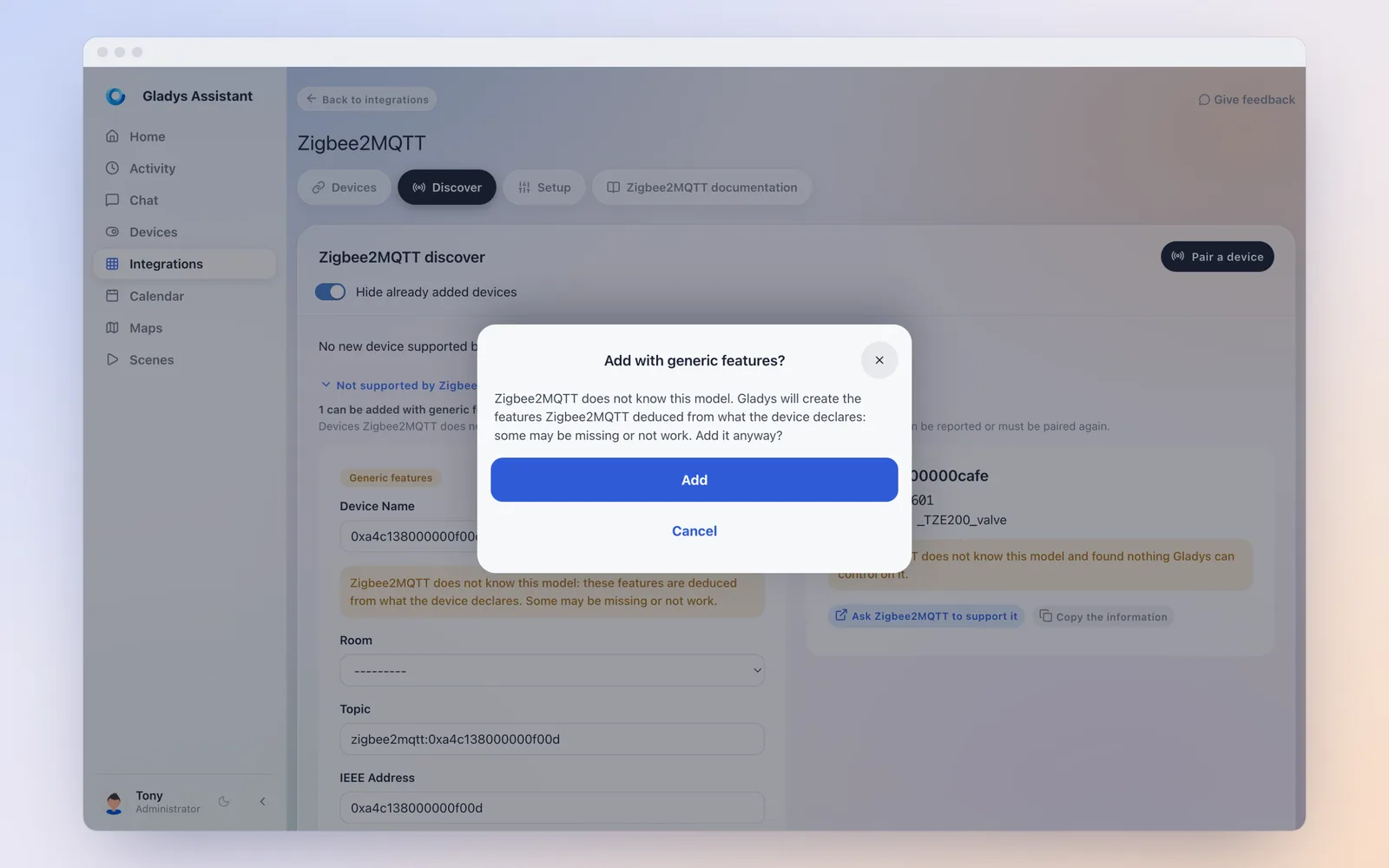
- Generic features: for a model it does not know, Zigbee2MQTT 2 deduces features from what the device declares (on/off, brightness, temperature…). When it finds at least one useful feature, you can add the device with these generic features, after a confirmation, since some may be missing or not work. Once in Gladys, it is controlled like any other device, and when a later Zigbee2MQTT supports the model, the Discover tab offers Update.
- A model Zigbee2MQTT does not know: a link to its "Support new devices" page, and Copy the information (model, manufacturer, clusters) to paste everything they need.
- A model Zigbee2MQTT knows, but of which Gladys only uses the battery or the signal: Suggest this device now opens a prefilled topic on the Gladys forum instead of a GitHub issue. No GitHub account needed.
- A failed identification: the advice to bring the device closer and pair it again.
The pairing window shows these devices too, with a "Generic features" step.
Zigbee2MQTT: a password for its interface
Since 5.3.4, the web interface of the Zigbee2MQTT installed by Gladys was always on, without a password: anyone on your local network could open it, permit joining, remove devices or change the settings. It now asks for a password, and you never have to type it:
- Gladys generates it and writes it in the configuration of Zigbee2MQTT. Existing installations get it at the next start of Gladys (Zigbee2MQTT restarts once). A Zigbee2MQTT that runs outside of Gladys is not touched.
- The links of Gladys to the interface carry it (dashboard tile, advanced settings, device and Discover pages): the interface opens without asking.
- A password you set yourself in the configuration file is kept.
- In Advanced settings, an "Interface password" row shows it for a few seconds and copies it in one click, for a bookmark or another device.
One limit of the Zigbee2MQTT interface: the very first time it opens in a browser, it may still show its login screen. Reload the page, and it opens without asking from then on.
Home Assistant Connect ZBT-2
With a ZBT-2, Zigbee2MQTT did not start (Failed to start EZSP layer with status=HOST_FATAL_ERROR). The dongle needs a speed of 460,800 bauds and hardware flow control, and the settings added by hand were erased at every start of Zigbee2MQTT. Gladys now writes them itself when the ZBT-2 is the selected model. Thanks to the community member who reported it and tested the settings by hand!
Dashboard: edit its content from your phone
We measured it on an iPhone: adding a sensor to an existing widget took 9 taps and 3 to 5 screens of scrolling, and 4 of these taps had nothing to do with the sensor (open the editor, close the panel, Save, Done). Every change of content went through the layout editor.
The content of a dashboard now changes from the dashboard itself, and every change is saved at once, with an Undo:
- A long press on a widget opens its menu: Add devices and Rename, reorder for a devices widget, then Move, Remove from the dashboard and Edit the layout. The other widgets get Edit the widget, which opens the editor on that widget with its settings already open.
- The "+" at the bottom of the screen: Add a device (pick it, then choose where: in an existing devices widget, or in a new one at the top or the bottom of the dashboard), Add a widget, Edit the layout.
- On the page of a device: Add to a dashboard, on the phone and on a computer.
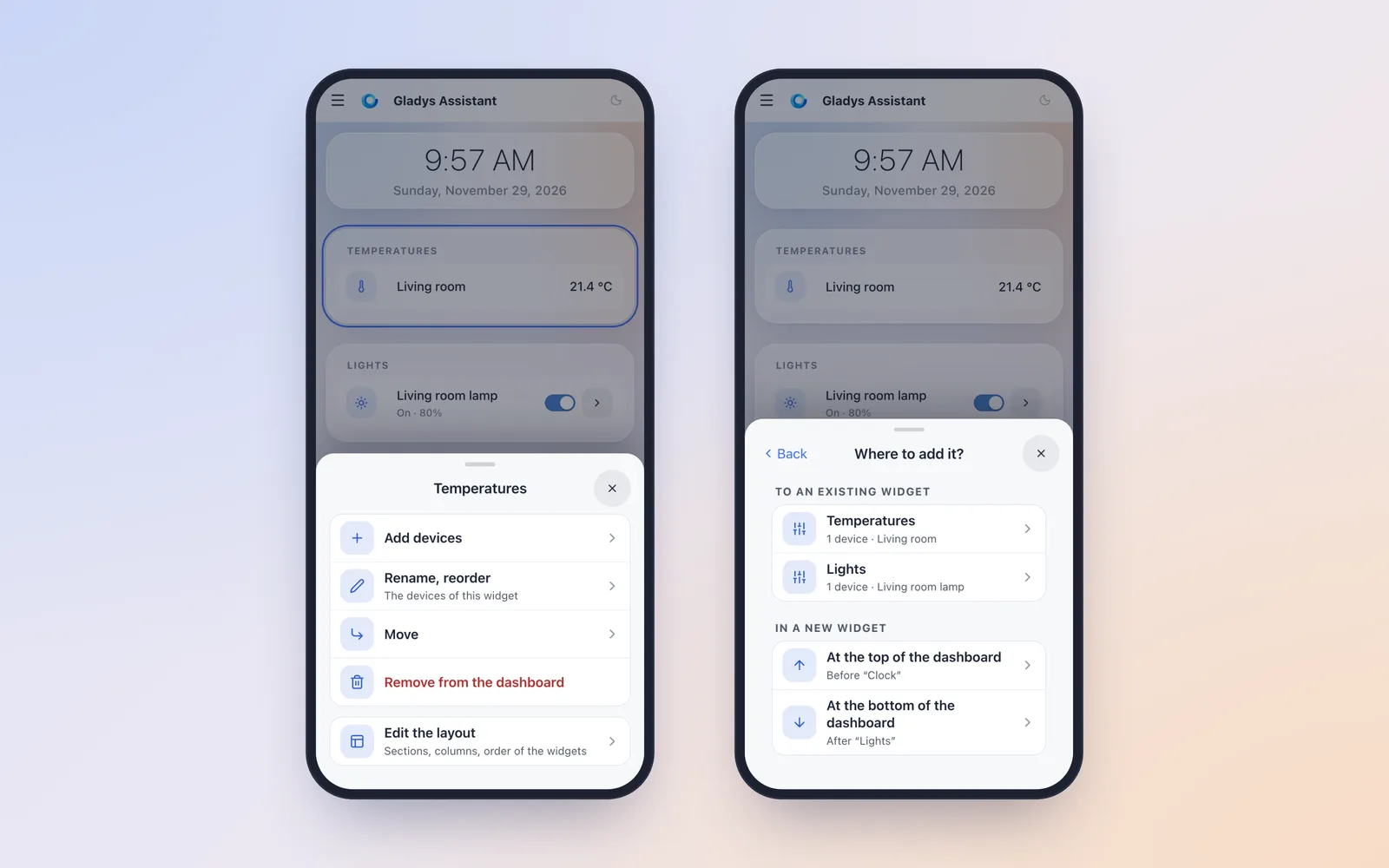
The device picker gets smarter too:
- Suggestions first: devices of the same kind as the ones the widget already shows, then the devices paired in the last 7 days.
- A light is one row (instead of three checkboxes with technical names), and its color shows as a swatch instead of a number.
- Names that look like the widget: a new row is named after its room or its device, like the rows already there.
| On an iPhone | Before | Now |
|---|---|---|
| Add a sensor to an existing widget | 9 taps, 3 to 5 screens of scrolling | a long press and 3 taps, no scrolling |
| Add a lamp in a new widget | 11 taps (3 checkboxes) | 6 taps |
| Add a device from its own page | not possible | 2 to 3 taps |
The editor stays for the layout, and it's lighter on a phone: a tap selects a widget and shows only its buttons, a second tap opens its settings, and entering or leaving the editor keeps the widget you were looking at in view.
And also
- AI chat and cameras: when you ask for a picture ("show me the living room"), Gladys now asks each camera of the room for a new picture, instead of only reading the images stored in the last hour. It works with cameras that have no image in advance, like a Karotz rabbit through an external integration. A camera that does not answer sends its last image if it is less than an hour old, a camera in private mode is never asked, and when no picture comes back, the AI says so instead of claiming it took one. Thanks @smuteau (forum)!
- Mode selectors on Android (pilot wire, fan, robot vacuum…): in a devices widget, the list kept closing and reopening in a loop, and no mode could be picked. Fixed: a devices widget no longer redraws on every event of the other devices of the house. Thanks to the community member who sent a video of the problem!
That's 7 pull requests since version 5.3.5.
Thanks to the contributors
A big thank you to @cicoub13 for the pairing window, the devices Zigbee2MQTT does not support, the password of the interface and the ZBT-2, to @smuteau for the pictures of the AI chat, and to @Pierre-Gilles for editing a dashboard from the phone and the mode selectors on Android. And thanks to everyone who reported bugs and ideas on the forum!
See you on the forum if you want to talk about this release :)
How to update?
As always, Gladys updates automatically within 24 hours if you use Watchtower, otherwise you can do it in one click from the settings.
The full CHANGELOG of 5.3.6 is on GitHub.