Gladys 4.81: Rolling Shutters, AI Quota & Zigbee2MQTT 🚀

Hey everyone!
Version 4.81 is here 😀 This release brings rolling shutter control to the AI agent and Alexa, a new AI quota display, several Zigbee2MQTT improvements, and a bunch of fixes.
🪟 Rolling shutters
Shutters get a lot of love in this version:
- 🤖 A new
device.set-shuttertool lets the AI agent control your shutters directly: open, close, stop, or set them to any position between 0 and 100%. You can now just ask Gladys to "close the living room shutters halfway". - 🗣️ Shutters and curtains are now controllable through Alexa, with both open/close and position control.
🤖 AI
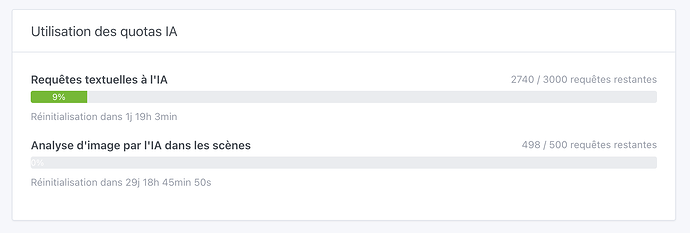
A new quota display gives you full visibility on your AI usage: you can now see your remaining text and image requests, their reset dates, and your real-time status under Integrations → Artificial Intelligence. No more guessing how much you have left.
📡 Zigbee2MQTT
Two nice improvements for Zigbee users:
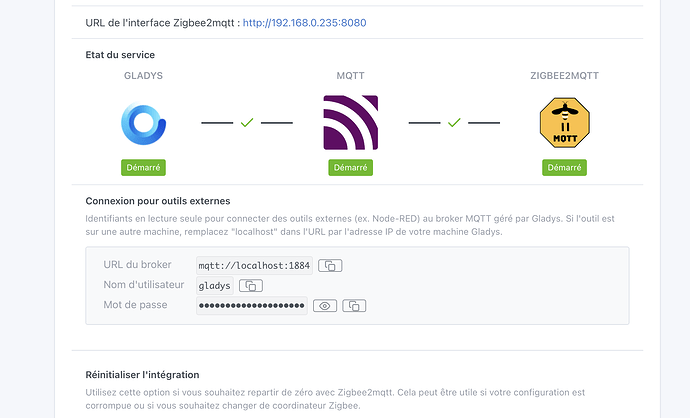
- 🔑 The interface now displays your MQTT credentials (host, port, username, and password), with a toggle to show or hide the password and one-click copy, making it much easier to connect external tools.
- 🔌 Added support for several missing coordinator types (dongles), including Home Assistant, SONOFF, SMLIGHT, Texas Instruments, and ZigStar models.
🎬 Scenes
The Ask AI, Send Message, and Send Camera Image actions now automatically select the first available user and camera, instead of leaving the fields empty. One less thing to configure when building a scene.
💡 Philips Hue
Fixed a bug where newly paired Hue bulbs required a Gladys restart before they could be controlled. The bridge now resynchronizes automatically, so new bulbs are immediately available.
🐛 Fixes
- ✏️ Corrected the handling of accents and special characters in scene messages, AI prompts, voice notifications, and SMS.
- 🌡️ System settings now display your CPU temperature, with color-coded thresholds and an automatic refresh every 30 seconds.
❤️ Thanks to the contributors
A big thank you to @Will_71 and @bertrandda for their contributions to this release. And thanks to the whole Gladys community for your feedback, tests, and ideas that keep the project moving forward! 🚀
As always, Gladys updates automatically within 24 hours if you use Watchtower, or you can do it in one click from the settings. See the full release notes.